Thank You Page - Done
View Live Example
Description
Once a PulseCheck survey is complete the respondent is taken to the Thank You page. The Thank You page contains some persistent details as well as some elements based conditionally on the survey responses.
Main HTML
<html>
<head>
<meta charset="utf-8">
<title>Thank You for Your Feedback</title>
<meta content="We appreciate you taking the time to share your thoughts. Your insights help us improve and create a better experience for everyone." name="description">
<meta content="width=device-width, initial-scale=1" name="viewport">
<link href="css/normalize.css" rel="stylesheet" type="text/css">
<link href="css/pulsecheck.css" rel="stylesheet" type="text/css">
<link href="images/favicon.png" rel="shortcut icon" type="image/x-icon">
<link href="images/webclip.png" rel="apple-touch-icon">
<style>
/* Page animations */
@keyframes rotate {
100% {
transform: rotate(360deg);
}
}
@keyframes dash {
0% {
stroke-dasharray: 1, 150;
stroke-dashoffset: 0;
}
50% {
stroke-dasharray: 90, 150;
stroke-dashoffset: -35;
}
100% {
stroke-dasharray: 90, 150;
stroke-dashoffset: -124;
}
}
@keyframes pulse {
0% { opacity: 0.6; }
50% { opacity: 1; }
100% { opacity: 0.6; }
}
/* Tippy Tooltip custom styles */
.tippy-box[data-theme~='consent-tooltip'] {
background-color: var(--pulsecheck--tooltip-background);
color: var(--pulsecheck--tooltip-text);
box-shadow: 0 4px 6px -1px rgba(0, 0, 0, 0.1), 0 2px 4px -1px rgba(0, 0, 0, 0.06);
border-radius: 0.375rem;
font-weight: 300;
font-size: 0.8rem;
}
.tippy-box[data-theme~='consent-tooltip'] .tippy-content {
padding: 0.75rem;
}
.tippy-box[data-theme~='consent-tooltip'] .tippy-arrow {
color: var(--pulsecheck--tooltip-background);
}
</style>
</head>
<body class="pulsecheck-body">
<div class="pulsecheck-container">
<!-- START Language Picker - Only include if Multi-language is enabled -->
<div class="pulsecheck-language-dropdown">
<div class="pulsecheck-language-dropdown-closed">
<div class="dropdown-arrow w-icon-dropdown-toggle"></div>
<div id="selectedLanguage">English</div>
</div>
<div class="pulsecheck-language-dropdown-open">
<div class="pulsecheck-language-dropdown-option">
<div>English</div>
</div>
</div>
</div>
<!-- END Language Picker -->
<!-- START Customer Logo - Include only if a logo/image provided for PulseCheck -->
<img loading="lazy" src="{logo provided by cystomer}" alt="{Workspace Name}" class="pulsecheck-logo">
<!-- END Customer Logo - Include only if a logo/image provided for PulseCheck -->
<!-- ################################# -->
<!-- # CONDITIONAL SECTION GOES HERE # -->
<!-- ################################# -->
</div>
<!-- START 360Pulse Powered-by Badge - omit if turned off in PulseCheck settings -->
<a id="powered-by-badge" title="Try 360Pulse Continuous Feedback Surveys for Free" href="https://www.360pulse.app/powered-by" target="_blank" class="pulsecheck-powered-by w-inline-block">
<div id="powered-by">Powered by</div>
<div class="powered-by-logo w-embed">
<?xml version="1.0" encoding="UTF-8"?><svg id="360Pulse-Logo" width="1289.94" height="250.72" xmlns="http://www.w3.org/2000/svg" viewbox="0 0 1289.94 250.72">
<defs>
<style>.b{fill:#13a2e4;}.c{fill:#3f494c;}</style>
</defs>
<path class="b" d="M398.22,57.53c7.59,2,13.14,5.29,16.63,9.89,3.49,4.6,5.24,11.02,5.24,19.28,0,10.66-1.79,18.78-5.35,24.38-3.57,5.59-10.14,9.06-19.71,10.39v.8c10.94,1.47,18.53,4.96,22.78,10.49,4.25,5.53,6.38,13.95,6.38,25.27,0,9.59-1.86,17.28-5.58,23.08-3.72,5.79-9.72,10.06-18,12.79-8.28,2.73-19.25,4.1-32.92,4.1-17.17,0-36-1.27-56.5-3.8l1.37-26.97c15.79.8,30.3,1.2,43.52,1.2,6.98,0,12.3-.43,15.95-1.3,3.65-.87,6.23-2.46,7.75-4.79,1.52-2.33,2.28-5.83,2.28-10.49,0-6.12-1.37-10.39-4.1-12.79-2.73-2.4-8.2-3.53-16.4-3.4l-30.07.2v-23.98h30.07c7.59,0,12.57-1.06,14.92-3.2,2.35-2.13,3.53-5.59,3.53-10.39,0-4.26-.57-7.39-1.71-9.39s-3.08-3.33-5.81-4c-2.73-.67-7.06-1-12.99-1-13.67,0-28.25.13-43.74.4l-1.37-25.97c17.31-2.53,34.86-3.8,52.63-3.8,13.21,0,23.62,1,31.21,3Z"></path>
<path class="b" d="M544.71,108.58c6.68,2.87,11.39,7.36,14.12,13.49,2.73,6.13,4.1,14.45,4.1,24.97,0,12.12-1.6,21.78-4.79,28.97s-9,12.59-17.43,16.18c-8.43,3.6-20.54,5.39-36.34,5.39s-28.48-1.97-37.14-5.89c-8.66-3.93-14.81-10.85-18.45-20.78-3.65-9.92-5.47-24.34-5.47-43.26,0-20.38,2.47-35.79,7.4-46.25,4.93-10.46,12.19-17.48,21.76-21.08,9.57-3.6,22.71-5.39,39.41-5.39s29.77,1.33,40.55,4l-1.82,23.18c-8.66-.13-21.57-.2-38.73-.2-7.14,0-12.53.77-16.18,2.3-3.65,1.53-6.3,4.43-7.97,8.69-1.67,4.26-2.73,10.79-3.19,19.58,4.4-3.06,9.07-5.2,14.01-6.39,4.93-1.2,11.05-1.8,18.34-1.8,11.85,0,21.11,1.43,27.79,4.3ZM516.92,168.22c2.58-1.46,4.21-3.66,4.9-6.59.68-2.93,1.03-7.52,1.03-13.79,0-5.06-.5-8.86-1.48-11.39-.99-2.53-2.77-4.3-5.35-5.29-2.58-1-6.46-1.5-11.62-1.5-3.64,0-6.95.4-9.91,1.2-2.96.8-6.34,2.13-10.14,4,.15,10.92.64,18.75,1.48,23.48.83,4.73,2.62,7.93,5.35,9.59,2.73,1.67,7.21,2.5,13.44,2.5,5.62,0,9.72-.73,12.3-2.2Z"></path>
<path class="b" d="M681.64,61.33c9.26,4.53,15.95,11.96,20.05,22.28,4.1,10.32,6.15,24.54,6.15,42.66s-2.05,32.34-6.15,42.66c-4.1,10.32-10.79,17.75-20.05,22.28-9.27,4.53-21.95,6.79-38.05,6.79s-28.75-2.27-37.93-6.79c-9.19-4.53-15.83-11.95-19.94-22.28-4.1-10.32-6.15-24.54-6.15-42.66s2.05-32.33,6.15-42.66c4.1-10.32,10.74-17.75,19.94-22.28,9.19-4.53,21.83-6.79,37.93-6.79s28.78,2.27,38.05,6.79ZM629.92,86.4c-3.04,2.2-5.17,6.29-6.38,12.29-1.22,5.99-1.82,15.18-1.82,27.57s.61,21.58,1.82,27.57c1.21,5.99,3.34,10.09,6.38,12.29,3.04,2.2,7.52,3.3,13.44,3.3s10.67-1.1,13.78-3.3c3.11-2.2,5.28-6.29,6.49-12.29,1.21-5.99,1.82-15.18,1.82-27.57s-.61-21.58-1.82-27.57c-1.22-5.99-3.38-10.09-6.49-12.29-3.11-2.2-7.71-3.3-13.78-3.3s-10.41,1.1-13.44,3.3Z"></path>
<path class="c" d="M840.32,63.23c7.82,5.13,11.73,13.62,11.73,25.47,0,3.07-.38,7.06-1.14,11.99-1.98,12.12-5.05,21.28-9.23,27.47-4.18,6.19-10.02,10.42-17.54,12.69-7.52,2.27-17.88,3.4-31.1,3.4-9.11,0-19.44-.6-30.98-1.8l-8.43,52.75h-28.48l22.1-137.86c8.5-.8,16.48-1.3,23.92-1.5,7.44-.2,18-.3,31.67-.3,17.16,0,29.65,2.57,37.48,7.69ZM823.57,90.7c0-5.73-1.63-9.59-4.9-11.59-3.27-2-8.85-3-16.75-3-13.98,0-23.69.07-29.16.2l-7.75,47.55h26.66c7.44,0,13.17-.7,17.2-2.1,4.02-1.4,7.06-3.86,9.11-7.39,2.05-3.53,3.61-8.69,4.67-15.48.61-4.26.91-6.99.91-8.19Z"></path>
<path class="c" d="M975.53,97.29l-15.49,97.9h-21.42l.91-19.38c-9.11,7.59-17.62,13.16-25.52,16.68-7.9,3.53-15.95,5.29-24.15,5.29-9.11,0-16.03-1.93-20.73-5.79-4.71-3.86-7.06-9.19-7.06-15.98,0-2.53.15-4.46.46-5.79l11.62-72.93h27.57l-10.71,66.53c-.31,1.33-.46,3.07-.46,5.19,0,2.93.8,5.03,2.39,6.29,1.59,1.27,4.14,1.9,7.63,1.9,5.62,0,11.08-1.4,16.4-4.2,5.31-2.8,12.53-7.66,21.64-14.58l9.57-61.14h27.34Z"></path>
<path class="c" d="M1022.92,165.22c-.15.8-.23,1.93-.23,3.4,0,2.8.87,4.73,2.62,5.79,1.74,1.07,4.67,1.6,8.77,1.6h10.02l1.14,18.18c-2.28.93-5.89,1.7-10.82,2.3-4.94.6-9.15.9-12.64.9-8.66,0-15.42-1.97-20.28-5.89-4.86-3.93-7.29-9.42-7.29-16.48,0-.93.15-2.6.46-5l18.45-114.68h27.57l-17.77,109.89Z"></path>
<path class="c" d="M1140.71,95.59c9.57.73,17.84,1.57,24.83,2.5l-2.96,16.58c-14.28-.4-29.16-.6-44.65-.6-6.99,0-11.96.13-14.92.4-2.96.27-5.17.93-6.61,2-1.45,1.07-2.16,2.87-2.16,5.39,0,2.13.91,3.8,2.73,4.99,1.82,1.2,5.16,2.8,10.02,4.8l28.48,11.19c8.35,3.2,14.35,6.56,18,10.09,3.65,3.53,5.47,8.16,5.47,13.89,0,.93-.15,2.6-.46,5-1.22,7.33-3.99,12.82-8.32,16.48-4.33,3.67-10.02,6.09-17.09,7.29-7.06,1.2-16.6,1.8-28.59,1.8-8.51,0-15.04-.17-19.59-.5-4.56-.33-9.8-.83-15.72-1.5l-10.48-1.2,2.96-16.98c8.05.53,19.59.8,34.63.8,9.42,0,16.52-.23,21.3-.7,4.78-.46,8.2-1.23,10.25-2.3,2.05-1.06,3.3-2.66,3.76-4.79.3-2.4-.23-4.13-1.59-5.19-1.37-1.07-3.38-2.1-6.04-3.1-2.66-1-4.6-1.76-5.81-2.3l-28.48-11.19c-7.75-3.06-13.41-6.62-16.97-10.69-3.57-4.06-5.35-8.96-5.35-14.69,0-1.86.07-3.26.23-4.2,1.21-8.92,5.54-15.22,12.99-18.88,7.44-3.66,18.83-5.5,34.17-5.5,7.75,0,16.4.37,25.97,1.1Z"></path>
<path class="c" d="M1279.68,101.19c6.83,4.46,10.25,10.89,10.25,19.28,0,2.8-.15,5-.46,6.59-1.52,9.59-5.77,16.52-12.76,20.78-6.99,4.26-17.7,6.79-32.12,7.59l-35.31,2.6c.15,7.73,2.28,12.96,6.38,15.68,4.1,2.73,10.33,4.1,18.68,4.1,12.61,0,26.58-.8,41.92-2.4l1.82,15.78c-6.08,2.27-13.44,3.9-22.1,4.9s-17.09,1.5-25.29,1.5c-17.32,0-30-3.33-38.05-9.99-8.05-6.66-12.08-16.78-12.08-30.37,0-3.73.38-8.26,1.14-13.59,1.97-12.79,5.24-22.71,9.8-29.77,4.56-7.06,11.05-12.05,19.48-14.99,8.43-2.93,19.71-4.4,33.83-4.4,16.4,0,28.02,2.23,34.86,6.69ZM1261,117.17c-1.22-1.53-3.19-2.5-5.92-2.9s-7.29-.6-13.67-.6c-6.83.13-12.19.93-16.06,2.4-3.87,1.47-6.91,4.2-9.11,8.19-2.2,4-3.99,9.86-5.35,17.58l31.9-2.6c6.38-.4,11.05-1.63,14.01-3.7,2.96-2.06,4.82-5.62,5.58-10.69.3-3.6-.15-6.16-1.37-7.69Z"></path>
<path class="b" d="M16.69,154.82h30.6L83.51,24.51c.92-3.3,3.92-5.79,7.65-6.35,5.18-.78,10.08,2.36,10.94,7.02l31.09,167.76,26.44-83.22c.86-2.71,3.16-4.86,6.13-5.76,4.98-1.49,10.36.93,12.02,5.4l16.84,45.45h52.61c2.27-9.45,3.49-19.31,3.49-29.45C250.72,56.13,194.6,0,125.36,0S0,56.13,0,125.36c0,10.15,1.21,20.01,3.49,29.45h13.21Z"></path>
<path class="b" d="M217.92,171.91h-30.15c-4.09,0-7.72-2.35-9.02-5.84l-9.29-25.08-29.58,93.11c-1.17,3.67-4.89,6.19-9.13,6.2h-.54c-4.44-.23-8.11-3.19-8.84-7.14l-30.51-164.62-26.93,96.9c-1.06,3.81-4.86,6.47-9.22,6.48H8.93c18.48,46.19,63.64,78.81,116.43,78.81s97.95-32.63,116.43-78.81h-23.87Z"></path>
</svg>
</div>
<div id="try-free" class="try-free-url">Try it for Free</div>
</a>
<!-- END 360Pulse Powered-by Badge -->
<!-- START Tippy Tooltop Requirements -->
<script src="https://unpkg.com/@popperjs/core@2"></script>
<script src="https://unpkg.com/tippy.js@6"></script>
<link rel="stylesheet" href="https://unpkg.com/tippy.js@6/dist/tippy.css">
<!-- END Tippy Tooltop Requirements -->
<!-- START Language Translation JS - Exclude if multi-language isn't enabled -->
<script src="https://cdn.jsdelivr.net/gh/leevaniderstine/360pulse/thank-you-language.js?v=20250228"></script>
<!-- END Language Translation JS -->
<script>
document.addEventListener('DOMContentLoaded', function() {
/* --------------------------------------------------------------------
Testimonial, Review, Star Rating, and Platform Systems
--------------------------------------------------------------------
This script manages:
1) Tabs for testimonials and reviews
2) Testimonial and review text handling (with placeholders to call AI)
3) Star rating (5-star system)
4) Platform-specific rating integrations
----------------------------------------------------------------------- */
// Grab references to the elements we need.
const tabButtons2 = document.querySelectorAll('.tab-button');
const tabPanels = document.querySelectorAll('.tab-panel');
const testimonialText = document.getElementById('testimonial-text');
const reviewText = document.getElementById('review-text');
const testimonialForm = document.getElementById('testimonial-form');
const generateTestimonialBtn = document.getElementById('generate-testimonial');
const generateReviewBtn = document.getElementById('generate-review');
const submitTestimonialBtn = document.getElementById('submit-testimonial');
const skipTestimonialBtn = document.getElementById('skip-testimonial');
const copyTestimonialBtn = document.getElementById('copy-testimonial');
const copyReviewBtn = document.getElementById('copy-review');
const successMessage = document.getElementById('success-message');
const starRatingContainer = document.getElementById('star-rating');
const starRatingInfo = document.getElementById('star-rating-info');
const platformCards = document.querySelectorAll('.platform-card');
// Tracks which tab is active, current star rating, and submission state
let activeTab = null;
let starRating = 5;
let hasSubmittedTestimonial = false;
// Various translations for star rating and copy-to-clipboard messages.
// Language codes used: en, zh, es, fr, de, ja, ko, it, pt, nl, ru, ar, hi, bn, id, vi, tr, pl, uk, sv, no, da, fi, el, he, tl, yue
const ratingTranslations = {
en: "Your {starRating}-star rating will be prefilled on platforms that support it.",
zh: "您的 {starRating} 星评分将在支持的平台上预先填写。",
es: "Tu calificación de {starRating} estrellas se prellenará en las plataformas que lo soportan.",
fr: "Votre note de {starRating} étoiles sera pré-remplie sur les plateformes qui le supportent.",
de: "Ihre {starRating}-Sterne-Bewertung wird auf Plattformen, die dies unterstützen, vorausgefüllt.",
ja: "あなたの{starRating}つ星の評価は、対応しているプラットフォームで自動的に入力されます。",
ko: "당신의 {starRating}점짜리 평점은 지원되는 플랫폼에서 미리 채워집니다.",
it: "La tua valutazione di {starRating} stelle verrà precompilata sulle piattaforme che lo supportano.",
pt: "Sua avaliação de {starRating} estrelas será preenchida automaticamente nas plataformas que o suportam.",
nl: "Je {starRating}-sterrenbeoordeling wordt automatisch ingevuld op platformen die dit ondersteunen.",
ru: "Ваша оценка в {starRating} звезд будет автоматически заполнена на поддерживаемых платформах.",
ar: "سيتم تعبئة تقييمك بنجمة {starRating} مسبقًا على المنصات التي تدعمه.",
hi: "आपकी {starRating}-स्टार रेटिंग उन प्लेटफॉर्म्स पर पहले से भरी जाएगी जो इसे सपोर्ट करते हैं।",
bn: "আপনার {starRating}-তারকা রেটিং সেই প্ল্যাটফর্মগুলিতে স্বয়ংক্রিয়ভাবে পূরণ করা হবে যা এটি সমর্থন করে।",
id: "Rating {starRating} bintang Anda akan diisi otomatis di platform yang mendukungnya.",
vi: "Đánh giá {starRating}-sao của bạn sẽ được điền sẵn trên các nền tảng hỗ trợ.",
tr: "Destekleyen platformlarda {starRating} yıldızlık puanınız otomatik olarak doldurulacaktır.",
pl: "Twoja ocena {starRating}-gwiazdkowa zostanie automatycznie uzupełniona na platformach, które to obsługują.",
uk: "Ваша {starRating}-зіркова оцінка буде попередньо заповнена на підтримуваних платформах.",
sv: "Din {starRating}-stjärniga betyg kommer att förifyllas på plattformar som stöder det.",
no: "Din {starRating}-stjerners vurdering vil bli forhåndsutfylt på plattformer som støtter det.",
da: "Din {starRating}-stjernede vurdering bliver forudfyldt på platforme, der understøtter det.",
fi: "Sinun {starRating}-tähden arvostelusi esitäytetään alustoilla, jotka tukevat sitä.",
el: "Η αξιολόγησή σας με {starRating} αστέρια θα προπληρωθεί στις πλατφόρμες που το υποστηρίζουν.",
he: "הדירוג שלך ב-{starRating} כוכבים ימולא מראש בפלטפורמות התומכות בכך.",
tl: "Ang iyong {starRating}-star na rating ay awtomatikong mapupunan sa mga platform na sumusuporta rito.",
yue: "你嘅 {starRating} 星評分會喺支持嘅平台上自動填充."
};
const copyTranslations = {
en: "Copied!",
zh: "已复制!",
es: "¡Copiado!",
fr: "Copié!",
de: "Kopiert!",
ja: "コピーしました!",
ko: "복사됨!",
it: "Copiato!",
pt: "Copiado!",
nl: "Gekopieerd!",
ru: "Скопировано!",
ar: "تم النسخ!",
hi: "कॉपी किया गया!",
bn: "কপি করা হয়েছে!",
id: "Tersalin!",
vi: "Đã sao chép!",
tr: "Kopyalandı!",
pl: "Skopiowano!",
uk: "Скопійовано!",
sv: "Kopierat!",
no: "Kopiert!",
da: "Kopieret!",
fi: "Kopioitu!",
el: "Αντιγράφηκε!",
he: "הועתק!",
tl: "Nakopya!",
yue: "已複製!"
};
// "Generating..." text in various languages
const generatingTranslations = {
en: "Generating...",
zh: "生成中...",
es: "Generando...",
fr: "Génération en cours...",
de: "Wird generiert...",
ja: "生成中...",
ko: "생성 중...",
it: "Generazione in corso...",
pt: "Gerando...",
nl: "Wordt gegenereerd...",
ru: "Генерация...",
ar: "جارٍ التوليد...",
hi: "जनरेट हो रहा है...",
bn: "জেনারেট হচ্ছে...",
id: "Menghasilkan...",
vi: "Đang tạo...",
tr: "Oluşturuluyor...",
pl: "Generowanie...",
uk: "Генерується...",
sv: "Genererar...",
no: "Genererer...",
da: "Genererer...",
fi: "Luodaan...",
el: "Γίνεται δημιουργία...",
he: "נבנה...",
tl: "Ginagawa...",
yue: "產生中..."
};
/**
* Cleans up tab buttons that don't match any existing panel.
* If a button references a panel that doesn't exist, remove it.
*/
function cleanupTabButtons() {
tabButtons2.forEach(button => {
const tabId = button.getAttribute('data-tab');
const correspondingPanel = document.getElementById(`${tabId}-panel`);
if (!correspondingPanel) {
button.remove();
}
});
}
/**
* Resets all tabs, then sets the first remaining tab as active.
*/
function initializeActiveTab() {
tabPanels.forEach(panel => panel.classList.remove('active'));
tabButtons2.forEach(button => button.classList.remove('active'));
const remainingButtons = document.querySelectorAll('.tab-button');
if (remainingButtons.length > 0) {
const firstButton = remainingButtons[0];
const firstTabId = firstButton.getAttribute('data-tab');
const firstPanel = document.getElementById(`${firstTabId}-panel`);
if (firstPanel) {
firstButton.classList.add('active');
firstPanel.classList.add('active');
activeTab = firstTabId;
focusOnActiveTabTextarea(firstTabId);
}
}
}
/**
* Assign click listeners to newly found tab buttons, enabling tab switching.
*/
function initializeTabSystem() {
const updatedTabButtons = document.querySelectorAll('.tab-button');
updatedTabButtons.forEach(button => {
button.addEventListener('click', () => {
const tabId = button.getAttribute('data-tab');
switchTab(tabId);
});
});
}
/**
* Switches the visible panel to the selected tab.
*/
function switchTab(tabId) {
document.querySelectorAll('.tab-button').forEach(btn => {
if (btn.getAttribute('data-tab') === tabId) {
btn.classList.add('active');
} else {
btn.classList.remove('active');
}
});
tabPanels.forEach(panel => {
if (panel.id === `${tabId}-panel`) {
panel.classList.add('active');
} else {
panel.classList.remove('active');
}
});
activeTab = tabId;
focusOnActiveTabTextarea(tabId);
}
/**
* Focuses on the appropriate textarea (testimonial or review) for the current tab,
* placing the cursor at the end of the text.
*/
function focusOnActiveTabTextarea(tabId) {
setTimeout(() => {
let textareaToFocus = null;
if (tabId === 'testimonial' && testimonialText) {
textareaToFocus = testimonialText;
} else if (tabId === 'reviews' && reviewText) {
textareaToFocus = reviewText;
}
if (textareaToFocus) {
textareaToFocus.focus();
const length = textareaToFocus.value.length;
textareaToFocus.setSelectionRange(length, length);
}
}, 100);
}
/**
* Initializes the testimonial system, including:
* - Generating testimonial text (with AI placeholder)
* - Copying testimonial text
* - Submitting or skipping the testimonial
*/
function initializeTestimonialSystem() {
// If there's no testimonial tab/panel, we skip this.
if (!document.getElementById('testimonial-panel')) return;
let debounceTimer;
// Listen for changes in the testimonial textarea to enable/disable the submit button.
if (testimonialText) {
testimonialText.addEventListener('input', function() {
clearTimeout(debounceTimer);
debounceTimer = setTimeout(() => {
toggleSubmitButton();
}, 300);
});
}
// Handle "Generate Testimonial" button clicks.
if (generateTestimonialBtn) {
generateTestimonialBtn.addEventListener('click', function() {
const loadingEl = this.querySelector('.ai-loading');
const textEl = this.querySelector('.ai-button-text');
if (!loadingEl || !textEl) return;
// Retrieve the user’s current language (defaults to English).
var currentLang = (window.pulseCheckLanguage && window.pulseCheckLanguage.code) ? window.pulseCheckLanguage.code : 'en';
const generatingText = generatingTranslations[currentLang] || generatingTranslations['en'];
// Display "Generating..." while we await the AI generation.
loadingEl.textContent = generatingText;
loadingEl.style.display = 'flex';
textEl.style.display = 'none';
this.disabled = true;
// [AI Placeholder: This is where you would call your AI function to generate testimonial text]
// You might replace this setTimeout with a real API call to your AI service, e.g.:
// fetch('/my-ai-api', { method: 'POST', ... }).then(...)
setTimeout(() => {
// Imagine these "surveyHighlights" are data your AI would use to form the testimonial
const surveyHighlights = document.querySelector('.survey-highlights')?.value || 'Your service was excellent.';
// Sample AI-like generated text; you’d get this from your AI function instead:
const generatedText = `I've been thoroughly impressed with the service. ${surveyHighlights} I would highly recommend this to anyone looking for a reliable and effective solution.`;
if (testimonialText) {
testimonialText.value = generatedText;
toggleSubmitButton();
testimonialText.focus();
}
// Hide the "loading" spinner and restore button text
loadingEl.style.display = 'none';
textEl.style.display = 'block';
this.disabled = false;
}, 1500);
});
}
// Handle "Copy Testimonial" button
if (copyTestimonialBtn && testimonialText) {
copyTestimonialBtn.addEventListener('click', function() {
copyToClipboard(testimonialText.value, this);
});
}
// Handle Testimonial form submission (when user clicks "Submit")
if (testimonialForm && testimonialText) {
testimonialForm.addEventListener('submit', function(e) {
e.preventDefault();
const savedTestimonial = testimonialText.value;
// Show a success message, hide the testimonial panel, then switch to the reviews tab
if (successMessage) {
successMessage.style.display = 'block';
}
const testimonialPanel = document.getElementById('testimonial-panel');
if (testimonialPanel) {
testimonialPanel.style.display = 'none';
}
setTimeout(() => {
if (successMessage) {
successMessage.style.display = 'none';
}
switchTab('reviews');
const testimonialTabButton = document.querySelector('.tab-button[data-tab="testimonial"]');
if (testimonialTabButton) {
testimonialTabButton.style.display = 'none';
}
if (reviewText) {
// Prefill the review text with the testimonial, just an example usage
reviewText.value = savedTestimonial;
reviewText.focus();
}
hasSubmittedTestimonial = true;
}, 2000);
});
}
// Handle "Skip Testimonial" button
if (skipTestimonialBtn) {
skipTestimonialBtn.addEventListener('click', function() {
switchTab('reviews');
const testimonialTabButton = document.querySelector('.tab-button[data-tab="testimonial"]');
if (testimonialTabButton) {
testimonialTabButton.style.display = 'none';
}
});
}
// Enables or disables the "Submit Testimonial" button based on text content.
function toggleSubmitButton() {
if (!submitTestimonialBtn || !testimonialText) return;
if (testimonialText.value.trim().length > 0) {
submitTestimonialBtn.classList.remove('disabled');
submitTestimonialBtn.disabled = false;
} else {
submitTestimonialBtn.classList.add('disabled');
submitTestimonialBtn.disabled = true;
}
}
// Initialize the submit button state on load
if (testimonialText && submitTestimonialBtn) {
toggleSubmitButton();
}
}
/**
* Initializes the review system (similar to testimonial):
* - Generating review text (with AI placeholder)
* - Copying the generated review
*/
function initializeReviewSystem() {
// If there's no review panel, skip.
if (!document.getElementById('reviews-panel')) return;
// Handle "Generate Review" button.
if (generateReviewBtn && reviewText) {
generateReviewBtn.addEventListener('click', function() {
const loadingEl = this.querySelector('.ai-loading');
const textEl = this.querySelector('.ai-button-text');
if (!loadingEl || !textEl) return;
// Retrieve the user’s current language (defaults to English).
var currentLang = (window.pulseCheckLanguage && window.pulseCheckLanguage.code) ? window.pulseCheckLanguage.code : 'en';
const generatingText = generatingTranslations[currentLang] || generatingTranslations['en'];
// Show "Generating..." for AI.
loadingEl.textContent = generatingText;
loadingEl.style.display = 'flex';
textEl.style.display = 'none';
this.disabled = true;
// [AI Placeholder: This is where you would call your AI function to generate review text]
// Replace the setTimeout() with your real AI integration.
setTimeout(() => {
// Possibly pass highlights or user info to your AI
const surveyHighlights = document.querySelector('.survey-highlights')?.value || 'Your service was excellent.';
// Sample AI-like generated text:
const generatedText = `I had an excellent experience with this company. ${surveyHighlights} The service exceeded my expectations and I would definitely use them again.`;
reviewText.value = generatedText;
reviewText.focus();
// Revert button states
loadingEl.style.display = 'none';
textEl.style.display = 'block';
this.disabled = false;
}, 1500);
});
}
// Handle "Copy Review" button
if (copyReviewBtn && reviewText) {
copyReviewBtn.addEventListener('click', function() {
copyToClipboard(reviewText.value, this);
});
}
}
/**
* Sets up the star-rating component (5-star system) and ensures
* changes to the rating reflect in the UI (both main and per-platform).
*/
function initializeStarRatingSystem() {
if (!starRatingContainer) {
return;
}
const starElements = starRatingContainer.querySelectorAll('.star');
if (!starElements || starElements.length === 0) {
return;
}
// Default rating = 5
starRating = 5;
updateAllStarDisplays();
// When a user clicks on a star, update the rating
starElements.forEach(star => {
star.addEventListener('click', function() {
const value = parseInt(this.getAttribute('data-value'));
if (!isNaN(value) && value >= 1 && value <= 5) {
starRating = value;
updateAllStarDisplays();
}
});
});
}
/**
* Update star rating in all relevant places:
* - The main star rating area
* - The textual info about the rating
* - Each platform card that supports rating
*/
function updateAllStarDisplays() {
updateMainStarDisplay();
updatePlatformStars();
updateStarRatingInfo();
}
/**
* Fills in active/inactive stars in the main star rating widget
* based on the current starRating value.
*/
function updateMainStarDisplay() {
if (!starRatingContainer) return;
const stars = starRatingContainer.querySelectorAll('.star');
stars.forEach(star => {
const value = parseInt(star.getAttribute('data-value'));
if (value <= starRating) {
star.classList.add('active');
} else {
star.classList.remove('active');
}
});
}
/**
* Updates the star rating info text (e.g. "Your 5-star rating will be prefilled...")
* in the user’s chosen language.
*/
function updateStarRatingInfo() {
if (!starRatingInfo) {
return;
}
// Retrieve current language (defaults to English if not set)
var currentLang = (window.pulseCheckLanguage && window.pulseCheckLanguage.code) ? window.pulseCheckLanguage.code : 'en';
const template = ratingTranslations[currentLang] || ratingTranslations['en'];
const translatedText = template.replace('{starRating}', starRating);
if (starRatingInfo.querySelector('span')) {
starRatingInfo.querySelector('span').textContent = translatedText;
} else {
starRatingInfo.textContent = translatedText;
}
}
/**
* Set up the platform cards, which can be clicked to open new windows
* with pre-filled rating parameters if the platform supports rating.
*/
function initializePlatformSystem() {
if (!platformCards || platformCards.length === 0) {
return;
}
updatePlatformStars();
platformCards.forEach(card => {
card.addEventListener('click', function() {
const supportsRating = this.getAttribute('data-supports-rating') === 'true';
const ratingParam = this.getAttribute('data-rating-param');
let url = this.getAttribute('data-url');
if (supportsRating && starRating > 0) {
const selectedRating = this.getAttribute('data-selected-rating') || starRating;
const separator = url.includes('?') ? '&' : '?';
url += `${separator}${ratingParam}=${selectedRating}`;
}
window.open(url, '_blank');
});
});
}
/**
* Reflect the current star rating in each platform card that supports rating,
* e.g., showing 5 stars if starRating = 5.
*/
function updatePlatformStars() {
platformCards.forEach(card => {
const supportsRating = card.getAttribute('data-supports-rating') === 'true';
if (!supportsRating) return;
const starsContainer = card.querySelector('.platform-stars');
if (!starsContainer) {
return;
}
card.setAttribute('data-selected-rating', starRating);
starsContainer.innerHTML = '';
for (let i = 0; i < starRating; i++) {
const starEl = document.createElement('div');
starEl.className = 'platform-star';
starEl.textContent = '★';
starsContainer.appendChild(starEl);
}
});
}
/**
* Copies the given text to the user's clipboard, then updates the button
* to reflect success for a short period.
*/
function copyToClipboard(text, button) {
if (!button) return;
const originalText = button.innerHTML;
// Retrieve the current language, defaulting to English
var currentLang = (window.pulseCheckLanguage && window.pulseCheckLanguage.code) ? window.pulseCheckLanguage.code : 'en';
const copiedText = copyTranslations[currentLang] || copyTranslations['en'];
navigator.clipboard.writeText(text)
.then(() => {
// Show a short "Copied!" confirmation
button.innerHTML = '<svg xmlns="http://www.w3.org/2000/svg" width="12" height="12" viewBox="0 0 24 24" fill="none" stroke="currentColor" stroke-width="2" stroke-linecap="round" stroke-linejoin="round" class="icon-copy"><rect x="9" y="9" width="13" height="13" rx="2" ry="2"></rect><path d="M5 15H4a2 2 0 0 1-2-2V4a2 2 0 0 1 2-2h9a2 2 0 0 1 2 2v1"></path></svg> ' + copiedText;
setTimeout(() => {
button.innerHTML = originalText;
}, 2000);
})
.catch(err => {
// Handle error if needed
});
}
// Clean up any tab buttons that have no corresponding panel
cleanupTabButtons();
// Set the first tab as active
initializeActiveTab();
// Prepare the tab system logic
initializeTabSystem();
// Prepare testimonial-related features
initializeTestimonialSystem();
// Prepare review-related features
initializeReviewSystem();
// Enable star rating
initializeStarRatingSystem();
// Enable platform support (if star rating applies)
initializePlatformSystem();
// If multi-language support is enabled, update star rating info when the language changes.
if (window.LanguageUtil) {
LanguageUtil.onLanguageChange(function(newLang) {
updateStarRatingInfo();
});
}
/* --- Tippy.js (Tooltip) Initialization --- */
const tippyInstances = tippy('[data-tippy-content]', {
arrow: true,
animation: 'fade',
delay: [100, 50],
allowHTML: true,
theme: 'consent-tooltip',
placement: 'top',
maxWidth: 300,
offset: [0, 8],
interactive: true,
content: function(reference) {
return reference.getAttribute('data-tippy-content');
},
onShow(instance) {
const content = instance.reference.getAttribute('data-tippy-content');
instance.setContent(content);
}
});
});
</script>
</body>
</html>Conditional Sections
Pages by Sentiment
Depending on the Referral Question score (0-10 scale) a different page will be displayed. This is based on the Net Promoter Score metric.
Score: 0-6
If the user provides referral score of 0-6 they are generally unhappy. In these cases we will use the folllowing page structure
<div class="pulsecheck-questions">
    <form id="pulsecheck-feedback" name="pulsecheck-feedback" data-name="PulseCheck Feedback" method="post">
        <div class="detractors">
            <div>
                <h1 id="title-detractor" class="pulsecheck-title">Help Us Improve</h1>
                <p id="welcome-detractor" class="pulsecheck-welcome-paragraph">Thank you for taking the time to complete our survey. We’re sorry your experience wasn’t up to your expectations. Your honest feedback is crucial in helping us identify areas for improvement.</p>
            </div>
            <div class="feedback-container">
                <textarea id="feedback-placeholder-detractor" name="Feedback" maxlength="3000" data-name="Feedback" placeholder="Please share details about your experience and how we can do better..." required="" autofocus="true" class="pulsecheck-feedback"></textarea>
            </div>
            <button type="submit" data-type="submit-feedback" class="button">Submit Feedback</button>
        </div>
    </form>
</div>
Score: 7 or 8
If the user provides a 7 or 8 they are generally meh, neither happy or unhappy. They are unlikely give a positive testimonial or 5-star review, and are more likely to give a controversal review. We want to handle these cases by
<div class="pulsecheck-questions">
    <form id="pulsecheck-feedback" name="pulsecheck-feedback" data-name="PulseCheck Feedback" method="post">
        <div class="passives">
            <div>
                <h1 id="title-passive" class="pulsecheck-title">Share Your Thoughts</h1>
                <p id="welcome-passive" class="pulsecheck-welcome-paragraph">Thank you for taking the time to complete our survey. We’d appreciate hearing more about what you liked and any suggestions you might have.</p>
            </div>
            <div class="feedback-container">
                <textarea id="feedback-placeholder-passive" name="feedback" maxlength="5000" data-name="feedback" placeholder="Please share details about your experience and how we can do better..." required="" autofocus="true" class="pulsecheck-feedback w-input"></textarea>
            </div>
            <button type="submit" data-type="submit-feedback" class="button">Submit Feedback</button>
        </div>
    </form>
</div>
Score: 9 or 10
If the user provides a 9 or 10 that they would refer, they are extremely likely to leave a positive testimonial or 5 star review. Generally if they would refer they are unlikely to post a negative review.
Normal 9 or 10 Score
Normally, unless disabled, there will be a reviews tab atleast. If testimonial capture is enabled and its relevant to display to the user, the testiminal tab will display too (see specific section below.
<div class="promoter">
<div>
<h1 id="title" class="pulsecheck-title">Thank you!</h1>
<p id="welcome" class="pulsecheck-welcome-paragraph">We truly appreciate you taking the time to complete our survey. Your feedback helps us improve our services.</p>
</div>
<div class="tabs-container">
<div class="tabs-navigation">
<div data-tab="testimonial" class="tab-button active">
<div class="tab-icon">
<svg xmlns="http://www.w3.org/2000/svg" width="20" height="20" viewbox="0 0 24 24" fill="none" stroke="currentColor" stroke-width="2" stroke-linecap="round" stroke-linejoin="round" class="icon-message-square"><path d="M21 15a2 2 0 0 1-2 2H7l-4 4V5a2 2 0 0 1 2-2h14a2 2 0 0 1 2 2z"></path></svg>
</div>
<div class="tab-label"><span>Testimonial</span></div>
</div>
<div data-tab="reviews" class="tab-button">
<div class="tab-icon">
<svg xmlns="http://www.w3.org/2000/svg" width="20" height="20" viewbox="0 0 24 24" fill="none" stroke="currentColor" stroke-width="2" stroke-linecap="round" stroke-linejoin="round" class="icon-star"><polygon points="12 2 15.09 8.26 22 9.27 17 14.14 18.18 21.02 12 17.77 5.82 21.02 7 14.14 2 9.27 8.91 8.26 12 2"></polygon></svg>
</div>
<div class="tab-label"><span>Leave a Review</span></div>
</div>
</div>
<div class="tabs-content">
<!-- START Testimonial Tab -->
<div id="testimonial-panel" class="tab-panel active">
<div id="testimonial-form" class="form-block">
<form id="testimonial-form" name="testimonial-form" method="get">
<div class="form-group">
<h2 id="testimonial-heading" class="pulsecheck-h2">Share Your Experience</h2>
<div id="testimonial-subheading">A quick testimonial from you would mean the world to us!<br></div>
</div>
<div class="form-group">
<div class="form-label-wrapper">
<h3 id="write-testimonial-heading" class="heading">Write Your Testimonial</h3>
<button type="button" id="generate-testimonial" class="ai-button">
<span class="ai-button-text">Let AI write this for me</span>
<span style="display: none;" class="ai-loading">
<svg viewbox="0 0 50 50" class="spinner"><circle cx="25" cy="25" r="20" fill="none" stroke-width="5" class="path"></circle></svg>
<span>Generating...</span>
</span>
</button>
</div>
<textarea id="testimonial-text" rows="5" placeholder="Write your testimonial here or let AI help you..." autofocus="" class="form-textarea"></textarea>
<div class="testimonial-consent-container">
<div class="consent-checkbox-wrapper">
<label class="checkbox-field">
<input type="checkbox" id="testimonial-consent" name="testimonial-consent" data-name="testimonial-consent" required="" class="consent-checkbox" checked="">
<span class="consent-label" for="testimonial-consent">I agree that my testimonial may be used in marketing materials</span>
</label>
</div>
<div id="consent-info-icon" data-tippy-content="By checking this box, you agree that we may use all or parts of your testimonial in our marketing materials. Your testimonial may appear on our website, social media, and other marketing channels. We may also edit your testimonial for clarity while maintaining the essence of your feedback. This consent includes permission to use your name, title, company, photo if provided, and a link to your website when applicable. You may request to stop future use of your testimonial at any time by contacting us. Please note that while we can prevent your testimonial from being used in new materials, we may not be able to remove it from already published materials such as printed collateral, videos, or past social media posts." class="info-icon ">
<svg xmlns="http://www.w3.org/2000/svg" width="24" height="24" viewbox="0 0 24 24" fill="none" stroke="currentColor" stroke-width="2" stroke-linecap="round" stroke-linejoin="round"><circle cx="12" cy="12" r="10"></circle><path d="M9.09 9a3 3 0 0 1 5.83 1c0 2-3 3-3 3"></path><line x1="12" y1="17" x2="12.01" y2="17"></line></svg>
</div>
</div>
</div>
<div class="form-actions">
<button type="submit" id="submit-testimonial" disabled="" class="button disabled">
<span>Submit & Continue to Reviews</span>
<svg xmlns="http://www.w3.org/2000/svg" width="16" height="16" viewbox="0 0 24 24" fill="none" stroke="currentColor" stroke-width="2" stroke-linecap="round" stroke-linejoin="round" class="icon-check"><polyline points="20 6 9 17 4 12"></polyline></svg>
</button>
<button type="button" id="skip-testimonial" class="button secondary-button">Skip this step</button>
</div>
</form>
</div>
</div>
<!-- END Testimonial Tab -->
<!-- START Review Tab -->
<div id="reviews-panel" class="tab-panel active">
<div class="form-group">
<h2 id="review-heading" class="pulsecheck-h2">Leave a Review</h2>
<div id="review-subheading">Your experience can help your peers, would you share it as a review?<br></div>
</div>
<div class="star-rating-container">
<div class="form-label-wrapper">
<h3 id="rate-experience-heading" class="heading">How would you rate us?</h3>
</div>
<div id="star-rating" class="star-rating">
<div data-value="1" class="star">★</div>
<div data-value="2" class="star">★</div>
<div data-value="3" class="star">★</div>
<div data-value="4" class="star">★</div>
<div data-value="5" class="star">★</div>
</div>
<div id="star-rating-info" class="star-rating-info"><span>Select a rating to prefill on supported platforms.</span></div>
</div>
<div class="review-writer">
<div class="form-label-wrapper">
<h3 id="write-review-heading" class="heading">Write Your Review</h3>
<button type="button" id="generate-review" class="ai-button">
<span class="ai-button-text">Let AI write this for me</span>
<span style="display: none;" class="ai-loading">
<svg viewbox="0 0 50 50" class="spinner"><circle cx="25" cy="25" r="20" fill="none" stroke-width="5" class="path"></circle></svg>
<span>Generating...</span>
</span>
</button>
</div>
<textarea id="review-text" rows="4" placeholder="Write your review here or let AI help you..." autofocus="" class="form-textarea"></textarea>
<div class="copy-wrapper">
<div id="review-copy-info" class="review-copy-info">
<span>Copy this text to paste into your selected review platform</span>
</div>
<button type="button" id="copy-review" class="copy-button">
<svg xmlns="http://www.w3.org/2000/svg" width="12" height="12" viewbox="0 0 24 24" fill="none" stroke="currentColor" stroke-width="2" stroke-linecap="round" stroke-linejoin="round" class="icon-copy"><rect x="9" y="9" width="13" height="13" rx="2" ry="2"></rect><path d="M5 15H4a2 2 0 0 1-2-2V4a2 2 0 0 1 2-2h9a2 2 0 0 1 2 2v1"></path></svg>
<span>Copy to Clipboard</span>
</button>
</div>
</div>
<div class="review-platforms">
<h3 id="select-platform-heading" class="heading">Select a platform to share your review:</h3>
<div class="review-platforms-grid">
<!-- START Review Plaform - Repeat for each Review Platform -->
<div data-rating-param="rating" data-platform="google" data-url="https://search.google.com/local/writereview?placeid=YOUR_PLACE_ID" data-supports-rating="true" class="platform-card">
<div class="platform-icon ">
<svg id="Google" xmlns="http://www.w3.org/2000/svg" height="32" viewBox="0 0 24 24" width="32"><path d="M22.56 12.25c0-.78-.07-1.53-.2-2.25H12v4.26h5.92c-.26 1.37-1.04 2.53-2.21 3.31v2.77h3.57c2.08-1.92 3.28-4.74 3.28-8.09z" fill="#4285F4"></path><path d="M12 23c2.97 0 5.46-.98 7.28-2.66l-3.57-2.77c-.98.66-2.23 1.06-3.71 1.06-2.86 0-5.29-1.93-6.16-4.53H2.18v2.84C3.99 20.53 7.7 23 12 23z" fill="#34A853"></path><path d="M5.84 14.09c-.22-.66-.35-1.36-.35-2.09s.13-1.43.35-2.09V7.07H2.18C1.43 8.55 1 10.22 1 12s.43 3.45 1.18 4.93l2.85-2.22.81-.62z" fill="#FBBC05"></path><path d="M12 5.38c1.62 0 3.06.56 4.21 1.64l3.15-3.15C17.45 2.09 14.97 1 12 1 7.7 1 3.99 3.47 2.18 7.07l3.66 2.84c.87-2.6 3.3-4.53 6.16-4.53z" fill="#EA4335"></path><path d="M1 1h22v22H1z" fill="none"></path></svg>
</div>
<div class="platform-details">
<div class="platform-name">Google</div>
<div class="platform-description">Share your experience on Google – help others discover us!</div>
</div>
<!-- START Stars - Include if platform supports passing of star rating (Google, Trustpilot in initial platforms) -->
<div class="platform-stars">
<div data-value="1" class="platform-star">★</div>
<div data-value="1" class="platform-star">★</div>
<div data-value="1" class="platform-star">★</div>
<div data-value="1" class="platform-star">★</div>
<div data-value="1" class="platform-star">★</div>
</div>
<!-- END Stars -->
</div>
<!-- END Review Plaform -->
</div>
</div>
</div>
<!-- END Review Tab -->
</div>
</div>
<div id="success-message" class="success-message">
<div class="success-icon">
<svg xmlns="http://www.w3.org/2000/svg" width="32" height="32" viewbox="0 0 24 24" fill="none" stroke="currentColor" stroke-width="2" stroke-linecap="round" stroke-linejoin="round" class="icon-check"><polyline points="20 6 9 17 4 12"></polyline></svg>
</div>
<h3 id="testimonial-success" class="testimonial-success-message-h3">Thanks for your testimonial!</h3>
<p id="testimonial-success-message" class="testimonial-success-message-p">You'll be redirected to review options shortly.</p>
<div id="redirect-message" class="redirect-message">Redirecting...</div>
</div>
</div>No Testimonial or 3rd Party Reviews
If based on configuration or condition there is neither testimonial or review tabs, or there was only testimonial and it was submitted so there are no longer tabs... Show this feedback form:
<div class="pulsecheck-questions">
    <form id="pulsecheck-feedback" name="pulsecheck-feedback" data-name="PulseCheck Feedback" method="post">
        <div class="promoter-no-testimonial-or-3rd">
            <div>
                <h1 id="title-promoter" class="pulsecheck-title">We Appreciate Your Time!</h1>
                <p id="welcome-promoter" class="pulsecheck-welcome-paragraph">We truly appreciate your ongoing support. We welcome any additional thoughts you’d like to share, as your continued feedback helps us grow.</p>
            </div>
            <div class="feedback-container">
                <textarea id="feedback-placeholder-promoter" name="feedback" maxlength="5000" data-name="feedback" placeholder="Please share details about your experience and how we can do better..." required="" autofocus="true" class="pulsecheck-feedback"></textarea>
            </div>
            <button type="submit" data-type="submit-feedback" class="button">Submit Your Feedback</button>
        </div>
    </form>
</div>
Testimonial Tab
Description
The "Testimonial" tab allows the user to write a testimonial that the company can use for future marketing purposes.
The "Testiminial" section is only on the page shown to those with an 9 or 10 NPS score.
Showing the testiminial option every time would detract from the effectiveness of asking for it. To combat this we want to:
- Show it only to people most likely to leave a testimonial. If they don't fit the criteria, don't show it until we get an instance where they are likely.
- If someone leaves a testimonial we don't want to ask them for another one each time.
Display Conditions
- Referral Question Score is 9 or 10
- No Negative Answers
- Neutral 50% or less. of (Total Answers - N/A)
- Respondent has not left a testimonial for this PulseCheck in the 24 months.
AI Testimonial Writer
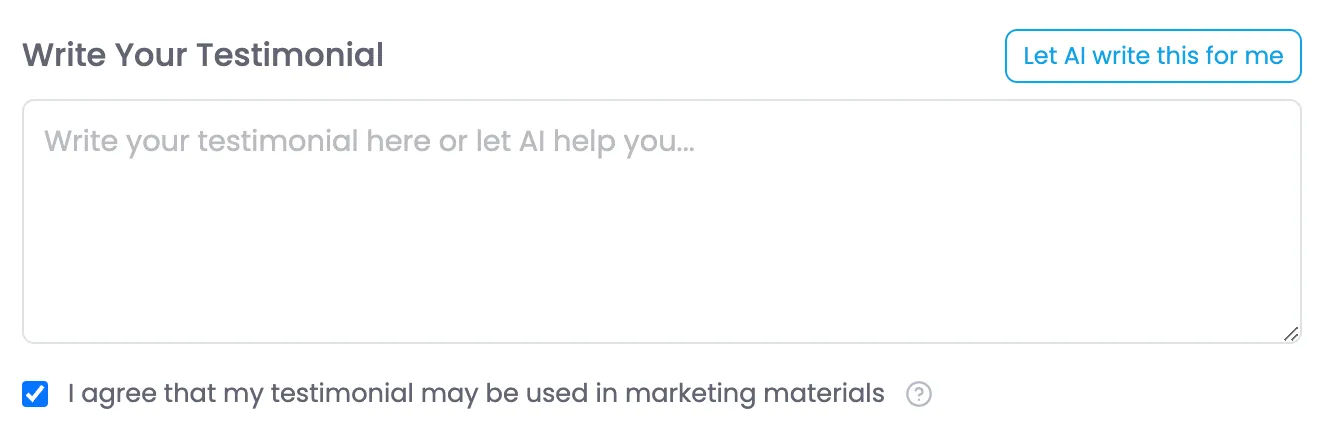
The "Let AI write this for me" button quickly uses information about the Workspace, Respondent, Survey and the Survey results to write a testiminial. This can cut-down the burden of having to think about and write a testimonial, leading to more respondents providing them. While we don't know specifics of their experience, we can leverage what we do know about them and their responses (especially if they left comments) so create a customized testimonial.
In the page code I have included a placeholder JS when the button is clicked to simulate AI writing and the "Generating" spinner button state on/off. You can reuse the trigger.
AI Prompt Process
I have broken the prompts into 2 steps/stages for efficiency and because I got better results with them separated.
- Step 1 - Review Analysis: This reviews the survey results and everything we know about them. This only needs to be run once per PulseCheck Instance per respondent. It should be stored with the results. On succesful completion, immediately run the next step.
- Step 2a - Testiminal Generation: This uses the Result Analysis to generate the testiminal text.
The prompts are in the AI Testimonial / Review Writer section at the bottom of this page.
Please note that the prompt to generate a Testimonial and the prompt to generate a Review are different and return a different style of output.
Testimonial Submission
At the bottom of the Testimonial tab there is a "Submit Testimonial" button. Once clicked the testimonial should be saved and the Testiminal tab hidden. I have a JS function that handles the hiding of the tab etc. on submit so you can use that as a starting point.
Note: there is a skip this step button. That should hide this tab without submitting.
If there is a Review tab (there are Review Platforms assigned to this PulseCheck), it should become the new selected/visible tab. Else load the fallback tab.
Leave a Review Tab
Description
The "Leave a Review" tab shows customers who are likely to give good reviews (and unlikely to leave negative reviews) the ability to quickly generate and leave reviews.
Display Conditions
- There are Review Platforms assigned to the PulseCheck (settings)
- On page layout where referral Question Score is 9 or 10
- No Negative Answers
- Neutral 50% or less. of (Total Answers - N/A)
Click Tracking
Track each time someone clicks on a Referral link and which platform its for. We will be using this in reporting.
Data to track each click:
- User
- Datatime (UTC)
- Platform
- Star Rating if applicable
Star Rating

The top of the review tab includes a "How would you rate your experience?" with 5 stars. By default this is set to 5 stars for a number of psychological reasons, but ultimately to increase the % of 5 star reviews.
When the user changes the number of stars, they are passed in the URL args to Review Platforms that support it (Google and TrustPilot at launch).

These stars also update visually on the card for the Review Platform, again for psychological reasons.
Store the Star Rating
Store the star rating as a numeric value 1-5 with the PulseCheck results. Null if no rating is selected.
AI Review Writer
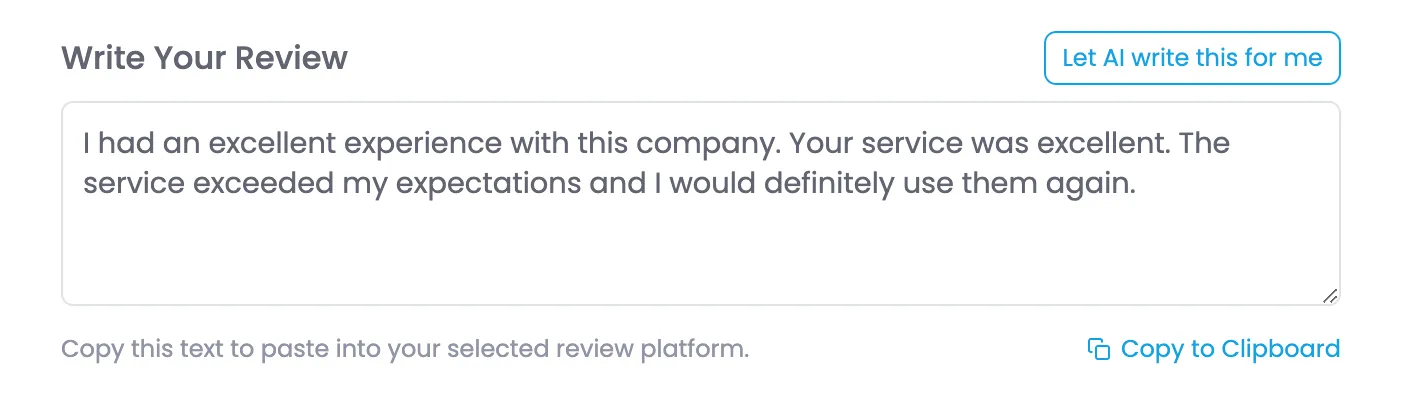
The "Let AI write this for me" button quickly uses information about the Workspace, Respondent, Survey and the Survey results to write a review the user can copy & paste into review sites. This can cut-down the burden of having to think about and write a review leaving a review and lead more users to leave one. While we don't know specifics of their experience, we can leverage what we do know about them and their responses (especially if they left comments) so create a customized review.
In the page code I have included a placeholder JS when the button is clicked to simulate AI writing and the "Generating" spinner button state on/off. You can reuse the trigger.
I have broken the prompts into 2 steps/stages for efficiency and because I got better results with them separated.
Step 1 - Review Analysis: This reviews the survey results and everything we know about them. This only needs to be run once per PulseCheck Instance per respondent. It should be stored with the results. On succesful completion, immediately run the next step.
Step 2b - Review Generation: This uses the Result Analysis to generate the testiminal text.
The prompts are in the AI Testimonial / Review Writer section at the bottom of this page.
Please note that the prompt to generate a Testimonial and the prompt to generate a Review are different and return a different style of output.
Completion of this tab
There is no next step from this tab. As we can't track where they leave reviews we will never know if/when they are done. This page stays intact until the user closes it.
Powered-by Badge

On the Pro plan we will allow users to turn off the Powered-by Badge in settings. If they do this, the badge should not be loaded on the page to save bandwdith. If multi-language is enabled on this PulseCheck the text in the badge will be translated automatically.
Multi-language Support
For Pro-plan users we offer the ability to turn on multi-language support in PulseCheck settings. This enables the survey page to detect the browsers language (and users can change from dropdown). Implementation of this is done in the following ways.
- Include the code for the language selection dropdown (should not be in code if feature not enabled on PulseCheck.)
- Add the language translation script.
- Replace the {Workplace Name} placeholder in the language translation in the script. (script will need to be embedded in the page, not external for this)
- Update the language translation script to pull the translated welcome, and questions based on the selected language. (English should be loaded by default)
Built-in Translations
The script automatically detects the users language and sets the language of the page based on that. The user can also use the dropdown to change the language. Once changed the Page Title, Meta Description, Textarea Placeholder, Complete Button, Referral Question scale legend, and Powered-by badge are all translated automatically.
This leaves only the content that is customizable for the PulseCheck to be pulled from the server.
PulseCheck Specific Translations
The following elements on this page will need to have their text swapped to the correct language version from our server as they are PulseCheck specific and are not handled by the current JS.
- <h1 id="title">
- <p id="welcome">
- For each Review Platform
- <div class="platform-name">
- <div class="platform-description">
AI Testimonial / Review Writer
Prompts
Step 1 - Result Analysis
Description
This prompt performs an analysis of the PulseCheck results providing foundation for AI to write a testimonial and/or review copy.
Implementation
- This prompt should only need to be run once.
- When a user clicks "Let AI write this for me" if there is no stored analysis for this PulseCheck, this prompt should run, and the output be stored, if the "Let AI write this for me" button is pressed again the stored analysis should be used so this doesn't need to run again.
Model to Use
- Google Gemini 2.0 Flash (primary)
- GPT 4o (fallback)
Prompt
<prompt>
  <goal>
    Analyze a single survey response and generate a structured summary in Markdown that:
    1. Clearly distinguishes between the <strong>respondent</strong> (who completed the survey) and the <strong>company conducting the survey</strong>.
    2. Uses the respondent's company name if provided; otherwise, infers it from the email domain if it’s not a generic provider.
    3. Ignores individual responses where the sentiment is "N/A".
    4. If all responses are "N/A", applies fallback logic by assuming the response represents an NPS score of 9 or 10 (indicating a promoter) while still using any inferred details based on the survey context or email domain.
    5. Produces a concise summary suitable as input for a testimonial.
  </goal>

  <input_data>
    <!-- Surveying company information -->
    <surveying_company>
      <name>{surveying_company_name}</name>
      <industry>{surveying_company_industry}</industry>
    </surveying_company>

    <!-- Survey details -->
    <survey_details>
      <name>{survey_name}</name>
      <topic_description>{survey_topic_description}</topic_description>
    </survey_details>

    <!-- Respondent information -->
    <respondent>
      <email>{respondent_email}</email>
      <company>
        <name>{respondent_company_name}</name> <!-- Provided data; if blank, infer from email domain if not generic -->
      </company>
    </respondent>

    <!-- Survey Response (up to 10 questions) -->
    <survey_response>
      <question>
        <text>{question_1_text}</text>
        <sentiment>{question_1_sentiment}</sentiment> <!-- Positive, Neutral, Negative, or N/A -->
        <comment>{question_1_comment}</comment>
      </question>
      <question>
        <text>{question_2_text}</text>
        <sentiment>{question_2_sentiment}</sentiment>
        <comment>{question_2_comment}</comment>
      </question>
      <!-- Additional questions if applicable -->
    </survey_response>
  </input_data>

  <instructions>
    <step number="1">
      Clearly differentiate between the <strong>surveying company</strong> (which sent the survey) and the <strong>respondent’s company</strong> (which completed it).
    </step>
    <step number="2">
      If the <strong>respondent’s company name</strong> is missing, infer it from the email domain—unless the domain is generic (e.g., gmail.com, yahoo.com, outlook.com, telus.net, comcast.net). <strong>Leverage the LLM's existing knowledge base to augment the inferred company information with known details.</strong>
    </step>
    <step number="3">
      If the email domain clearly belongs to a business, also infer the <strong>industry</strong> and provide a brief <strong>company description</strong> for context.
    </step>
    <step number="4">
      For each survey question, ignore responses where the sentiment is "N/A".
      <fallback>If all responses are "N/A", assume the response corresponds to an NPS score of 9 or 10 (a promoter) and still include any inferred company or survey context for the testimonial.</fallback>
    </step>
    <step number="5">
      Aggregate non-"N/A" sentiments to derive an <strong>overall sentiment</strong>. Use the majority sentiment while accounting for any outlier responses.
    </step>
    <step number="6">
      Generate a structured summary that includes:
      <substep>- <strong>Overall Sentiment</strong>: Summarize the aggregated sentiment.</substep>
      <substep>- <strong>Company Context</strong>: Include details such as inferred industry and a brief company description (if available).</substep>
      <substep>- <strong>Key Takeaways</strong>: List concise, summarized insights from the survey responses or fallback context.</substep>
    </step>
  </instructions>

  <output_format type="markdown">
## Survey Summary

**Surveying Company:**
{surveying_company_name} ({surveying_company_industry})

**Survey Details:**
- **Name:** {survey_name}
- **Topic/Description:** {survey_topic_description}

**Respondent Details:**
- **Email:** {respondent_email}
- **Company:**
  - **Name:** {respondent_company_name or inferred_name}
  - **Industry:** {if inferred, include industry; otherwise leave blank}
  - **Context:** {if inferred, include a brief company description; otherwise leave blank}

**Overall Sentiment:**
{overall_sentiment}

**Key Takeaways:**
- {key_takeaway_1}
- {key_takeaway_2}
<!-- Additional takeaways if needed -->
  </output_format>
</prompt>
Step 2a - Testimonial
Description
This prompt takes the output from Result Analysis and generates a testimonial.
Implementation
When the user clicks on "Let AI write this for me" on the Review tab, send this prompt to AI, along with the Result Analysis input.
Replace the language code in <output_language> with the current language code from the page.
On completion, enter the output from the prompt as text into the textarea (id="testimonial-text")
Note: the button is handled by JS and has a spinner (to show its doing something and prevent additional clicks), once the response is populated in the textarea, the button should be toggled back.
Model to Use
- Google Gemini 2.0 Flash (primary)
- GPT 4o (fallback)
Prompt
<prompt>
  <goal>
    Using the provided analysis summary of the survey response, write a testimonial from the respondent in plain paragraph form. The testimonial should be evergreen, highlighting long-term satisfaction and overall benefits in a way that is reusable by the company across different marketing channels.
  </goal>
  <input_data>
    <analysis_summary>
      {analysis_summary}
    </analysis_summary>
  </input_data>
  <instructions>
    <step>
      Write a concise, polished testimonial in first-person that reflects the respondent’s overall positive experience.
    </step>
    <step>
      Use simple, short words where possible to make the copy easy to read.
    </step>
    <step>
      Emphasize long-term benefits and enduring value using language that remains relevant over time.
    </step>
    <step>
      Avoid overly specific, time-bound details so the testimonial can be reused in different contexts.
    </step>
    <step>
      Ensure the tone sounds natural and human, as if the respondent truly wrote it.
    </step>
    <step>
      The final output should be a single plain paragraph with no additional formatting.
    </step>
  </instructions>
  <output_language>en</output_language>
  <output_format>Return just the review in plain text, do not include explainations or warnings, do not self reference.</output_format>
</prompt>
Step 2b - Review Generation
Description
This prompt takes the output from Result Analysis and generates a review.
Implementation
When the user clicks on "Let AI write this for me" on the Review tab, send this prompt to AI, along with the Result Analysis input.
Replace the language code in <output_language> with the current language code from the page.
On completion, enter the output from the prompt as text into the textarea (id="review-text")
Note: the button is handled by JS and has a spinner (to show its doing something and prevent additional clicks), once the response is populated in the textarea, the button should be toggled back.
Model to Use
- Google Gemini 2.0 Flash (primary)
- GPT 4o (fallback)
Prompt
<prompt>
  <goal>
    Using the provided analysis summary of the survey response, write a detailed review in plain paragraph form that is suitable for publication on platforms such as Google and TrustPilot, aiming for a 5-star review.
  </goal>
  <input_data>
    <analysis_summary>
      {analysis_summary}
    </analysis_summary>
  </input_data>
  <instructions>
    <step>
      Craft a clear and genuine review in first-person that explains the respondent’s positive experience.
    </step>
    <step>
      Use simple, short words where possible to make the review easy to understand.
    </step>
    <step>
      Include key context and benefits of the experience in a brief, unified paragraph.
    </step>
    <step>
      Ensure the tone is natural, human, and positive—using only language that supports a 5-star review. Avoid any wording that could be seen as negative.
    </step>
    <step>
      The final output should be a single, short plain paragraph with no distinct introduction or conclusion and no additional formatting.
    </step>
  </instructions>
  <output_language>en</output_language>
  <output_format>Return just the review in plain text, do not include explainations or warnings, do not self reference.</output_format>
</prompt>