Survey Page - Done
24 min
View Live Example
Description
This document provides comprehensive technical details for building the PulseCheck end-user survey page. The page is designed to collect user feedback via a survey that includes both area questions and a referral (NPS) question. This documentation covers the HTML structure, CSS dependencies, JavaScript functionalities, data storage considerations, and multi-language support.
1. Overview & Purpose
- Purpose: The PulseCheck survey page is the end-user interface for collecting feedback. Respondents complete the survey by selecting options for area questions and providing an NPS score at the end.
- Key Features:
- Area Questions: Up to 10 questions with 4 possible choices (Positive, Neutral, Negative, Not Applicable) and an optional comment field.
- Referral Question (NPS): A numeric scale (0–10) asking how likely the user is to recommend the service.
- Real-time Data Storage: Each answer and comment is stored immediately (on-click) to allow resuming an incomplete survey.
- Conditional Elements: Elements like the Powered-by badge can be conditionally rendered based on the user's plan.
- Multi-language Support: Enables automatic language detection and switching, including translation of dynamic page elements.
2. Page Structure & Components
2.1. Area Questions
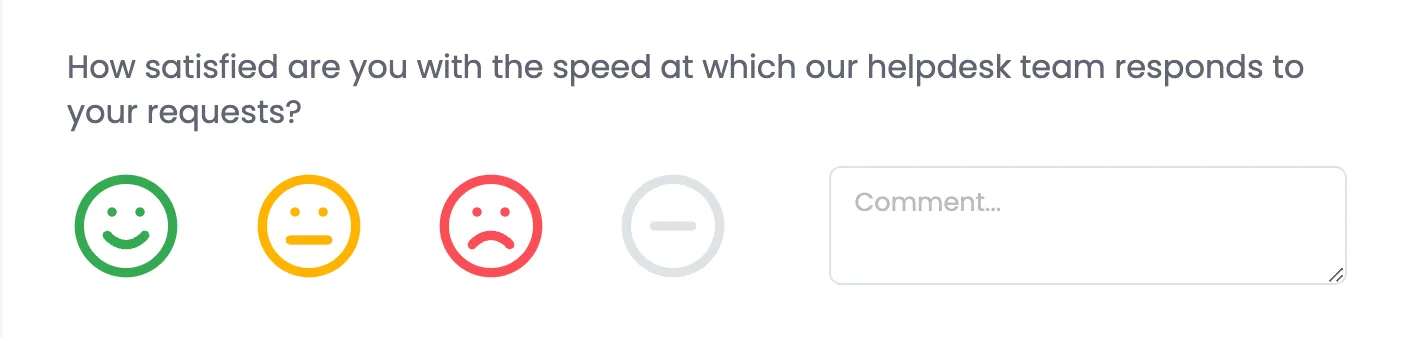
- Layout:
- Question Text: Displayed in an element with class .pulsecheck-question-text.
- Response Options: Four choices represented by icons:
- Positive (happy face)
- Neutral (meh face)
- Negative (sad face)
- Not Applicable (circle with dash)
- Comment Field: A <textarea> (with a maxlength of 5000 characters) for additional user input.
- Functionality:
- Each question includes a hidden input that stores the selected option.
- The chosen option is stored using the data-pulse attribute.
- If "Not Applicable" is selected, a specific element (.pulsecheck-question-na) is toggled to display accordingly.
- Scoring: Refer to external documentation ("Pulse Score Calculation - Done") for how scores are computed from these responses.
- Design Options:
- We will offer the option of different Icon Sets for the smileys which can be picked in PulseCheck settings.
2.2. Referral Question (NPS)

- Layout:
- The referral question asks: "How likely are you to recommend us to a friend or colleague?"
- Options range numerically from 0 to 10.
- Two legend labels clarify the scale:
- 0 = Not likely at all
- 10 = Extremely likely
- Functionality:
- A hidden input named referral-score is used to store the selected score.
- Each referral option has a data-referral-score attribute, and a click event updates the hidden input accordingly.
2.3. Conditional Elements
Powered-by Badge:

- Displayed by default at the bottom of the page.
- For Pro-plan users, the badge can be disabled via settings. If disable, don't just hide, omit to save bandwidth.
- When multi-language support is active, the badge text is automatically translated.
Multi-language Support:

- Dropdown:
- Include only if multi-language support is enabled.
- Allows users to select their preferred language.
- Translation Script:
- Automatically detects the browser’s language and swaps text in key elements.
- PulseCheck Specific Translations:
- Elements such as <h1 id="title">, <p id="welcome">, and each question’s text (.pulsecheck-question-text) require dynamic text replacement from server-provided translations.
2.4. Hand-off / Post to Thank You Page
- On clicking the "Complete" button, the form is submitted and the user is redirected to a Thank You page.
- If the language was changed via the dropdown, the selected ISO language code (e.g., ?language=en) needs to be appended to the URL to ensure consistency on the Thank You page.
2.5. On-page Variables
- For the page, {workspace name} should be the name of the Workspace. However we will have an override in settings. If overridden use that.
- There are locations in the base HTML that contain the variable {Workspace Name}, this should be replaced with the Workspace's name when the page is loaded.
- Set the variable window.workspaceName to the name of the workspace.
window.workspaceName = "Acme Corp"
3. Data Storage & Persistence
3.1. Storing Survey Results
- Raw Data:
- Save all raw responses (selected options and comments) to the database.
- Do not store only calculated scores; the original responses must be preserved for display and auditing purposes.
- Real-time Saving:
- Each time an option is clicked, the corresponding response is sent to the server.
- On page load, previously stored responses should be reselected to allow users to resume their survey.
3.2. Storing Comments
- Association:
- Each comment is stored in a way that it can be associated with its specific question.
- Filtering:
- The storage design should allow easy listing and filtering of comments for later analysis.
4. HTML & CSS Structure
4.1. HTML Requirements
- Stand-alone Page:
- The page is self-contained and optimized for fast loading.
- No external libraries like jQuery or Webflow’s JavaScript/CSS are required.
- Key HTML Elements:
- <head> includes:
- Meta tags (charset, viewport, description).
- Links to CSS files (css/normalize.css and css/pulsecheck.css).
- Favicon and Apple touch icon.
- Inline <style> for specific adjustments (e.g., aspect ratio for referral options).
- A script that defines window.workspaceName for dynamic replacement in text.
- <body> includes:
- A main container (.pulsecheck-container) wrapping all survey elements.
- An optional language dropdown (.pulsecheck-language-dropdown).
- The company logo.
- Survey title (<h1 id="title">) and welcome paragraph (<p id="welcome">).
- A form (<form id="pulsecheck-form">) containing:
- Area question blocks.
- The referral question block.
- Hidden inputs for storing answers.
- A "Complete" button for submission.
- The Powered-by badge.
4.2. CSS Dependencies
- Files:
- css/normalize.css – Ensures consistent styling across browsers.
- css/pulsecheck.css – Contains custom styles specific to the PulseCheck page.
- Notes:
- The page’s CSS is self-contained, reducing reliance on external style libraries.
5. JavaScript Functionality
5.1. Survey Options Interactivity
- Initialization:
- On DOMContentLoaded, iterate over each .pulsecheck-question-options container.
- For each container, a hidden input is created to store the selected option.
- Area Question Options:
- Event Listener:
- Each .pulsecheck-question-option receives a click event.
- On click:
- Remove the selected class from all sibling options.
- Add the selected class to the clicked option.
- Retrieve the value from the data-pulse attribute (converted to lowercase) and store it in the hidden input.
- Toggle the display of the .pulsecheck-question-na element if the "Not Applicable" option is selected.
- Referral Question Options:
- Initialization:
- Identify the referral container (.referral-question-container).
- Create a hidden input named referral-score.
- Event Listener:
- Each referral option (.referral-question-option) has a click event that:
- Removes the selected class from all referral options.
- Adds the selected class to the clicked option.
- Updates the hidden input with the value from the data-referral-score attribute.
5.2. Multi-language & Translation
- Language Dropdown:
- Rendered only if multi-language support is enabled on the PulseCheck.
- Allows users to switch languages, with the selected language displayed (e.g., via the #selectedLanguage element).
- Translation Script:
- Automatically detects the browser’s language.
- Dynamically updates text for:
- Page Title, Meta Description, Textarea Placeholder, Complete Button.
- Referral Question legend labels.
- Powered-by badge text.
- Replaces {Workspace Name} with the actual workspace name provided via window.workspaceName.
- Passing Language on Submission:
6. Integration & Performance Considerations
- Stand-alone & Lightweight:
- The page is designed to load quickly with minimal dependencies.
- Images are loaded lazily (using loading="lazy").
- Bandwidth Optimization:
- Conditional elements (e.g., Powered-by badge) are loaded only if required.
- Data Persistence:
- Utilize AJAX or similar techniques to save survey responses on-click.
- Ensure previously saved responses are pre-populated on page load for a seamless user experience.
7. File Structure & Deployment
- Files & Directories:
- html – Main HTML file.
- css/normalize.css – Reset/normalize CSS file.
- css/pulsecheck.css – Custom styles for the PulseCheck page.
- images/ – Contains favicon, logos, and other image assets.
- js/ – (Optional) Directory for additional JavaScript files.
- Server-Side Integration:
- Endpoints to store survey responses and comments.
- API endpoints to retrieve server-provided translations and customizable PulseCheck content.
- Deployment:
- The page is intended to be a standalone page.
- Configure appropriate cache headers and compression to ensure optimal performance.
HTML
<html>
<head>
<meta charset="utf-8">
<title>Help Us Improve | {Workspace Name} Feedback</title>
<meta content="Your feedback makes a difference! Complete this brief PulseCheck to share your thoughts and help {Workspace Name} improve." name="description">
<meta content="width=device-width, initial-scale=1" name="viewport">
<link href="css/normalize.css" rel="stylesheet" type="text/css">
<link href="css/pulsecheck.css" rel="stylesheet" type="text/css">
<link href="images/favicon.png" rel="shortcut icon" type="image/x-icon">
<link href="images/webclip.png" rel="apple-touch-icon">
<style>
.referral-question-option::before {
content: "";
display: block;
padding-top: 100%; /* 1:1 aspect ratio */
}
</style>
</head>
<body class="pulsecheck-body">
<div class="pulsecheck-container">
<!-- START Language Selection Dropdown - Exclude if multi-language isn't enabled -->
<div class="pulsecheck-language-dropdown">
<div class="pulsecheck-language-dropdown-closed">
<div class="dropdown-arrow"></div>
<div id="selectedLanguage">English</div>
</div>
<div class="pulsecheck-language-dropdown-open">
<div class="pulsecheck-language-dropdown-option">
<div>English</div>
</div>
</div>
</div>
<!-- END Language Selection Dropdown - Exclude if multi-language isn't enabled -->
<img loading="lazy" src="images/Logo-Logo.svg" alt="{Workspace Name}" class="pulsecheck-logo">
<div>
<h1 id="title" class="pulsecheck-title">Tell us how we're doing</h1>
<p id="welcome" class="pulsecheck-welcome-paragraph">At happier IT, we’re committed to delivering exceptional IT services and support that empower your business. Your insights help us understand what we’re doing well and where we can improve. Please take a few moments to share your feedback regarding our helpdesk, onsite support, proactiveness, leadership, and more. Thank you for helping us continually enhance our services to better serve you.</p>
</div>
<div class="pulsecheck-questions">
<form id="pulsecheck-form" name="pulsecheck-form" redirect="/thank-you?language=en" method="post">
<!-- START PulseCheck Question - Repeat for each question -->
<div class="pulsecheck-question">
<div class="pulsecheck-question-text">How satisfied are you with the speed at which our helpdesk team responds to your requests?</div>
<div class="pulsecheck-question-options-grid">
<div class="pulsecheck-question-options-container">
<div class="pulsecheck-question-options">
<div data-pulse="positive" class="pulsecheck-question-option">
<div class="pulsecheck-question-option-icon positive"><svg xmlns="http://www.w3.org/2000/svg" width="3.5rem" height="3.5rem" viewbox="0 0 24 24" fill="none" stroke="currentColor" stroke-width="2" stroke-linecap="round" stroke-linejoin="round">
<circle cx="12" cy="12" r="10"></circle>
<path d="M8 14s1.5 2 4 2 4-2 4-2"></path>
<line x1="9" y1="9" x2="9.01" y2="9"></line>
<line x1="15" y1="9" x2="15.01" y2="9"></line>
</svg></div>
</div>
<div data-pulse="neutral" class="pulsecheck-question-option">
<div class="pulsecheck-question-option-icon neutral"><svg xmlns="http://www.w3.org/2000/svg" width="3.5rem" height="3.5rem" viewbox="0 0 24 24" fill="none" stroke="currentColor" stroke-width="2" stroke-linecap="round" stroke-linejoin="round">
<circle cx="12" cy="12" r="10"></circle>
<line x1="8" y1="15" x2="16" y2="15"></line>
<line x1="9" y1="9" x2="9.01" y2="9"></line>
<line x1="15" y1="9" x2="15.01" y2="9"></line>
</svg></div>
</div>
<div data-pulse="negative" class="pulsecheck-question-option">
<div class="pulsecheck-question-option-icon negative"><svg xmlns="http://www.w3.org/2000/svg" width="3.5rem" height="3.5rem" viewbox="0 0 24 24" fill="none" stroke="currentColor" stroke-width="2" stroke-linecap="round" stroke-linejoin="round">
<circle cx="12" cy="12" r="10"></circle>
<path d="M16 16s-1.5-2-4-2-4 2-4 2"></path>
<line x1="9" y1="9" x2="9.01" y2="9"></line>
<line x1="15" y1="9" x2="15.01" y2="9"></line>
</svg></div>
</div>
<div data-pulse="na" class="pulsecheck-question-option">
<div class="pulsecheck-question-option-icon not-applicable"><svg xmlns="http://www.w3.org/2000/svg" width="512" height="512" viewbox="0 0 24 24" fill="none" stroke="currentColor" stroke-width="2" stroke-linecap="round" stroke-linejoin="round">
<circle cx="12" cy="12" r="10"></circle>
<line x1="8" y1="12" x2="16" y2="12"></line>
</svg></div>
</div>
</div>
<div class="pulsecheck-question-na">Not Applicable</div>
</div>
<textarea id="Comment-1" name="Comment1" maxlength="5000" data-name="Comment1" placeholder="Comment... " class="pulsecheck-question-comment"></textarea>
</div>
</div>
<!-- END PulseCheck Question -->
<!-- START Referral/NPS Question -->
<div class="pulsecheck-question">
<div class="pulsecheck-question-text">How likely are you to recommend us to a friend or colleague?</div>
<div class="referral-question-container-over">
<div class="referral-question-legend-label">0 = Not likely at all</div>
<div class="referral-question-legend-label">10 = Extremely likely</div>
</div>
<div class="referral-question-container">
<div data-referral-score="0" class="referral-question-option">
<div class="referral-question-option-text">0<br></div>
</div>
<div data-referral-score="1" class="referral-question-option">
<div class="referral-question-option-text">1</div>
</div>
<div data-referral-score="2" class="referral-question-option">
<div class="referral-question-option-text">2</div>
</div>
<div data-referral-score="3" class="referral-question-option">
<div class="referral-question-option-text">3</div>
</div>
<div data-referral-score="4" class="referral-question-option">
<div class="referral-question-option-text">4</div>
</div>
<div data-referral-score="5" class="referral-question-option">
<div class="referral-question-option-text">5</div>
</div>
<div data-referral-score="6" class="referral-question-option">
<div class="referral-question-option-text">6</div>
</div>
<div data-referral-score="7" class="referral-question-option">
<div class="referral-question-option-text">7</div>
</div>
<div data-referral-score="8" class="referral-question-option">
<div class="referral-question-option-text">8</div>
</div>
<div data-referral-score="9" class="referral-question-option">
<div class="referral-question-option-text">9</div>
</div>
<div data-referral-score="10" class="referral-question-option">
<div class="referral-question-option-text">10</div>
</div>
</div>
</div>
<!-- END PulseCheck Referral/NPS Question -->
</form>
</div>
<button type="submit" id="complete-button" class="button">Complete</button>
</div>
<!-- START 360Pulse Powered-by Badge - omit if turned off in PulseCheck settings -->
<a id="powered-by-badge" title="Try 360Pulse Continuous Feedback Surveys for Free" href="https://www.360pulse.app/powered-by" target="_blank" class="pulsecheck-powered-by">
<div id="powered-by">Powered by</div>
<div class="powered-by-logo">
<svg id="360Pulse-Logo" width="1289.94" height="250.72" xmlns="http://www.w3.org/2000/svg" viewbox="0 0 1289.94 250.72"><defs><style>.b{fill:#13a2e4;}.c{fill:#3f494c;}</style></defs><path class="b" d="M398.22,57.53c7.59,2,13.14,5.29,16.63,9.89,3.49,4.6,5.24,11.02,5.24,19.28,0,10.66-1.79,18.78-5.35,24.38-3.57,5.59-10.14,9.06-19.71,10.39v.8c10.94,1.47,18.53,4.96,22.78,10.49,4.25,5.53,6.38,13.95,6.38,25.27,0,9.59-1.86,17.28-5.58,23.08-3.72,5.79-9.72,10.06-18,12.79-8.28,2.73-19.25,4.1-32.92,4.1-17.17,0-36-1.27-56.5-3.8l1.37-26.97c15.79.8,30.3,1.2,43.52,1.2,6.98,0,12.3-.43,15.95-1.3,3.65-.87,6.23-2.46,7.75-4.79,1.52-2.33,2.28-5.83,2.28-10.49,0-6.12-1.37-10.39-4.1-12.79-2.73-2.4-8.2-3.53-16.4-3.4l-30.07.2v-23.98h30.07c7.59,0,12.57-1.06,14.92-3.2,2.35-2.13,3.53-5.59,3.53-10.39,0-4.26-.57-7.39-1.71-9.39s-3.08-3.33-5.81-4c-2.73-.67-7.06-1-12.99-1-13.67,0-28.25.13-43.74.4l-1.37-25.97c17.31-2.53,34.86-3.8,52.63-3.8,13.21,0,23.62,1,31.21,3Z"></path><path class="b" d="M544.71,108.58c6.68,2.87,11.39,7.36,14.12,13.49,2.73,6.13,4.1,14.45,4.1,24.97,0,12.12-1.6,21.78-4.79,28.97s-9,12.59-17.43,16.18c-8.43,3.6-20.54,5.39-36.34,5.39s-28.48-1.97-37.14-5.89c-8.66-3.93-14.81-10.85-18.45-20.78-3.65-9.92-5.47-24.34-5.47-43.26,0-20.38,2.47-35.79,7.4-46.25,4.93-10.46,12.19-17.48,21.76-21.08,9.57-3.6,22.71-5.39,39.41-5.39s29.77,1.33,40.55,4l-1.82,23.18c-8.66-.13-21.57-.2-38.73-.2-7.14,0-12.53.77-16.18,2.3-3.65,1.53-6.3,4.43-7.97,8.69-1.67,4.26-2.73,10.79-3.19,19.58,4.4-3.06,9.07-5.2,14.01-6.39,4.93-1.2,11.05-1.8,18.34-1.8,11.85,0,21.11,1.43,27.79,4.3ZM516.92,168.22c2.58-1.46,4.21-3.66,4.9-6.59.68-2.93,1.03-7.52,1.03-13.79,0-5.06-.5-8.86-1.48-11.39-.99-2.53-2.77-4.3-5.35-5.29-2.58-1-6.46-1.5-11.62-1.5-3.64,0-6.95.4-9.91,1.2-2.96.8-6.34,2.13-10.14,4,.15,10.92.64,18.75,1.48,23.48.83,4.73,2.62,7.93,5.35,9.59,2.73,1.67,7.21,2.5,13.44,2.5,5.62,0,9.72-.73,12.3-2.2Z"></path><path class="b" d="M681.64,61.33c9.26,4.53,15.95,11.96,20.05,22.28,4.1,10.32,6.15,24.54,6.15,42.66s-2.05,32.34-6.15,42.66c-4.1,10.32-10.79,17.75-20.05,22.28-9.27,4.53-21.95,6.79-38.05,6.79s-28.75-2.27-37.93-6.79c-9.19-4.53-15.83-11.95-19.94-22.28-4.1-10.32-6.15-24.54-6.15-42.66s2.05-32.33,6.15-42.66c4.1-10.32,10.74-17.75,19.94-22.28,9.19-4.53,21.83-6.79,37.93-6.79s28.78,2.27,38.05,6.79ZM629.92,86.4c-3.04,2.2-5.17,6.29-6.38,12.29-1.22,5.99-1.82,15.18-1.82,27.57s.61,21.58,1.82,27.57c1.21,5.99,3.34,10.09,6.38,12.29,3.04,2.2,7.52,3.3,13.44,3.3s10.67-1.1,13.78-3.3c3.11-2.2,5.28-6.29,6.49-12.29,1.21-5.99,1.82-15.18,1.82-27.57s-.61-21.58-1.82-27.57c-1.22-5.99-3.38-10.09-6.49-12.29-3.11-2.2-7.71-3.3-13.78-3.3s-10.41,1.1-13.44,3.3Z"></path><path class="c" d="M840.32,63.23c7.82,5.13,11.73,13.62,11.73,25.47,0,3.07-.38,7.06-1.14,11.99-1.98,12.12-5.05,21.28-9.23,27.47-4.18,6.19-10.02,10.42-17.54,12.69-7.52,2.27-17.88,3.4-31.1,3.4-9.11,0-19.44-.6-30.98-1.8l-8.43,52.75h-28.48l22.1-137.86c8.5-.8,16.48-1.3,23.92-1.5,7.44-.2,18-.3,31.67-.3,17.16,0,29.65,2.57,37.48,7.69ZM823.57,90.7c0-5.73-1.63-9.59-4.9-11.59-3.27-2-8.85-3-16.75-3-13.98,0-23.69.07-29.16.2l-7.75,47.55h26.66c7.44,0,13.17-.7,17.2-2.1,4.02-1.4,7.06-3.86,9.11-7.39,2.05-3.53,3.61-8.69,4.67-15.48.61-4.26.91-6.99.91-8.19Z"></path><path class="c" d="M975.53,97.29l-15.49,97.9h-21.42l.91-19.38c-9.11,7.59-17.62,13.16-25.52,16.68-7.9,3.53-15.95,5.29-24.15,5.29-9.11,0-16.03-1.93-20.73-5.79-4.71-3.86-7.06-9.19-7.06-15.98,0-2.53.15-4.46.46-5.79l11.62-72.93h27.57l-10.71,66.53c-.31,1.33-.46,3.07-.46,5.19,0,2.93.8,5.03,2.39,6.29,1.59,1.27,4.14,1.9,7.63,1.9,5.62,0,11.08-1.4,16.4-4.2,5.31-2.8,12.53-7.66,21.64-14.58l9.57-61.14h27.34Z"></path><path class="c" d="M1022.92,165.22c-.15.8-.23,1.93-.23,3.4,0,2.8.87,4.73,2.62,5.79,1.74,1.07,4.67,1.6,8.77,1.6h10.02l1.14,18.18c-2.28.93-5.89,1.7-10.82,2.3-4.94.6-9.15.9-12.64.9-8.66,0-15.42-1.97-20.28-5.89-4.86-3.93-7.29-9.42-7.29-16.48,0-.93.15-2.6.46-5l18.45-114.68h27.57l-17.77,109.89Z"></path><path class="c" d="M1140.71,95.59c9.57.73,17.84,1.57,24.83,2.5l-2.96,16.58c-14.28-.4-29.16-.6-44.65-.6-6.99,0-11.96.13-14.92.4-2.96.27-5.17.93-6.61,2-1.45,1.07-2.16,2.87-2.16,5.39,0,2.13.91,3.8,2.73,4.99,1.82,1.2,5.16,2.8,10.02,4.8l28.48,11.19c8.35,3.2,14.35,6.56,18,10.09,3.65,3.53,5.47,8.16,5.47,13.89,0,.93-.15,2.6-.46,5-1.22,7.33-3.99,12.82-8.32,16.48-4.33,3.67-10.02,6.09-17.09,7.29-7.06,1.2-16.6,1.8-28.59,1.8-8.51,0-15.04-.17-19.59-.5-4.56-.33-9.8-.83-15.72-1.5l-10.48-1.2,2.96-16.98c8.05.53,19.59.8,34.63.8,9.42,0,16.52-.23,21.3-.7,4.78-.46,8.2-1.23,10.25-2.3,2.05-1.06,3.3-2.66,3.76-4.79.3-2.4-.23-4.13-1.59-5.19-1.37-1.07-3.38-2.1-6.04-3.1-2.66-1-4.6-1.76-5.81-2.3l-28.48-11.19c-7.75-3.06-13.41-6.62-16.97-10.69-3.57-4.06-5.35-8.96-5.35-14.69,0-1.86.07-3.26.23-4.2,1.21-8.92,5.54-15.22,12.99-18.88,7.44-3.66,18.83-5.5,34.17-5.5,7.75,0,16.4.37,25.97,1.1Z"></path><path class="c" d="M1279.68,101.19c6.83,4.46,10.25,10.89,10.25,19.28,0,2.8-.15,5-.46,6.59-1.52,9.59-5.77,16.52-12.76,20.78-6.99,4.26-17.7,6.79-32.12,7.59l-35.31,2.6c.15,7.73,2.28,12.96,6.38,15.68,4.1,2.73,10.33,4.1,18.68,4.1,12.61,0,26.58-.8,41.92-2.4l1.82,15.78c-6.08,2.27-13.44,3.9-22.1,4.9s-17.09,1.5-25.29,1.5c-17.32,0-30-3.33-38.05-9.99-8.05-6.66-12.08-16.78-12.08-30.37,0-3.73.38-8.26,1.14-13.59,1.97-12.79,5.24-22.71,9.8-29.77,4.56-7.06,11.05-12.05,19.48-14.99,8.43-2.93,19.71-4.4,33.83-4.4,16.4,0,28.02,2.23,34.86,6.69ZM1261,117.17c-1.22-1.53-3.19-2.5-5.92-2.9s-7.29-.6-13.67-.6c-6.83.13-12.19.93-16.06,2.4-3.87,1.47-6.91,4.2-9.11,8.19-2.2,4-3.99,9.86-5.35,17.58l31.9-2.6c6.38-.4,11.05-1.63,14.01-3.7,2.96-2.06,4.82-5.62,5.58-10.69.3-3.6-.15-6.16-1.37-7.69Z"></path><path class="b" d="M16.69,154.82h30.6L83.51,24.51c.92-3.3,3.92-5.79,7.65-6.35,5.18-.78,10.08,2.36,10.94,7.02l31.09,167.76,26.44-83.22c.86-2.71,3.16-4.86,6.13-5.76,4.98-1.49,10.36.93,12.02,5.4l16.84,45.45h52.61c2.27-9.45,3.49-19.31,3.49-29.45C250.72,56.13,194.6,0,125.36,0S0,56.13,0,125.36c0,10.15,1.21,20.01,3.49,29.45h13.21Z"></path><path class="b" d="M217.92,171.91h-30.15c-4.09,0-7.72-2.35-9.02-5.84l-9.29-25.08-29.58,93.11c-1.17,3.67-4.89,6.19-9.13,6.2h-.54c-4.44-.23-8.11-3.19-8.84-7.14l-30.51-164.62-26.93,96.9c-1.06,3.81-4.86,6.47-9.22,6.48H8.93c18.48,46.19,63.64,78.81,116.43,78.81s97.95-32.63,116.43-78.81h-23.87Z"></path></svg>
</div>
<div id="try-free" class="try-free-url">Try it Free</div>
</a>
<!-- END 360Pulse Powered-by Badge -->
<!-- START Workspace/Organization Name Replacement -->
<script>
// START required for both this function and translation
window.workspaceName = "{Workspace Name}";
// END required for both this function and translation
document.addEventListener("DOMContentLoaded", function() {
const regex = /{workspace name}/gi;
const replacement = window.workspaceName;
function replaceText(node) {
if (node.nodeType === Node.TEXT_NODE) {
node.nodeValue = node.nodeValue.replace(regex, replacement);
}
// If it's an element node, process its attributes and children.
else if (node.nodeType === Node.ELEMENT_NODE) {
// Replace in all element attributes (like meta descriptions).
if (node.hasAttributes()) {
Array.from(node.attributes).forEach(attr => {
attr.value = attr.value.replace(regex, replacement);
});
}
// Recurse through child nodes.
node.childNodes.forEach(child => replaceText(child));
}
}
replaceText(document.documentElement);
});
</script>
<!-- START Workspace/Organization Name Replacement -->
<!-- START Language Translation JS - Exclude if multi-language isn't enabled -->
<script src="https://cdn.jsdelivr.net/gh/leevaniderstine/360pulse/pulsecheck-language.js?v=20250228"></script>
<!-- END Language Translation JS -->
<!-- START PulseCheck Page Functionliaty JS -->
<script>
document.addEventListener('DOMContentLoaded', function() {
// Get each container of pulsecheck options
var pulseCheckContainers = document.querySelectorAll('.pulsecheck-question-options');
pulseCheckContainers.forEach(function(container, index) {
// Create a hidden input for the selected pulsecheck value
var hiddenInput = document.createElement('input');
hiddenInput.type = 'hidden';
hiddenInput.name = 'pulsecheck-value-' + index;
container.appendChild(hiddenInput);
// Get the parent container (.pulsecheck-question-options-container)
var parentContainer = container.parentNode;
// Find the associated .pulsecheck-question-na element within the same parent
var pulsecheckNa = parentContainer.querySelector('.pulsecheck-question-na');
// Add event listeners to each pulsecheck option in the container
var options = container.querySelectorAll('.pulsecheck-question-option');
options.forEach(function(option) {
option.addEventListener('click', function(e) {
// Remove 'selected' from all options in this container
options.forEach(function(opt) {
opt.classList.remove('selected');
});
// Add 'selected' to the clicked option
option.classList.add('selected');
// Get the data-pulse value and convert it to lowercase
var pulseValue = option.getAttribute('data-pulse').toLowerCase();
hiddenInput.value = pulseValue;
// Toggle display of the associated .pulsecheck-question-na element
if (pulsecheckNa) {
if (pulseValue === "na") {
pulsecheckNa.style.display = 'flex';
} else {
pulsecheckNa.style.display = 'none';
}
}
});
});
});
var referralContainer = document.querySelector('.referral-question-container');
if (referralContainer) {
// Create a hidden input for the referral score
var referralHiddenInput = document.createElement('input');
referralHiddenInput.type = 'hidden';
referralHiddenInput.name = 'referral-score';
referralContainer.appendChild(referralHiddenInput);
// Add event listeners to each referral option
var referralOptions = referralContainer.querySelectorAll('.referral-question-option');
referralOptions.forEach(function(option) {
option.addEventListener('click', function(e) {
// Remove 'selected' from all referral options
referralOptions.forEach(function(opt) {
opt.classList.remove('selected');
});
// Add 'selected' to the clicked option
option.classList.add('selected');
// Update the hidden input with the data-referral-score value
referralHiddenInput.value = option.getAttribute('data-referral-score');
});
});
}
});
</script>
<!-- END PulseCheck Page Functionliaty JS -->
</body>
</html>