Tags - UPDATED - Done
28 min
View Live Example
Overview
Tags in 360Pulse serve as flexible metadata labels that streamline contact organization, filtering, and audience segmentation. By assigning tags to contacts, you can quickly filter PulseCheck dashboards or reports, automatically include the right contacts in recurring surveys, and efficiently map CSV data to existing or newly created tags—all of which help ensure that relevant PulseChecks reach the intended audience.
Tag Structure
Each tag has:
- Tag Name: A unique identifier (e.g., "Account Manager", "Contact Type").
- Description: A brief explanation of the tag’s purpose.
- Format: Either Dropdown or Text.
- Usage Counter: Tracks how many contacts currently have the tag.
Format Types
- Dropdown
- Presents predefined options for users to select (e.g., department, region).
- Ideal for standardized values that don’t change often.
- Text
- Allows free-form input for each contact (e.g., a custom field like “Company Name” or “Store ID”).
- Useful when you can’t predetermine all possible values (e.g., “XYZ Corp,” “Acme Inc”).
Primary Tag Functions
Filtering
- PulseCheck Dashboards or Reports: Tags are the primary way to filter datasets. Even text-format tags appear as dropdowns in the filter modal, populated with unique values found in your database.
- Contact Management: Tags help you quickly locate specific segments of contacts (e.g., all contacts tagged as “Customers” or in a specific “Region”).
Automatic Inclusion in PulseChecks
- When creating or editing a PulseCheck, you can define rules based on tags to automatically include contacts who meet certain criteria (e.g., Contact Type = "Customer").
CSV Import Mapping
- During the CSV import process, you can map columns to existing tags or create new tags from those columns.
- If a tag in the CSV doesn’t already exist, the system can create it automatically (for text-format tags).
- If the tag exists, 360Pulse assigns that tag and value to the imported contacts.
Creating and Managing Tags
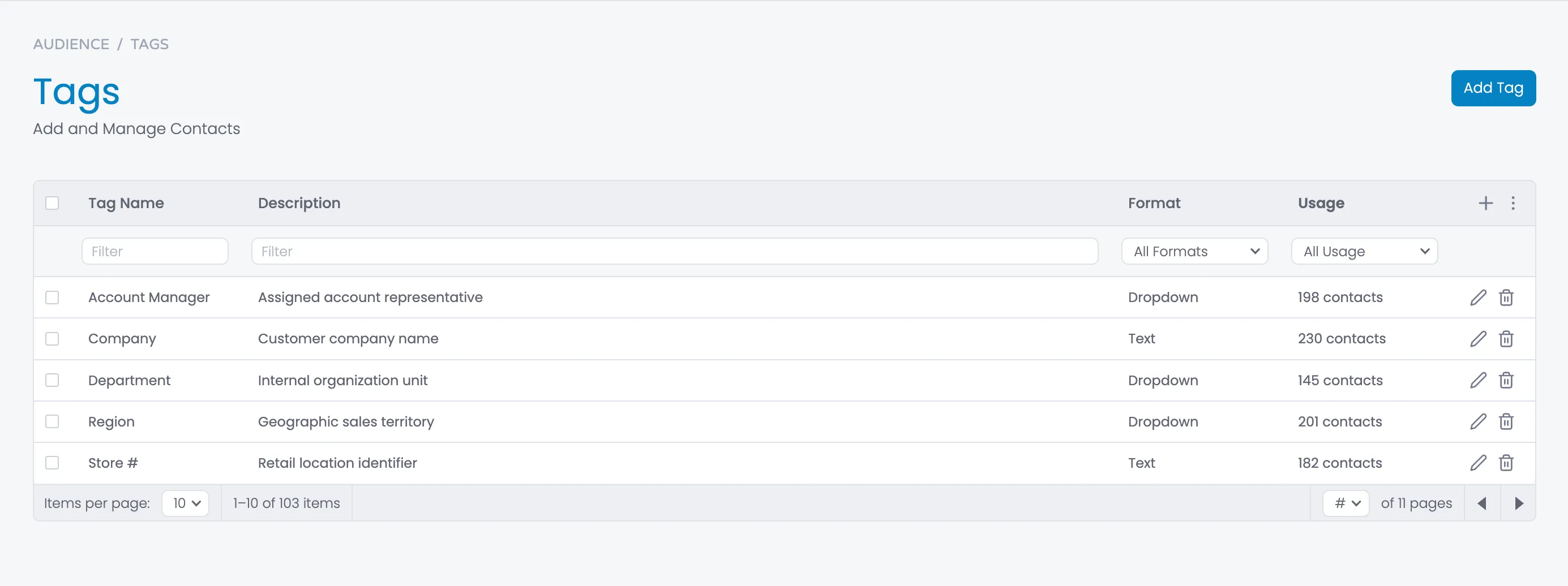
Manage Tags Page
- Accessed from the left-hand navigation under Tags.
- Displays a table with columns for Tag Name, Description, Format, and Usage.
- Allows you to create new tags, edit existing tags, or delete them.
Add Tag Modal
- Click Add Tag to open the Add Tag modal.
- Tag Name *: Required unique identifier (e.g., “Region”).
- Description: Optional explanation of the tag’s purpose (e.g., “Geographical area identifier”).
- Format:
- Dropdown: Specify multiple predefined options.
- Text: Free-form text for contacts to have any value.
- Dropdown Options (only for Dropdown format): Add/remove options as needed.
- Create Tag: The new tag becomes available immediately for use.
Orphaned Tags and Lifecycle
Deletion & Orphaning
- Deleting a tag removes it from the active list but not from contacts that already had it.
- Those instances become orphaned.
Visibility & Editing
- Orphaned tags remain visible (and editable/deletable) on individual contact profiles.
- They no longer appear in filters, the Manage Tags page, or the Add Tag modal for new assignments.
Relinking
- If you recreate a tag with the exact same name, the system automatically relinks any orphaned instances.
- This restores the tag to the active list and makes it available for filtering and assignment.
CSV Import Integration
Column Matching
- During CSV import of Contacts, each column can be mapped to an existing tag or used to create a new tag.
- If the tag doesn’t exist, you can create it (specifying Dropdown or Text).
Automatic Tag Creation
- For Text tags, new values from the CSV are added automatically.
- For Dropdown tags, CSV values not already in the dropdown list are added automatically.
Contact Assignments
- After import, each contact is assigned any tag values specified in the CSV.
- If a tag is later deleted, its instances remain on those contacts as orphaned tags.
Filtering & Dashboard/Report Views
Filter Modal on PulseCheck Dashboards/Reports
- Users can open the filter modal and see all active tags.
- Text-format tags appear as dropdowns with all unique values in the database.
- Selecting a value (e.g., “XYZ Corp”) filters to show data only for contacts with that specific tag value.
Compound Filtering
- Multiple filters can be applied simultaneously for more refined data views.
- The dashboard or report updates in real time.
Automatic Audience Inclusion
PulseCheck Rules
- When creating or editing a PulseCheck, specify tag conditions to include relevant contacts automatically (e.g., tag "Contact Type" = "Customer").
Dynamic Updates
- As contacts are added or existing contacts change tags, they automatically become included or excluded from the relevant PulseChecks.
- No manual adjustments needed once the tag rule is set.
Modals
HTML
<section class="section">
<div class="w-layout-blockcontainer body-container w-container">
<div class="page-header">
<div class="w-layout-grid grid-2">
<div class="page-header-left">
<div class="breadcrumbs">
<div class="breadcrumb">Audience</div>
<div class="breadcrumb-divider">/</div>
<a href="#" class="breadcrumb">Tags</a>
</div>
<div class="tab-heading-container-for-button">
<div>
<h1>Tags<br></h1>
<div class="subheading">Add and Manage Tags</div>
</div>
<div class="flex">
<a href="#" class="button w-inline-block">
<div>Add Tag</div>
</a>
</div>
</div>
</div>
</div>
</div>
<div class="content-area">
<form id="tag-filter-form" name="tag-filter-form" data-name="Tag Filter Form" method="get" data-wf-page-id="67d9c581dda57c0fb12fa8c0" data-wf-element-id="ddb2f00b-a9fa-347e-f2fe-06b56c940b56">
<div class="table-outline">
<div class="table-scroll-container">
<table class="table" aria-label="Tags management table">
<thead class="table-head">
<tr class="table-header-row">
<th class="table-checkbox-column">
<label class="w-checkbox table-checkbox-field" for="select-all-tags">
<div class="w-checkbox-input w-checkbox-input--inputType-custom table-checkbox"></div>
<input type="checkbox" id="select-all-tags" name="select-all-tags" data-name="Select All Tags" style="opacity:0;position:absolute;z-index:-1" aria-label="Select all tags">
</label>
</th>
<th>
<div class="table-cell-content">
<div class="table-heading">Tag Name</div>
</div>
</th>
<th>
<div class="table-cell-content">
<div class="table-heading">Description</div>
</div>
</th>
<th>
<div class="table-cell-content">
<div class="table-heading">Format</div>
</div>
</th>
<th>
<div class="table-cell-content">
<div class="table-heading"><strong>Usage</strong></div>
</div>
</th>
<th class="action-column _9rem">
<div class="table-header-icon-container">
<a data-tippy-content="Add Tag" href="#" class="table-header-button w-inline-block" aria-label="Add new tag">
<div class="table-button-icon">
<svg xmlns="http://www.w3.org/2000/svg" width="24" height="24" viewbox="0 0 24 24" fill="none" stroke="currentColor" stroke-width="2" stroke-linecap="round" stroke-linejoin="round" class="feather feather-plus" aria-hidden="true">
<line x1="12" y1="5" x2="12" y2="19"></line>
<line x1="5" y1="12" x2="19" y2="12"></line>
</svg>
</div>
</a>
<div data-delay="0" data-hover="false" class="table-menu-container w-dropdown">
<div class="table-menu-button w-dropdown-toggle" id="tag-actions-menu-button" aria-haspopup="true" aria-expanded="false" aria-label="Tag actions menu">
<div class="table-header-button">
<div class="table-button-icon">
<svg version="1.1" fill="currentColor" xmlns="http://www.w3.org/2000/svg" width="32px" height="32px" viewbox="0 0 32 32" aria-hidden="true">
<circle cx="16" cy="8" r="2"></circle>
<circle cx="16" cy="16" r="2"></circle>
<circle cx="16" cy="24" r="2"></circle>
</svg>
</div>
</div>
</div>
<nav class="table-menu w-dropdown-list" id="tag-actions-dropdown" aria-labelledby="tag-actions-menu-button">
<a href="#" class="table-menu-item w-inline-block" id="delete-selected-tags" aria-label="Delete selected tags">
<div class="table-menu-item-icon">
<svg xmlns="http://www.w3.org/2000/svg" width="24" height="24" viewbox="0 0 24 24" fill="none" stroke="currentColor" stroke-width="2" stroke-linecap="round" stroke-linejoin="round" class="feather feather-trash-2" aria-hidden="true">
<polyline points="3 6 5 6 21 6"></polyline>
<path d="M19 6v14a2 2 0 0 1-2 2H7a2 2 0 0 1-2-2V6m3 0V4a2 2 0 0 1 2-2h4a2 2 0 0 1 2 2v2"></path>
<line x1="10" y1="11" x2="10" y2="17"></line>
<line x1="14" y1="11" x2="14" y2="17"></line>
</svg>
</div>
<div class="table-menu-item-text">Delete Selected</div>
</a>
<a href="#" class="table-menu-item w-inline-block" id="delete-unused-tags" aria-label="Delete unused tags">
<div class="table-menu-item-icon">
<svg fill="currentColor" xmlns="http://www.w3.org/2000/svg" width="32" height="32" viewbox="0 0 32 32" aria-hidden="true">
<path d="M23.092,10.3218,30,3.4141,28.5859,2,2,28.5859,3.4141,30l6.9077-6.9077,6.3218,6.3223a2.001,2.001,0,0,0,2.8286,0l9.9424-9.9424a2.001,2.001,0,0,0,0-2.8286ZM18.0579,28l-6.3218-6.3223,9.9419-9.9419L28,18.0576Z" transform="translate(0 0)"></path>
<path d="M10,14a4,4,0,1,1,4-4A4.0045,4.0045,0,0,1,10,14Zm0-6a2,2,0,1,0,1.998,2.0044A2.002,2.002,0,0,0,10,8Z" transform="translate(0 0)"></path>
<path d="M7.4927,20.2627l1.414-1.4141L4,13.9414V4h9.9417l4.9069,4.9067,1.4141-1.414L15.3555,2.5859A2,2,0,0,0,13.9414,2H4A2,2,0,0,0,2,4v9.9414a2,2,0,0,0,.5857,1.4141Z" transform="translate(0 0)"></path>
</svg>
</div>
<div class="table-menu-item-text">Delete Unused Tags</div>
</a>
<a href="#" class="table-menu-item w-inline-block" id="export-tags-csv" aria-label="Export tags to CSV file">
<div class="table-menu-item-icon">
<svg fill="currentColor" xmlns="http://www.w3.org/2000/svg" width="32" height="32" viewbox="0 0 32 32" aria-hidden="true">
<polygon points="5 18 5 20 10.586 20 3 27.586 4.414 29 12 21.414 12 27 14 27 14 18 5 18"></polygon>
<path d="M27,3H5A2,2,0,0,0,3,5V15H5V11H15v4h2V11H27v7H17v2H27v7H17v2H27a2,2,0,0,0,2-2V5A2,2,0,0,0,27,3Zm0,6H5V5H27Z"></path>
</svg>
</div>
<div>Export to CSV</div>
</a>
</nav>
</div>
</div>
</th>
</tr>
<tr class="table-filter-row">
<th class="table-checkbox-column"> </th>
<th>
<div class="table-filter-cell-content">
<input class="input-filter w-input" maxlength="256" name="tag-name-filter" data-name="Tag Name Filter" placeholder="Filter" type="text" id="tag-name-filter" aria-label="Filter by tag name">
</div>
</th>
<th>
<div class="table-filter-cell-content">
<input class="input-filter w-input" maxlength="256" name="description-filter" data-name="Description Filter" placeholder="Filter" type="text" id="description-filter" aria-label="Filter by description">
</div>
</th>
<th>
<div class="table-filter-cell-content">
<div data-delay="0" data-hover="false" class="dropdown w-dropdown">
<div class="dropdown-closed table-filter w-dropdown-toggle" id="format-filter-dropdown" aria-haspopup="true" aria-expanded="false" aria-label="Filter by format">
<div class="filter-dropdown-arrow w-icon-dropdown-toggle"></div>
<div class="dropdown-text-content">All Formats</div>
</div>
<nav class="dropdown-open w-dropdown-list" id="format-filter-options" aria-labelledby="format-filter-dropdown">
<div class="dropdown-option-container">
<a href="#" class="dropdown-option-simple w-inline-block" id="all-formats-option" aria-label="Show all formats">
<div class="dropdown-option-selected-icon-container">
<div class="dropdown-option-selected-icon selected">
<svg xmlns="http://www.w3.org/2000/svg" width="24" height="24" viewbox="0 0 24 24" fill="none" stroke="currentColor" stroke-width="4" stroke-linecap="round" stroke-linejoin="round" class="feather feather-check" aria-hidden="true">
<polyline points="20 6 9 17 4 12"></polyline>
</svg>
</div>
</div>
<div class="dropdown-option-text">All Formats</div>
</a>
<a href="#" class="dropdown-option-simple w-inline-block" id="dropdown-format-option" aria-label="Show dropdown format tags">
<div class="dropdown-option-selected-icon-container">
<div class="dropdown-option-selected-icon">
<svg xmlns="http://www.w3.org/2000/svg" width="24" height="24" viewbox="0 0 24 24" fill="none" stroke="currentColor" stroke-width="4" stroke-linecap="round" stroke-linejoin="round" class="feather feather-check" aria-hidden="true">
<polyline points="20 6 9 17 4 12"></polyline>
</svg>
</div>
</div>
<div class="dropdown-option-text">Dropdown</div>
</a>
<a href="#" class="dropdown-option-simple w-inline-block" id="text-format-option" aria-label="Show text format tags">
<div class="dropdown-option-selected-icon-container">
<div class="dropdown-option-selected-icon">
<svg xmlns="http://www.w3.org/2000/svg" width="24" height="24" viewbox="0 0 24 24" fill="none" stroke="currentColor" stroke-width="4" stroke-linecap="round" stroke-linejoin="round" class="feather feather-check" aria-hidden="true">
<polyline points="20 6 9 17 4 12"></polyline>
</svg>
</div>
</div>
<div class="dropdown-option-text">Text</div>
</a>
</div>
</nav>
</div>
</div>
</th>
<th>
<div class="table-filter-cell-content">
<div data-delay="0" data-hover="false" class="dropdown w-dropdown">
<div class="dropdown-closed table-filter w-dropdown-toggle" id="usage-filter-dropdown" aria-haspopup="true" aria-expanded="false" aria-label="Filter by usage">
<div class="filter-dropdown-arrow w-icon-dropdown-toggle"></div>
<div class="dropdown-text-content">All Usage</div>
</div>
<nav class="dropdown-open w-dropdown-list" id="usage-filter-options" aria-labelledby="usage-filter-dropdown">
<div class="dropdown-option-container">
<a href="#" class="dropdown-option-simple w-inline-block" id="all-usage-option" aria-label="Show all usage">
<div class="dropdown-option-selected-icon-container">
<div class="dropdown-option-selected-icon selected">
<svg xmlns="http://www.w3.org/2000/svg" width="24" height="24" viewbox="0 0 24 24" fill="none" stroke="currentColor" stroke-width="4" stroke-linecap="round" stroke-linejoin="round" class="feather feather-check" aria-hidden="true">
<polyline points="20 6 9 17 4 12"></polyline>
</svg>
</div>
</div>
<div class="dropdown-option-text">All Usage</div>
</a>
<a href="#" class="dropdown-option-simple w-inline-block" id="zero-usage-option" aria-label="Show unused tags">
<div class="dropdown-option-selected-icon-container">
<div class="dropdown-option-selected-icon">
<svg xmlns="http://www.w3.org/2000/svg" width="24" height="24" viewbox="0 0 24 24" fill="none" stroke="currentColor" stroke-width="4" stroke-linecap="round" stroke-linejoin="round" class="feather feather-check" aria-hidden="true">
<polyline points="20 6 9 17 4 12"></polyline>
</svg>
</div>
</div>
<div class="dropdown-option-text">Zero Usage</div>
</a>
</div>
</nav>
</div>
</div>
</th>
<th> </th>
</tr>
</thead>
<tbody class="table-body">
<!-- START Tag - Repeat for each Tag -->
<tr class="table-row">
<td class="table-checkbox-column">
<label class="w-checkbox table-checkbox-field" for="tag-select-1">
<div class="w-checkbox-input w-checkbox-input--inputType-custom table-checkbox"></div>
<input type="checkbox" id="tag-select-1" name="tag-select-1" data-name="Tag Select 1" style="opacity:0;position:absolute;z-index:-1" aria-label="Select this tag">
</label>
</td>
<td class="table-cell">
<div class="table-cell-content">
<div class="table-data">Account Manager</div>
</div>
</td>
<td class="table-cell truncate">
<div class="table-cell-content">
<div class="table-data overflow">Assigned account representative</div>
</div>
</td>
<td class="table-cell">
<div class="table-cell-content">
<div class="table-data">Dropdown</div>
</div>
</td>
<td class="table-cell">
<div class="table-cell-content">
<div class="table-data">24 contacts</div>
</div>
</td>
<td class="table-cell">
<div class="table-row-action-button-container">
<div data-tippy-content="Edit" class="table-row-action-button" role="button" tabindex="0" aria-label="Edit tag">
<div class="table-row-action-button-icon">
<svg xmlns="http://www.w3.org/2000/svg" width="24" height="24" viewbox="0 0 24 24" fill="none" stroke="currentColor" stroke-width="2" stroke-linecap="round" stroke-linejoin="round" aria-hidden="true">
<path d="M17 3a2.828 2.828 0 1 1 4 4L7.5 20.5 2 22l1.5-5.5L17 3z"></path>
</svg>
</div>
</div>
<div data-tippy-content="Delete" class="table-row-action-button danger" role="button" tabindex="0" aria-label="Delete tag">
<div class="table-row-action-button-icon">
<svg xmlns="http://www.w3.org/2000/svg" width="24" height="24" viewbox="0 0 24 24" fill="none" stroke="currentColor" stroke-width="2" stroke-linecap="round" stroke-linejoin="round" aria-hidden="true">
<polyline points="3 6 5 6 21 6"></polyline>
<path d="M19 6v14a2 2 0 0 1-2 2H7a2 2 0 0 1-2-2V6m3 0V4a2 2 0 0 1 2-2h4a2 2 0 0 1 2 2v2"></path>
<line x1="10" y1="11" x2="10" y2="17"></line>
<line x1="14" y1="11" x2="14" y2="17"></line>
</svg>
</div>
</div>
</div>
</td>
</tr>
<!-- END Tags -->
</tbody>
</table>
</div>
<div class="table-pagination" role="navigation" aria-label="Pagination">
<div class="pagination-left">
<div class="items-per-page-container">
<div id="per-page-label">Items per page:</div>
<div data-delay="0" data-hover="false" class="dropdown w-dropdown">
<div class="dropdown-closed table-filter w-dropdown-toggle" id="items-per-page-dropdown" aria-haspopup="true" aria-expanded="false" aria-labelledby="per-page-label">
<div class="filter-dropdown-arrow w-icon-dropdown-toggle"></div>
<div class="dropdown-text-content">10</div>
</div>
<nav class="dropdown-open top-left w-dropdown-list" id="items-per-page-options" aria-labelledby="items-per-page-dropdown">
<div class="dropdown-option-container">
<a href="#" class="dropdown-option-simple w-inline-block" id="items-10-option" aria-label="Show 10 items per page">
<div class="dropdown-option-selected-icon-container">
<div class="dropdown-option-selected-icon">
<svg xmlns="http://www.w3.org/2000/svg" width="24" height="24" viewbox="0 0 24 24" fill="none" stroke="currentColor" stroke-width="2" stroke-linecap="round" stroke-linejoin="round" class="feather feather-check" aria-hidden="true">
<polyline points="20 6 9 17 4 12"></polyline>
</svg>
</div>
</div>
<div class="dropdown-option-text">10</div>
</a>
<a href="#" class="dropdown-option-simple w-inline-block" id="items-25-option" aria-label="Show 25 items per page">
<div class="dropdown-option-selected-icon-container">
<div class="dropdown-option-selected-icon selected">
<svg xmlns="http://www.w3.org/2000/svg" width="24" height="24" viewbox="0 0 24 24" fill="none" stroke="currentColor" stroke-width="4" stroke-linecap="round" stroke-linejoin="round" class="feather feather-check" aria-hidden="true">
<polyline points="20 6 9 17 4 12"></polyline>
</svg>
</div>
</div>
<div class="dropdown-option-text">25</div>
</a>
<a href="#" class="dropdown-option-simple w-inline-block" id="items-50-option" aria-label="Show 50 items per page">
<div class="dropdown-option-selected-icon-container">
<div class="dropdown-option-selected-icon">
<svg xmlns="http://www.w3.org/2000/svg" width="24" height="24" viewbox="0 0 24 24" fill="none" stroke="currentColor" stroke-width="4" stroke-linecap="round" stroke-linejoin="round" class="feather feather-check" aria-hidden="true">
<polyline points="20 6 9 17 4 12"></polyline>
</svg>
</div>
</div>
<div class="dropdown-option-text">50</div>
</a>
<a href="#" class="dropdown-option-simple w-inline-block" id="items-100-option" aria-label="Show 100 items per page">
<div class="dropdown-option-selected-icon-container">
<div class="dropdown-option-selected-icon">
<svg xmlns="http://www.w3.org/2000/svg" width="24" height="24" viewbox="0 0 24 24" fill="none" stroke="currentColor" stroke-width="4" stroke-linecap="round" stroke-linejoin="round" class="feather feather-check" aria-hidden="true">
<polyline points="20 6 9 17 4 12"></polyline>
</svg>
</div>
</div>
<div class="dropdown-option-text">100</div>
</a>
</div>
</nav>
</div>
</div>
<div class="paginaton-total-items">
<div id="pagination-status" aria-live="polite">1–10 of 103 items</div>
</div>
</div>
<div class="pagination-right">
<div class="pagination-pages-dropdown">
<div data-delay="0" data-hover="false" class="dropdown w-dropdown">
<div class="dropdown-closed table-filter w-dropdown-toggle" id="page-selector-dropdown" aria-haspopup="true" aria-expanded="false" aria-label="Select page">
<div class="filter-dropdown-arrow w-icon-dropdown-toggle"></div>
<div class="dropdown-text-content">#</div>
</div>
<nav class="dropdown-open w-dropdown-list" id="page-selector-options" aria-labelledby="page-selector-dropdown">
<div class="dropdown-option-container">
<a href="#" class="dropdown-option-simple w-inline-block" id="page-1-option" aria-label="Go to page 1">
<div class="dropdown-option-selected-icon-container">
<div class="dropdown-option-selected-icon">
<svg xmlns="http://www.w3.org/2000/svg" width="24" height="24" viewbox="0 0 24 24" fill="none" stroke="currentColor" stroke-width="2" stroke-linecap="round" stroke-linejoin="round" class="feather feather-check" aria-hidden="true">
<polyline points="20 6 9 17 4 12"></polyline>
</svg>
</div>
</div>
<div class="dropdown-option-text">1</div>
</a>
<a href="#" class="dropdown-option-simple w-inline-block" id="page-2-option" aria-label="Go to page 2">
<div class="dropdown-option-selected-icon-container">
<div class="dropdown-option-selected-icon selected">
<svg xmlns="http://www.w3.org/2000/svg" width="24" height="24" viewbox="0 0 24 24" fill="none" stroke="currentColor" stroke-width="4" stroke-linecap="round" stroke-linejoin="round" class="feather feather-check" aria-hidden="true">
<polyline points="20 6 9 17 4 12"></polyline>
</svg>
</div>
</div>
<div class="dropdown-option-text">2</div>
</a>
<a href="#" class="dropdown-option-simple w-inline-block" id="page-3-option" aria-label="Go to page 3">
<div class="dropdown-option-selected-icon-container">
<div class="dropdown-option-selected-icon">
<svg xmlns="http://www.w3.org/2000/svg" width="24" height="24" viewbox="0 0 24 24" fill="none" stroke="currentColor" stroke-width="4" stroke-linecap="round" stroke-linejoin="round" class="feather feather-check" aria-hidden="true">
<polyline points="20 6 9 17 4 12"></polyline>
</svg>
</div>
</div>
<div class="dropdown-option-text">3</div>
</a>
<a href="#" class="dropdown-option-simple w-inline-block" id="page-4-option" aria-label="Go to page 4">
<div class="dropdown-option-selected-icon-container">
<div class="dropdown-option-selected-icon">
<svg xmlns="http://www.w3.org/2000/svg" width="24" height="24" viewbox="0 0 24 24" fill="none" stroke="currentColor" stroke-width="4" stroke-linecap="round" stroke-linejoin="round" class="feather feather-check" aria-hidden="true">
<polyline points="20 6 9 17 4 12"></polyline>
</svg>
</div>
</div>
<div class="dropdown-option-text">4</div>
</a>
</div>
</nav>
</div>
<div id="total-pages" aria-label="Total pages">of 11 pages</div>
</div>
<div class="pagination-button" role="button" tabindex="0" aria-label="Previous page">
<div class="pagination-icon">
<svg fill="currentColor" xmlns="http://www.w3.org/2000/svg" width="32" height="32" viewbox="0 0 32 32" xml:space="preserve" aria-hidden="true">
<polygon points="20,24 10,16 20,8 "></polygon>
</svg>
</div>
</div>
<div class="pagination-button" role="button" tabindex="0" aria-label="Next page">
<div class="pagination-icon">
<svg version="1.1" fill="currentColor" xmlns="http://www.w3.org/2000/svg" width="32px" height="32px" viewbox="0 0 32 32" xml:space="preserve" aria-hidden="true">
<polygon points="12,8 22,16 12,24 "></polygon>
</svg>
</div>
</div>
</div>
</div>
</div>
</form>
</div>
<!-- STANDARD Footer object goes here -->
</div>
</section>