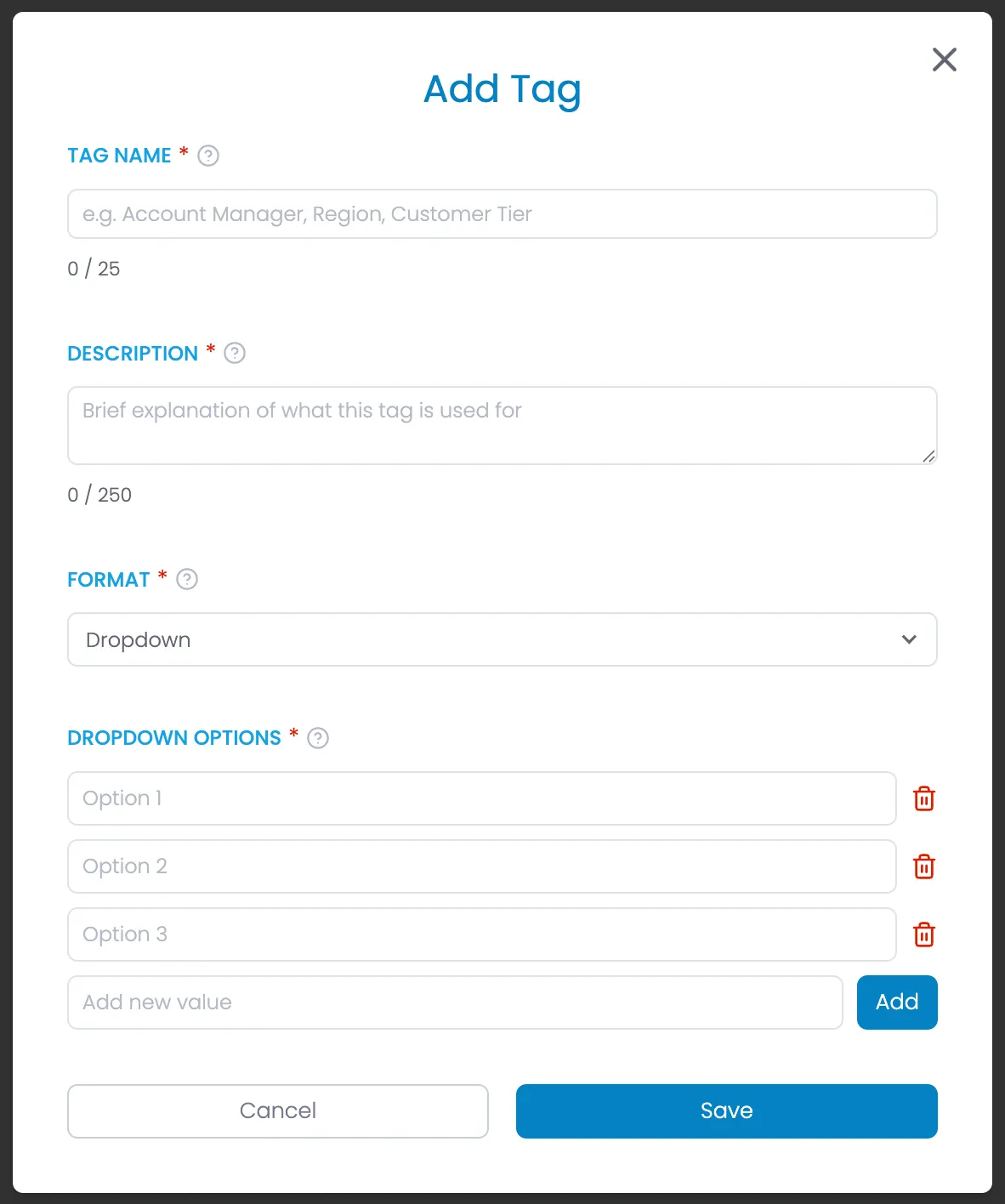
Add/Edit Tag Modal - Done
1 min
HTML
<div class="modal-background" role="dialog" aria-labelledby="modal-title" aria-modal="true">
    <div class="modal-container">
        <div class="modal-heading-container">
            <h1 id="modal-title" class="modal-h1">Add Tag {or "Edit Tag" for Edit}</h1>
        </div>
        <form id="create-tag-form" name="create-tag-form" method="post">
            <div class="form-list gap-1rem">
                <div class="form-field-container">
                    <div class="field-label-container">
                        <label for="tag-name" class="field-label">Tag Name</label>
                        <div class="required-star" aria-hidden="true">*</div>
                        <div data-tippy-content="<p><strong>Tag Name</strong></p> <p>A short, descriptive name for the tag category you're creating. This helps organize items into categories.</p> <p>Tag names are used in reporting to track related items and trends for each specific category.</p> <p>Keep it concise and descriptive (e.g., Region, Product Line, Customer Tier).</p>" class="help-tooltip" role="button" aria-label="Tag Name help information">
                            <svg xmlns="http://www.w3.org/2000/svg" width="24" height="24" viewBox="0 0 24 24" fill="none" stroke="currentColor" stroke-width="2" stroke-linecap="round" stroke-linejoin="round">
                                <circle cx="12" cy="12" r="10"></circle>
                                <path d="M9.09 9a3 3 0 0 1 5.83 1c0 2-3 3-3 3"></path>
                                <line x1="12" y1="17" x2="12.01" y2="17"></line>
                            </svg>
                        </div>
                    </div>
                    <input class="form-field input" maxlength="25" name="tag-name" placeholder="e.g. Account Manager, Region, Customer Tier" type="text" id="tag-name" required aria-required="true" aria-describedby="tag-name-count">
                    <div class="text-area-under" id="tag-name-count">
                        <div><span id="tag-name-used-chars">0</span> / <span id="tag-name-max-chars">25</span></div>
                    </div>
                </div>
                <div class="form-field-container">
                    <div class="field-label-container">
                        <label for="tag-description" class="field-label">Description</label>
                        <div class="required-star" aria-hidden="true">*</div>
                        <div data-tippy-content="<p><strong>Description</strong></p> <p>A brief explanation of what this tag is used for and how it should be applied.</p> <p>Keep descriptions clear and focused to help users understand when and how to use this tag.</p>" class="help-tooltip" role="button" aria-label="Description help information">
                            <svg xmlns="http://www.w3.org/2000/svg" width="24" height="24" viewBox="0 0 24 24" fill="none" stroke="currentColor" stroke-width="2" stroke-linecap="round" stroke-linejoin="round">
                                <circle cx="12" cy="12" r="10"></circle>
                                <path d="M9.09 9a3 3 0 0 1 5.83 1c0 2-3 3-3 3"></path>
                                <line x1="12" y1="17" x2="12.01" y2="17"></line>
                            </svg>
                        </div>
                    </div>
                    <textarea id="tag-description" name="tag-description" maxlength="250" placeholder="Brief explanation of what this tag is used for" required class="form-field text-area w-input" aria-required="true" aria-describedby="description-count"></textarea>
                    <div class="text-area-under" id="description-count">
                        <div><span id="description-used-chars">0</span> / <span id="description-max-chars">250</span></div>
                    </div>
                </div>
                <div class="form-field-container">
                    <div class="field-label-container">
                        <label id="format-label" class="field-label">Format</label>
                        <div class="required-star" aria-hidden="true">*</div>
                        <div data-tippy-content="<p><strong>Format</strong></p> <p>Choose how this tag will be displayed and used. Dropdown creates a list of predefined options, while Text allows free-form entries.</p> <p>Select the format that best suits how this tag will be used in your workflow.</p>" class="help-tooltip" role="button" aria-label="Format help information">
                            <svg xmlns="http://www.w3.org/2000/svg" width="24" height="24" viewBox="0 0 24 24" fill="none" stroke="currentColor" stroke-width="2" stroke-linecap="round" stroke-linejoin="round">
                                <circle cx="12" cy="12" r="10"></circle>
                                <path d="M9.09 9a3 3 0 0 1 5.83 1c0 2-3 3-3 3"></path>
                                <line x1="12" y1="17" x2="12.01" y2="17"></line>
                            </svg>
                        </div>
                    </div>
                    <div data-delay="0" data-hover="false" class="dropdown" role="combobox" aria-labelledby="format-label" aria-expanded="false" aria-haspopup="listbox">
                        <div class="dropdown-closed" tabindex="0" aria-label="Select format">
                            <div class="dropdown-arrow" aria-hidden="true"></div>
                            <div class="dropdown-text">Dropdown</div>
                        </div>
                        <div class="dropdown-open" role="listbox">
                            <div class="dropdown-options">
                                <div class="dropdown-option" role="option" aria-selected="true" tabindex="0">
                                    <div class="dropdown-option-selected-icon-container">
                                        <div class="dropdown-option-selected-icon selected">
                                            <svg xmlns="http://www.w3.org/2000/svg" width="24" height="24" viewBox="0 0 24 24" fill="none" stroke="currentColor" stroke-width="4" stroke-linecap="round" stroke-linejoin="round" class="feather feather-check" aria-hidden="true">
                                                <polyline points="20 6 9 17 4 12"></polyline>
                                            </svg>
                                        </div>
                                    </div>
                                    <div class="dropdown-option-text">Dropdown</div>
                                </div>
                                <div class="dropdown-option" role="option" aria-selected="false" tabindex="0">
                                    <div class="dropdown-option-selected-icon-container">
                                        <div class="dropdown-option-selected-icon">
                                            <svg xmlns="http://www.w3.org/2000/svg" width="24" height="24" viewBox="0 0 24 24" fill="none" stroke="currentColor" stroke-width="2" stroke-linecap="round" stroke-linejoin="round" class="feather feather-check" aria-hidden="true">
                                                <polyline points="20 6 9 17 4 12"></polyline>
                                            </svg>
                                        </div>
                                    </div>
                                    <div class="dropdown-option-text">Text</div>
                                </div>
                            </div>
                        </div>
                    </div>
                </div>
                <div id="dropdown-options" class="form-field-container" aria-labelledby="dropdown-options-label">
                    <div class="field-label-container">
                        <label id="dropdown-options-label" class="field-label">Dropdown Options</label>
                        <div class="required-star" aria-hidden="true">*</div>
                        <div data-tippy-content="<p><strong>Dropdown Options</strong></p> <p>The predefined options that will be available in this dropdown tag.</p> <p>Add multiple options that are meaningful and relevant to your use case. You can add, edit, or remove options as needed.</p>" class="help-tooltip" role="button" aria-label="Dropdown Options help information">
                            <svg xmlns="http://www.w3.org/2000/svg" width="24" height="24" viewBox="0 0 24 24" fill="none" stroke="currentColor" stroke-width="2" stroke-linecap="round" stroke-linejoin="round">
                                <circle cx="12" cy="12" r="10"></circle>
                                <path d="M9.09 9a3 3 0 0 1 5.83 1c0 2-3 3-3 3"></path>
                                <line x1="12" y1="17" x2="12.01" y2="17"></line>
                            </svg>
                        </div>
                    </div>
                    <div class="form-add-options-container">
                        <div class="form-add-option-input">
                            <input class="form-field w-input" maxlength="256" name="option-1" placeholder="Option 1" type="text" id="option-1" required aria-required="true">
                            <button type="button" class="delete-option-button" aria-label="Delete option 1">
                                <div class="icon _16 danger-text">
                                    <svg xmlns="http://www.w3.org/2000/svg" width="24" height="24" viewBox="0 0 24 24" fill="none" stroke="currentColor" stroke-width="2" stroke-linecap="round" stroke-linejoin="round" aria-hidden="true">
                                        <polyline points="3 6 5 6 21 6"></polyline>
                                        <path d="M19 6v14a2 2 0 0 1-2 2H7a2 2 0 0 1-2-2V6m3 0V4a2 2 0 0 1 2-2h4a2 2 0 0 1 2 2v2"></path>
                                        <line x1="10" y1="11" x2="10" y2="17"></line>
                                        <line x1="14" y1="11" x2="14" y2="17"></line>
                                    </svg>
                                </div>
                            </button>
                        </div>
                        <div class="form-add-option-input">
                            <input class="form-field w-input" maxlength="256" name="option-2" placeholder="Option 2" type="text" id="option-2" required aria-required="true">
                            <button type="button" class="delete-option-button" aria-label="Delete option 2">
                                <div class="icon _16 danger-text">
                                    <svg xmlns="http://www.w3.org/2000/svg" width="24" height="24" viewBox="0 0 24 24" fill="none" stroke="currentColor" stroke-width="2" stroke-linecap="round" stroke-linejoin="round" aria-hidden="true">
                                        <polyline points="3 6 5 6 21 6"></polyline>
                                        <path d="M19 6v14a2 2 0 0 1-2 2H7a2 2 0 0 1-2-2V6m3 0V4a2 2 0 0 1 2-2h4a2 2 0 0 1 2 2v2"></path>
                                        <line x1="10" y1="11" x2="10" y2="17"></line>
                                        <line x1="14" y1="11" x2="14" y2="17"></line>
                                    </svg>
                                </div>
                            </button>
                        </div>
                        <div class="form-add-option-input">
                            <input class="form-field w-input" maxlength="256" name="option-3" placeholder="Option 3" type="text" id="option-3" required aria-required="true">
                            <button type="button" class="delete-option-button" aria-label="Delete option 3">
                                <div class="icon _16 danger-text">
                                    <svg xmlns="http://www.w3.org/2000/svg" width="24" height="24" viewBox="0 0 24 24" fill="none" stroke="currentColor" stroke-width="2" stroke-linecap="round" stroke-linejoin="round" aria-hidden="true">
                                        <polyline points="3 6 5 6 21 6"></polyline>
                                        <path d="M19 6v14a2 2 0 0 1-2 2H7a2 2 0 0 1-2-2V6m3 0V4a2 2 0 0 1 2-2h4a2 2 0 0 1 2 2v2"></path>
                                        <line x1="10" y1="11" x2="10" y2="17"></line>
                                        <line x1="14" y1="11" x2="14" y2="17"></line>
                                    </svg>
                                </div>
                            </button>
                        </div>
                        <div class="form-add-option-input">
                            <input class="form-field w-input" maxlength="256" name="new-option" placeholder="Add new value" type="text" id="new-option" aria-label="New option value">
                            <button type="button" class="button" aria-label="Add new option">
                                <div>Add</div>
                            </button>
                        </div>
                    </div>
                </div>
            </div>
        </form>
        <div class="form-button-container">
            <button type="button" class="button tertiary full w-button" aria-label="Cancel">Cancel</button>
            <button type="button" class="button full w-button" aria-label="Save Tag">Save</button>
        </div>
        <button type="button" class="modal-close-button" aria-label="Close modal">
            <svg xmlns="http://www.w3.org/2000/svg" width="256" height="256" viewBox="0 0 24 24" fill="none" stroke="currentColor" stroke-width="2" stroke-linecap="round" stroke-linejoin="round" aria-hidden="true">
                <line x1="18" y1="6" x2="6" y2="18"></line>
                <line x1="6" y1="6" x2="18" y2="18"></line>
            </svg>
        </button>
    </div>
</div>