PulseChecks - Done
View Live Example
Overview
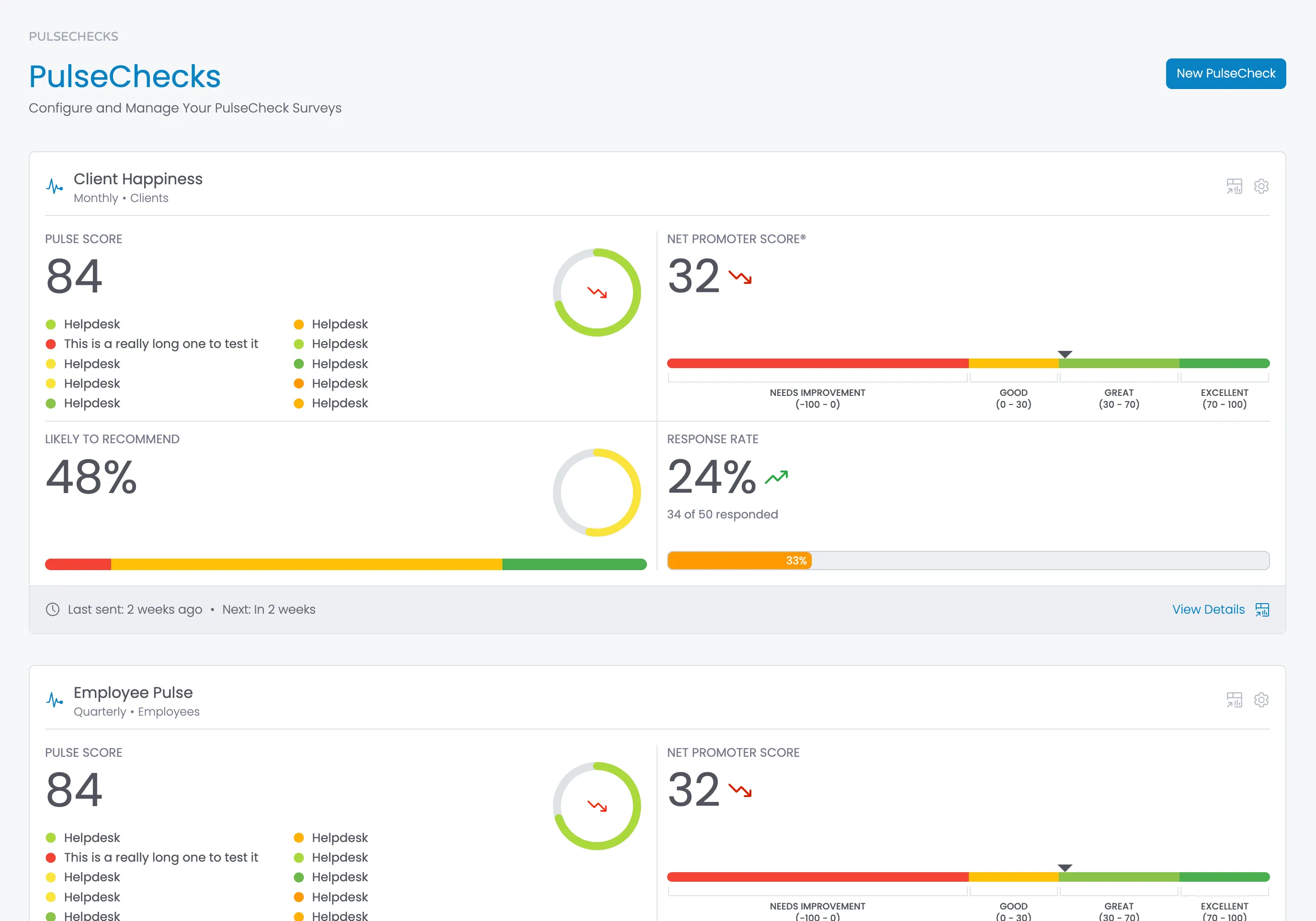
The PulseChecks dashboard serves as the primary entry point for users after authentication. This page displays all of a user's PulseChecks in a vertical tile layout, providing quick access to key metrics and allowing users to monitor multiple surveys simultaneously.
Key Components
The PulseChecks dashboard consists of several key components working together to create a cohesive user experience:
Page Title
- Document Title: "PulseChecks | 360Pulse"
- Breadcrumb Navigation: Shows hierarchy context ("PULSECHECKS")
- Page Heading: "PulseChecks" (prominent H1 element)
- Page Description: "Configure and Manage Your PulseCheck Surveys"
Action Controls
- New PulseCheck Button: Prominently positioned in the top-right corner
- Primary button using brand color
- Triggers the PulseCheck creation wizard
- Consistently accessible throughout the interface
PulseCheck Cards
Each PulseCheck is represented as an interactive card displaying essential metrics:
- Card Header: Contains title, metadata, and action buttons
- Metrics Display: Quadrant layout with four key performance indicators
- Card Footer: Contains timing information and view details link
- Interactive Elements: Charts, trend indicators, and action buttons
Add PulseCheck "Ghost Tile"
- Implements a "ghost tile" design pattern for creating new items
- Visually distinct from regular tiles (lighter styling)
- Contains plus icon and "Add PulseCheck" label
- Same interaction target size as regular tiles for consistency
Layout Structure
- Responsive Grid: Adapts to different screen sizes
- Vertical Stack: Cards arranged in a vertical flow
- Card Anatomy: Consistent internal structure across all PulseCheck cards
- Visual Hierarchy: Emphasizes important metrics with size and positioning
PulseCheck Card Component
Each PulseCheck card is a self-contained component that displays four key metrics in a quadrant layout:
Card Header
- Title (e.g., "Client Happiness", "Employee Pulse")
- Frequency and audience information (e.g., "Monthly • Clients", "Quarterly • Employees")
- Action buttons for viewing dashboard and accessing settings
Metrics Grid
The card contains four main metric sections arranged in a 2×2 grid:
- Pulse Score (Top Left)
- Large numerical display (e.g., "84")
- List of color-coded question items with labels
- Circular chart visualization with trend indicator
- Net Promoter Score (Top Right)
- Score with trend indicator (e.g., "32")
- Color-coded NPS scale showing current position
- Range indicators ("Needs Improvement", "Good", "Great", "Excellent")
- Likely to Recommend (Bottom Left)
- Percentage display (e.g., "48%")
- Horizontal stacked bar showing promoter/passive/detractor distribution
- Circular chart visualization
- Response Rate (Bottom Right)
- Percentage with trend indicator (e.g., "24%")
- Respondent counts (e.g., "34 of 50 responded")
- Progress bar visualization with percentage completion
Card Footer
- Survey timing information ("Last sent: 2 weeks ago • Next: In 2 weeks")
- "View Details" link
Data Attributes and Visualization
The PulseChecks component uses a well-defined set of data attributes to control its visualizations:
Chart Elements and Their Attributes
- Circular Progress Charts (.pulsecheck-tile-chart)
- data-chart-value: Current value (0-100) to display
- data-chart-value-previous: Previous value for trend comparison
- Implementation: SVG circle with animated stroke-dashoffset
- Trend indicators (up/down/no-change) based on comparison with previous value
- NPS Indicator (.nps-legend)
- data-chart-value: NPS score (-100 to 100)
- Implementation: Animated caret that positions itself along the NPS scale
- CSS transitions for smooth animation
- Color-coded ranges with descriptive labels
- Stacked Bar Charts
- Implementation: Three segments for detractors, passives, and promoters
- Color-coded segments (red, yellow, green)
- Interactive tooltips with detailed breakdowns
- CSS transforms for animation
- Progress Bars (.progress-bar-container)
- data-chart-value: Percentage value (0-100)
- Implementation: Animated width transition
- Color mapping based on percentage value
- Numerical overlay showing exact percentage
- Score Indicators (.pulsecheck-tile-pulsescore-area)
- data-chart-value: Score value to display and use for color coding
- Implementation: Color-coded icons using CSS variables
- Tooltips showing exact score percentages
Page Structure
HTML
<section class="section">
<div class="w-layout-blockcontainer body-container w-container">
<div class="page-header">
<div class="w-layout-grid grid-2">
<div class="page-header-left">
<div class="breadcrumbs">
<div class="breadcrumb">PulseChecks</div>
</div>
<div class="tab-heading-container-for-button">
<div>
<h1>PulseChecks</h1>
<div class="subheading">Configure and Manage Your PulseCheck Surveys</div>
</div>
<div>
<a href="{launch Add PulseCheck wizard}" class="button w-inline-block">
<div>New PulseCheck</div>
</a>
</div>
</div>
</div>
</div>
</div>
<div class="content-area">
<div class="pulsechecks-list">
<!-- START PulseCheck Tile - repeat for each PulseCheck -->
<div class="pulsecheck-tile">
<div class="pulsecheck-tile-body">
<div class="dashboard-card-header">
<div class="dashboard-tile-heading-container">
<div data-tippy-content="Previous Score: 34" class="icon _20 brand-text w-embed">
<svg fill="currentColor" width="32" height="32" viewbox="0 0 512 512" xmlns="http://www.w3.org/2000/svg"><path d="M432,272a48.09,48.09,0,0,0-45.25,32H347.53l-28.35-85.06a16,16,0,0,0-30.56.66L244.11,375.36l-52.33-314a16,16,0,0,0-31.3-1.25L99.51,304H48a16,16,0,0,0,0,32h64a16,16,0,0,0,15.52-12.12l45.34-181.37,51.36,308.12A16,16,0,0,0,239.1,464c.3,0,.6,0,.91,0a16,16,0,0,0,15.37-11.6l49.8-174.28,15.64,46.94A16,16,0,0,0,336,336h50.75A48,48,0,1,0,432,272Z"></path></svg>
</div>
<div>
<h2 class="dashboard-card-heading">Client Happiness</h2>
<div class="pulsecheck-tile-subheading">
<div data-tippy-content="Tuesday, January 3, 2025">{PulseCheck frequency (e.g. Monthly)}</div>
<div>•</div>
<div data-tippy-content="Tuesday, January 3, 2025">{PulseCheck audience name plural (e.g. Clients)}</div>
</div>
</div>
</div>
<div class="flex">
<a data-tippy-content="View PulseCheck" href="{Link to dashboard for this PulseCheck}" class="w-inline-block">
<div class="dashboard-tile-details w-embed">
<svg width="18" height="18" fill="currentColor" xmlns="http://www.w3.org/2000/svg" viewbox="0 0 32 32"><polygon points="4 20 4 22 8.586 22 2 28.586 3.414 30 10 23.414 10 28 12 28 12 20 4 20"><rect x="24.0001" y="21" width="2" height="5"></rect><rect x="20.0001" y="16" width="2" height="10"></rect><rect x="16" y="18" width="2" height="8"></rect><path d="M28,2H4A2.002,2.002,0,0,0,2,4V16H4V13H28.001l.001,15H16v2H28a2.0027,2.0027,0,0,0,2-2V4A2.0023,2.0023,0,0,0,28,2ZM12,11H4V4h8Zm2,0V4H28l.0007,7Z"></path></polygon></svg>
</div>
</a>
<a data-tippy-content="Settings" href="{link to settings page for this PulseCheck}" class="w-inline-block">
<div class="dashboard-tile-details w-embed">
<svg width="18" height="18" fill="currentColor" xmlns="http://www.w3.org/2000/svg" viewbox="0 0 32 32"><path d="M27,16.76c0-.25,0-.5,0-.76s0-.51,0-.77l1.92-1.68A2,2,0,0,0,29.3,11L26.94,7a2,2,0,0,0-1.73-1,2,2,0,0,0-.64.1l-2.43.82a11.35,11.35,0,0,0-1.31-.75l-.51-2.52a2,2,0,0,0-2-1.61H13.64a2,2,0,0,0-2,1.61l-.51,2.52a11.48,11.48,0,0,0-1.32.75L7.43,6.06A2,2,0,0,0,6.79,6,2,2,0,0,0,5.06,7L2.7,11a2,2,0,0,0,.41,2.51L5,15.24c0,.25,0,.5,0,.76s0,.51,0,.77L3.11,18.45A2,2,0,0,0,2.7,21L5.06,25a2,2,0,0,0,1.73,1,2,2,0,0,0,.64-.1l2.43-.82a11.35,11.35,0,0,0,1.31.75l.51,2.52a2,2,0,0,0,2,1.61h4.72a2,2,0,0,0,2-1.61l.51-2.52a11.48,11.48,0,0,0,1.32-.75l2.42.82a2,2,0,0,0,.64.1,2,2,0,0,0,1.73-1L29.3,21a2,2,0,0,0-.41-2.51ZM25.21,24l-3.43-1.16a8.86,8.86,0,0,1-2.71,1.57L18.36,28H13.64l-.71-3.55a9.36,9.36,0,0,1-2.7-1.57L6.79,24,4.43,20l2.72-2.4a8.9,8.9,0,0,1,0-3.13L4.43,12,6.79,8l3.43,1.16a8.86,8.86,0,0,1,2.71-1.57L13.64,4h4.72l.71,3.55a9.36,9.36,0,0,1,2.7,1.57L25.21,8,27.57,12l-2.72,2.4a8.9,8.9,0,0,1,0,3.13L27.57,20Z" transform="translate(0 0)"></path><path d="M16,22a6,6,0,1,1,6-6A5.94,5.94,0,0,1,16,22Zm0-10a3.91,3.91,0,0,0-4,4,3.91,3.91,0,0,0,4,4,3.91,3.91,0,0,0,4-4A3.91,3.91,0,0,0,16,12Z" transform="translate(0 0)"></path><rect style="fill: none;" data-name="<Transparent Rectangle>" width="32" height="32"></rect></svg>
</div>
</a>
</div>
</div>
<div class="w-layout-grid pulsecheck-tile-grid">
<div class="dashboard-tile-grid-segment">
<div class="pulsecheck-tile-segment-container-top">
<div class="pulsecheck-tile-segment-content">
<div class="dashboard-tile-stat-label">Pulse Score</div>
<div class="pulsecheck-tile-stat-container">
<div class="pulsecheck-tile-stat">
<div>{overall pulse score}</div>
</div>
</div>
<div class="w-layout-grid pulsecheck-tile-pulsescore-area-grid">
<!-- START Question Pulse Score - Repeat for each Question -->
<div data-chart-value="{PulseCheck score (0-100)}" class="pulsecheck-tile-pulsescore-area">
<div class="icon _12 w-embed">
<svg xmlns="http://www.w3.org/2000/svg" fill="currentColor" width="16" height="16" viewbox="0 0 32 32"><circle cx="16" cy="16" r="14"></circle></svg>
</div>
<div>Helpdesk</div>
</div>
<!-- END Question Scores -->
</div>
</div>
<div id="pulse-score-chart" data-chart-value="{PulseCheck score (0-100)}" data-chart-value-previous="{previous PulseCheck score (0-100)} if null do not include this attribute" class="pulsecheck-tile-chart"></div>
</div>
</div>
<div class="dashboard-tile-grid-segment right">
<div class="pulsecheck-tile-segment-container-top">
<div class="pulsecheck-tile-segment-content">
<div class="dashboard-tile-stat-label">Net Promoter Score®</div>
<div class="pulsecheck-tile-stat-container">
<div class="pulsecheck-tile-stat">
<div>{NPS Score}</div>
<div class="dashboard-pulse-score-trend-icon-container">
<div data-tippy-content="Previous Score: {previous NPS Score}" class="icon _24 danger-text w-embed">
<svg xmlns="http://www.w3.org/2000/svg" width="24" height="24" viewbox="0 0 24 24" fill="none" stroke="currentColor" stroke-width="2" stroke-linecap="round" stroke-linejoin="round"><polyline points="23 18 13.5 8.5 8.5 13.5 1 6"></polyline><polyline points="17 18 23 18 23 12"></polyline></svg>
</div>
</div>
</div>
</div>
</div>
</div>
<div data-chart-value="32" class="nps-legend">
<div class="nps-legend-segment width-50">
<div class="nps-legend-bar red short"></div>
<div class="nps-legend-bracket"></div>
<div class="nps-legend-label">Needs Improvement<br>(-100 - 0)</div>
</div>
<div class="nps-legend-segment width-15">
<div class="nps-legend-bar amber short"></div>
<div class="nps-legend-bracket"></div>
<div class="nps-legend-label">Good<br>(0 - 30)</div>
</div>
<div class="nps-legend-segment width-20">
<div class="nps-legend-bar light-green short"></div>
<div class="nps-legend-bracket"></div>
<div class="nps-legend-label">Great<br>(30 - 70)</div>
</div>
<div class="nps-legend-segment width-15">
<div class="nps-legend-bar green short"></div>
<div class="nps-legend-bracket"></div>
<div class="nps-legend-label">Excellent<br>(70 - 100)</div>
</div>
</div>
</div>
<div class="dashboard-tile-grid-segment bottom">
<div class="pulsecheck-tile-segment-container-top">
<div class="pulsecheck-tile-segment-content">
<div class="dashboard-tile-stat-label">Likely to Recommend</div>
<div class="pulsecheck-tile-stat-container">
<div class="pulsecheck-tile-stat">
<div>{Percentage of promoters (e.g. 48%)}</div>
</div>
</div>
</div>
<div id="recommend-score-chart" data-chart-value="{Percentage of promoters no % (e.g. 48)}" data-chart-value-previous="{previous PulseCheck instance Percentage of promoters no % (e.g. 48)} do not include attribute if no previous instance." class="pulsecheck-tile-chart"></div>
</div>
<div style="-webkit-transform:translate3d(0, 0, 0) scale3d(0, 1, 1) rotateX(0) rotateY(0) rotateZ(0) skew(0, 0);-moz-transform:translate3d(0, 0, 0) scale3d(0, 1, 1) rotateX(0) rotateY(0) rotateZ(0) skew(0, 0);-ms-transform:translate3d(0, 0, 0) scale3d(0, 1, 1) rotateX(0) rotateY(0) rotateZ(0) skew(0, 0);transform:translate3d(0, 0, 0) scale3d(0, 1, 1) rotateX(0) rotateY(0) rotateZ(0) skew(0, 0)" class="dashboard-stacked-horizontal-bar div">
<div data-tippy-content="<b>{percentage detractors (e.g. 24%)}<br>At Risk</b><br> <p>This segment represents the percentage of respondents who are unlikely to recommend your organization. They may share negative feedback about their experiences.</p>" class="dashboard-stacked-horizontal-bar-segment segment-1 w-inline-block"></div>
<div data-tippy-content="<b>{percentage passives (e.g. 24%)}<br>Unlikely to Recommend</b><br> <p>This segment represents the percentage of respondents who are satisfied but not enthusiastic about your organization. They typically won't actively recommend you to others.</p>" class="dashboard-stacked-horizontal-bar-segment segment-2 w-inline-block"></div>
<div data-tippy-content="<b>{percentage promoters (e.g. 24%)}lt;br>Likely to Recommend</b><br> <p>This segment represents the percentage of respondents who are highly likely to recommend your organization. These loyal supporters are willing to refer others to you.</p>" class="dashboard-stacked-horizontal-bar-segment segment-3 w-inline-block"></div>
</div>
</div>
<div class="dashboard-tile-grid-segment bottom right">
<div class="pulsecheck-tile-segment-container">
<div class="pulsecheck-tile-segment-container-top">
<div>
<div class="dashboard-tile-stat-label">Response Rate</div>
<div class="pulsecheck-tile-stat-container">
<div class="pulsecheck-tile-stat">
<div>{response rate percentage e.g. 24%}</div>
<div class="dashboard-pulse-score-trend-icon-container">
<div data-tippy-content="Previous Score: {previous instance response rate percentage no % e.g. 24}" class="icon _24 success-text pulsecheck-tile-segment-container w-embed">
<svg xmlns="http://www.w3.org/2000/svg" width="24" height="24" viewbox="0 0 24 24" fill="none" stroke="currentColor" stroke-width="2" stroke-linecap="round" stroke-linejoin="round"><polyline points="23 6 13.5 15.5 8.5 10.5 1 18"></polyline><polyline points="17 6 23 6 23 12"></polyline></svg>
</div>
</div>
</div>
</div>
<div class="pulsecheck-tile-response-rate-responded">{number of respondents who completed the survey e.g. 34} of {total number of respondents invited 50} responded<br></div>
</div>
</div>
<div class="progress-bar-wrapper">
<div data-chart-value="{response rate percentage no % e.g. 24}" class="progress-bar-container">
<div class="progress-bar-base">
<div class="progress-bar-progress">
<div>{response rate percentage e.g. 24%}</div>
</div>
</div>
</div>
</div>
</div>
</div>
</div>
</div>
<div class="pulsecheck-tile-bottom">
<div class="pulsecheck-tile-footer-left">
<div data-tippy-content="View trend chart" class="icon _16 w-embed">
<svg width="16" height="16" fill="currentColor" xmlns="http://www.w3.org/2000/svg" viewbox="0 0 32 32"><path d="M16,30A14,14,0,1,1,30,16,14,14,0,0,1,16,30ZM16,4A12,12,0,1,0,28,16,12,12,0,0,0,16,4Z"></path><polygon points="20.59 22 15 16.41 15 7 17 7 17 15.58 22 20.59 20.59 22"></polygon></svg>
</div>
<div data-tippy-content="Date it was sent {e.g. 'Tuesday, January 3, 2025'}">Last sent: {When was it last sent e.g. "2 weeks ago"}</div>
<div>•</div>
<div data-tippy-content="Date it will send next {e.g. 'Tuesday, January 3, 2025'}">Next: {When will it send next e.g. "In 2 weeks"}</div>
</div>
<div class="pulsecheck-tile-footer-right">
<a data-tippy-content="View PulseCheck" href="{link to PluseCheck dashboard}" class="flex w-inline-block">
<div>View Details</div>
<div data-tippy-content="View PulseCheck" class="icon _16 w-embed">
<svg width="16" height="16" fill="currentColor" xmlns="http://www.w3.org/2000/svg" viewbox="0 0 32 32"><polygon points="4 20 4 22 8.586 22 2 28.586 3.414 30 10 23.414 10 28 12 28 12 20 4 20"><rect x="24.0001" y="21" width="2" height="5"></rect><rect x="20.0001" y="16" width="2" height="10"></rect><rect x="16" y="18" width="2" height="8"></rect><path d="M28,2H4A2.002,2.002,0,0,0,2,4V16H4V13H28.001l.001,15H16v2H28a2.0027,2.0027,0,0,0,2-2V4A2.0023,2.0023,0,0,0,28,2ZM12,11H4V4h8Zm2,0V4H28l.0007,7Z"></path></polygon></svg>
</div>
</a>
</div>
</div>
</div>
<!-- END PulseCheck Tile -->
<!-- START Add PulseCheck Tile -->
<a href="{launch Add PulseCheck wizard}" class="add-pulsecheck-ghost-tile w-inline-block">
<div class="icon _24 w-embed">
<svg fill="currentColor" width="24" height="24" xmlns="http://www.w3.org/2000/svg" viewbox="0 0 32 32"><path d="M16,4c6.6,0,12,5.4,12,12s-5.4,12-12,12S4,22.6,4,16S9.4,4,16,4 M16,2C8.3,2,2,8.3,2,16s6.3,14,14,14s14-6.3,14-14S23.7,2,16,2z"></path><polygon points="24,15 17,15 17,8 15,8 15,15 8,15 8,17 15,17 15,24 17,24 17,17 24,17 "></polygon></svg>
</div>
<div>Add PulseCheck</div>
</a>
<!-- END Add PulseCheck Tile -->
</div>
</div>
<!-- START Standard Footer - pull this from somewhere central as we put it on every page. -->
<div class="page-footer">
<div id="poweredBy" class="powered-by">
<p class="paragraph">Powered by <a href="https://www.userfirstdigital.com">User First</a>
</p>
</div>
<div class="legal-links">
<a href="#">Privacy</a>
<a href="#">Terms of Use</a>
</div>
</div>
<!-- END Standard Footer -->
</div>
</section>Javascript
// Consolidated PulseCheck Dashboard Script
(function() {
  // Add minimal CSS
  const styleElement = document.createElement('style');
  styleElement.textContent = `
    .progress-bar-progress {
      height: 100%;
      transition: width 0.5s ease-out;
      width: 0%;
    }
    .nps-caret {
      position: absolute;
      top: 0;
      width: 0;
      height: 0;
      border-left: 8px solid transparent;
      border-right: 8px solid transparent;
      border-top: 8px solid currentColor;
      transform: translateY(-100%);
      z-index: 2;
      transition: left 500ms ease-out;
    }
  `;
  document.head.appendChild(styleElement);

  // SVG icons for trends
  const trendSVG = {
    up: `<svg xmlns="http://www.w3.org/2000/svg" width="16" height="16" viewBox="0 0 24 24" fill="none" stroke="var(--360pulse--trend-up)" stroke-width="2" stroke-linecap="round" stroke-linejoin="round"><polyline points="23 6 13.5 15.5 8.5 10.5 1 18"></polyline><polyline points="17 6 23 6 23 12"></polyline></svg>`,
    dn: `<svg xmlns="http://www.w3.org/2000/svg" width="16" height="16" viewBox="0 0 24 24" fill="none" stroke="var(--360pulse--trend-down)" stroke-width="2" stroke-linecap="round" stroke-linejoin="round"><polyline points="23 18 13.5 8.5 8.5 13.5 1 6"></polyline><polyline points="17 18 23 18 23 12"></polyline></svg>`,
    nc: `<svg xmlns="http://www.w3.org/2000/svg" width="16" height="16" viewBox="0 0 24 24" fill="none" stroke="var(--360pulse--trend-no-change)" stroke-width="2" stroke-linecap="round" stroke-linejoin="round"><circle cx="12" cy="12" r="1"></circle><circle cx="19" cy="12" r="1"></circle><circle cx="5" cy="12" r="1"></circle></svg>`
  };

  // Color function
  function getColorVariable(score) {
    if (score < 0 || score > 100) return '--360pulse--score-color-neutral';
    if (score >= 0 && score <= 9) return '--360pulse--score-color-0-9';
    else if (score >= 10 && score <= 19) return '--360pulse--score-color-10-19';
    else if (score >= 20 && score <= 29) return '--360pulse--score-color-20-29';
    else if (score >= 30 && score <= 39) return '--360pulse--score-color-30-39';
    else if (score >= 40 && score <= 49) return '--360pulse--score-color-40-49';
    else if (score >= 50 && score <= 59) return '--360pulse--score-color-50-59';
    else if (score >= 60 && score <= 69) return '--360pulse--score-color-60-69';
    else if (score >= 70 && score <= 79) return '--360pulse--score-color-70-79';
    else if (score >= 80 && score <= 89) return '--360pulse--score-color-80-89';
    else if (score >= 90 && score <= 99) return '--360pulse--score-color-90-99';
    else if (score === 100) return '--360pulse--score-color-100';
  }

  function easeOutQuad(t) { return t * (2 - t); }

  function parseNumberWithPercent(text) {
    const hasPercent = text.endsWith('%');
    let cleanText = hasPercent ? text.substring(0, text.length - 1).trim() : text;
    const value = parseFloat(cleanText);
    return !isNaN(value) ? { value, hasPercent } : null;
  }

  function initTooltips(selector) {
    if (typeof tippy !== 'undefined') {
      tippy(selector, { allowHTML: true, animation: 'fade' });
    }
  }

  function initDonutCharts() {
    const charts = document.querySelectorAll('.pulsecheck-tile-chart:empty');
    if (charts.length === 0) return;

    charts.forEach(function(chart) {
      let currentValue = null;
      let previousValue = null;

      if (chart.hasAttribute('data-chart-value')) {
        currentValue = parseFloat(chart.getAttribute('data-chart-value'));
      } else if (chart.hasAttribute('data-chart-value-current')) {
        currentValue = parseFloat(chart.getAttribute('data-chart-value-current'));
      }

      if (chart.hasAttribute('data-chart-value-previous')) {
        previousValue = parseFloat(chart.getAttribute('data-chart-value-previous'));
      }

      if (currentValue === null || isNaN(currentValue)) {
        currentValue = 70;
      }

      renderDonutChart(chart, currentValue, previousValue);
    });

    setTimeout(() => initTooltips('.pulsecheck-tile-chart svg'), 100);
  }

  function renderDonutChart(container, currentValue, previousValue) {
    currentValue = Math.max(0, Math.min(100, currentValue));
    const colorVar = getColorVariable(currentValue);
    const radius = 40;
    const circumference = 2 * Math.PI * radius;
    const strokeDashOffset = circumference * (1 - currentValue / 100);

    let trendIconHTML = "";
    let tooltipContent = `Current: ${currentValue}%`;

    if (previousValue !== null && !isNaN(previousValue)) {
      tooltipContent += `<br>Previous: ${previousValue}%`;

      let trendKey;
      if (currentValue > previousValue) {
        trendKey = 'up';
        tooltipContent += `<br><span style="color: var(--360pulse--trend-up)">▲ Up ${(currentValue - previousValue).toFixed(1)}%</span>`;
      } else if (currentValue < previousValue) {
        trendKey = 'dn';
        tooltipContent += `<br><span style="color: var(--360pulse--trend-down)">▼ Down ${(previousValue - currentValue).toFixed(1)}%</span>`;
      } else {
        trendKey = 'nc';
        tooltipContent += `<br><span style="color: var(--360pulse--trend-no-change)">No change</span>`;
      }

      trendIconHTML = `<g transform="translate(50, 50) scale(1.2) translate(-8, -8)">${trendSVG[trendKey]}</g>`;
    }

    const animationId = Math.random().toString(36).substr(2, 9);
    const svg = `
      <svg width="100%" height="100%" viewBox="0 0 100 100" data-tippy-content="${tooltipContent}">
        <circle cx="50" cy="50" r="${radius}" fill="none" stroke="var(--brand-colors--gray-200, #D1D5DB)" stroke-width="8" stroke-linecap="round"/>
        <circle cx="50" cy="50" r="${radius}" fill="none" stroke="var(${colorVar}, #22c55e)" stroke-width="8" stroke-dasharray="${circumference}" stroke-dashoffset="${circumference}" stroke-linecap="round" transform="rotate(-90 50 50)">
          <animate attributeName="stroke-dashoffset" from="${circumference}" to="${strokeDashOffset}" dur="500ms" fill="freeze" begin="indefinite" id="arc-animation-${animationId}"/>
        </circle>
        ${trendIconHTML}
      </svg>
    `;

    container.innerHTML = svg;

    setTimeout(() => {
      const circle = container.querySelector(`#arc-animation-${animationId}`);
      if (circle && typeof circle.beginElement === 'function') {
        circle.beginElement();
      }
    }, 50);
  }

  function initNPSCarets() {
    const legends = document.querySelectorAll('.nps-legend:not(:has(.nps-caret))');
    if (legends.length === 0) return;

    legends.forEach(function(legend) {
      const score = legend.hasAttribute('data-chart-value')
        ? parseFloat(legend.getAttribute('data-chart-value'))
        : null;

      if (score !== null && !isNaN(score)) {
        addCaretToLegend(score, legend);
      }
    });
  }

  function addCaretToLegend(score, legendElement) {
    score = Math.max(-100, Math.min(100, score));
    const percentage = ((score + 100) / 200) * 100;

    const existingCarets = legendElement.querySelectorAll('.nps-caret');
    existingCarets.forEach(caret => caret.remove());

    const caret = document.createElement('div');
    caret.className = 'nps-caret';
    caret.style.left = 'calc(0% - 8px)';

    legendElement.appendChild(caret);

    if (window.getComputedStyle(legendElement).position !== 'relative') {
      legendElement.style.position = 'relative';
    }

    setTimeout(() => caret.style.left = `calc(${percentage}% - 8px)`, 10);
  }

  function initProgressBars() {
    setProgressBarColors();
    setTimeout(animateProgressBars, 50);
  }

  function setProgressBarColors() {
    const containers = document.querySelectorAll('.progress-bar-container:not(.colored)');
    if (containers.length === 0) return;

    containers.forEach(function(container) {
      const value = container.hasAttribute('data-chart-value')
        ? parseFloat(container.getAttribute('data-chart-value'))
        : null;

      if (value !== null && !isNaN(value)) {
        const safeValue = Math.max(0, Math.min(100, value));
        const progressBarElement = container.querySelector('.progress-bar-progress');

        if (progressBarElement) {
          const colorVar = getColorVariable(safeValue);
          progressBarElement.style.backgroundColor = `var(${colorVar})`;
          progressBarElement.setAttribute('data-target-width', safeValue);
          progressBarElement.innerHTML = `<div>${safeValue}%</div>`;
          container.setAttribute('data-tippy-content', `Progress: ${safeValue}%`);
          container.classList.add('colored');
        }
      }
    });

    initTooltips('.progress-bar-container');
  }

  function animateProgressBars() {
    const containers = document.querySelectorAll('.progress-bar-container.colored:not(.animated)');
    if (containers.length === 0) return;

    containers.forEach(function(container) {
      const progressBarElement = container.querySelector('.progress-bar-progress');

      if (progressBarElement) {
        const targetValue = progressBarElement.getAttribute('data-target-width');
        if (targetValue !== null) {
          progressBarElement.style.width = targetValue + '%';
          container.classList.add('animated');
        }
      }
    });
  }

  function initNumberCounters() {
    const statContainers = document.querySelectorAll('.pulsecheck-tile-stat:not(.counted)');
    if (statContainers.length === 0) return;

    statContainers.forEach(function(container) {
      const textContainer = container.querySelector(':scope > div:first-child');
      if (!textContainer) return;

      const originalText = textContainer.textContent.trim();
      const parsedValue = parseNumberWithPercent(originalText);

      if (parsedValue) {
        if (!textContainer.hasAttribute('data-original-value')) {
          textContainer.setAttribute('data-original-value', originalText);
          textContainer.setAttribute('data-target-value', parsedValue.value);
          textContainer.setAttribute('data-has-percent', parsedValue.hasPercent ? 'true' : 'false');
          animateNumber(textContainer, parsedValue.value, parsedValue.hasPercent);
        }
        container.classList.add('counted');
      }
    });
  }

  function animateNumber(element, targetValue, hasPercent) {
    const duration = 500;
    const framesPerSecond = 60;
    const totalFrames = duration / 500 * framesPerSecond;
    let currentFrame = 0;
    const startValue = 0;
    const isInteger = Number.isInteger(targetValue);

    const interval = setInterval(function() {
      const progress = currentFrame / totalFrames;
      const easedProgress = easeOutQuad(progress);
      let currentValue = startValue + (targetValue - startValue) * easedProgress;

      if (isInteger) {
        currentValue = Math.round(currentValue);
      } else {
        currentValue = Math.round(currentValue * 10) / 10;
      }

      element.textContent = currentValue + (hasPercent ? '%' : '');
      currentFrame++;

      if (currentFrame > totalFrames) {
        clearInterval(interval);
        element.textContent = targetValue + (hasPercent ? '%' : '');
      }
    }, 500 / framesPerSecond);
  }

  function initPulseScoreAreas() {
    const pulseScoreAreas = document.querySelectorAll('.pulsecheck-tile-pulsescore-area');
    if (pulseScoreAreas.length === 0) return;

    pulseScoreAreas.forEach(function(area) {
      const chartValue = parseFloat(area.getAttribute('data-chart-value'));
      if (isNaN(chartValue)) return;

      const colorVariable = `var(${getColorVariable(chartValue)})`;
      const iconElement = area.querySelector('.icon');
      if (iconElement) {
        iconElement.style.color = colorVariable;
      }

      area.setAttribute('data-tippy-content', Math.round(chartValue) + '%');
      area.setAttribute('data-tippy-placement', 'top-start');
    });

    initTooltips('.pulsecheck-tile-pulsescore-area');
  }

  function initAll() {
    initDonutCharts();
    initNPSCarets();
    initProgressBars();
    initNumberCounters();
    initPulseScoreAreas();
  }

  if (document.readyState === 'loading') {
    document.addEventListener('DOMContentLoaded', initAll);
  } else {
    initAll();
  }

  window.addEventListener('load', initAll);
})();
Interactive Components
Element | Page |
|---|---|
Dasboard icon and "View Details" link | |
Settings icon | |
"New PulseCheck" button or "New PulseCheck" tile |