Remove From Tag - Done
2 min
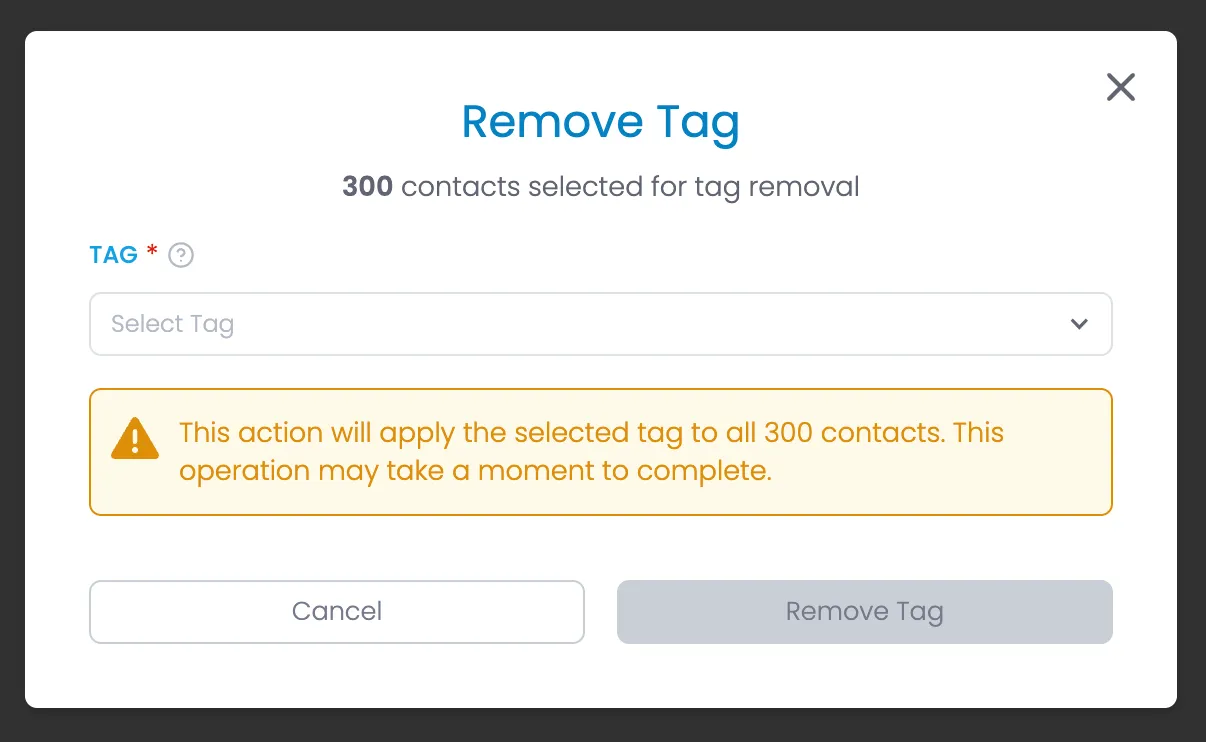
Description
Enables users to remove one or more contacts from a Tag.
HTML
<div class="modal-background">
    <div class="modal-container">
        <div class="modal-heading-container">
            <h1 class="modal-h1">Remove Tag</h1>
            <div class="flex small-gap">
                <div><strong>{# of seleced contacts}</strong> contacts selected for tag removal<br></div>
            </div>
        </div>
        <form id="remove-tag" name="remove-tag" method="get">
            <div class="form-list gap-1rem">
                <div class="form-field-container">
                    <div class="field-label-container"><label for="name" class="field-label">Tag</label>
                        <div class="required-star">*</div>
                        <div data-tippy-content="Select an existing tag to assign to all selected contacts. This tag will be applied to every contact in your selection." class="help-tooltip w-embed"><svg xmlns="http://www.w3.org/2000/svg" width="24" height="24" viewbox="0 0 24 24" fill="none" stroke="currentColor" stroke-width="2" stroke-linecap="round" stroke-linejoin="round">
                            <circle cx="12" cy="12" r="10"></circle>
                            <path d="M9.09 9a3 3 0 0 1 5.83 1c0 2-3 3-3 3"></path>
                            <line x1="12" y1="17" x2="12.01" y2="17"></line>
                            </svg></div>
                    </div>
                    <div data-delay="0" data-hover="false" class="dropdown w-dropdown">
                        <div class="dropdown-closed w-dropdown-toggle">
                            <div class="dropdown-arrow w-icon-dropdown-toggle"></div>
                            <div class="dropdown-text dropdown-placeholder">Select Tag</div>
                        </div>
                        <div class="dropdown-open w-dropdown-list">
                            <div class="dropdown-options">

                                <!-- START Tags - Repeat for each Tag -->

                                <a href="#" class="dropdown-option w-inline-block">
                                    <div class="dropdown-option-selected-icon-container">
                                        <div class="dropdown-option-selected-icon selected w-embed"><svg xmlns="http://www.w3.org/2000/svg" width="24" height="24" viewbox="0 0 24 24" fill="none" stroke="currentColor" stroke-width="4" stroke-linecap="round" stroke-linejoin="round" class="feather feather-check">
                                            <polyline points="20 6 9 17 4 12"></polyline>
                                            </svg></div>
                                    </div>
                                    <div class="dropdown-option-text">{Tag Name}</div>
                                </a>

                                <!-- END Tags -->

                            </div>
                        </div>
                    </div>
                </div>
                <div class="alert-box warning">
                    <div class="alert-icon w-embed"><svg fill="currentColor" xmlns="http://www.w3.org/2000/svg" viewbox="0 0 512 512">
                        <path d="M256 32c14.2 0 27.3 7.5 34.5 19.8l216 368c7.3 12.4 7.3 27.7 .2 40.1S486.3 480 472 480L40 480c-14.3 0-27.6-7.7-34.7-20.1s-7-27.8 .2-40.1l216-368C228.7 39.5 241.8 32 256 32zm0 128c-13.3 0-24 10.7-24 24l0 112c0 13.3 10.7 24 24 24s24-10.7 24-24l0-112c0-13.3-10.7-24-24-24zm32 224a32 32 0 1 0 -64 0 32 32 0 1 0 64 0z"></path>
                        </svg></div>
                    <div>This action will apply the selected tag to all {# of seleced contacts} contacts. This operation may take a moment to complete.</div>
                </div>
            </div>
        </form>

        <div class="form-button-container">
            <button type="button" href="#" class="button tertiary full w-button">Cancel</button>
            <button type="button" href="#" class="button full disabled w-button" disabled>Remove Tag</button> <!-- disabled until a tag is selected -->
        </div>
        <div class="modal-close-button w-embed"><svg xmlns="http://www.w3.org/2000/svg" width="256" height="256" viewbox="0 0 24 24" fill="none" stroke="currentColor" stroke-width="2" stroke-linecap="round" stroke-linejoin="round">
            <line x1="18" y1="6" x2="6" y2="18"></line>
            <line x1="6" y1="6" x2="18" y2="18"></line>
            </svg></div>
    </div>
</div>