Filter by Tag - Done
2 min
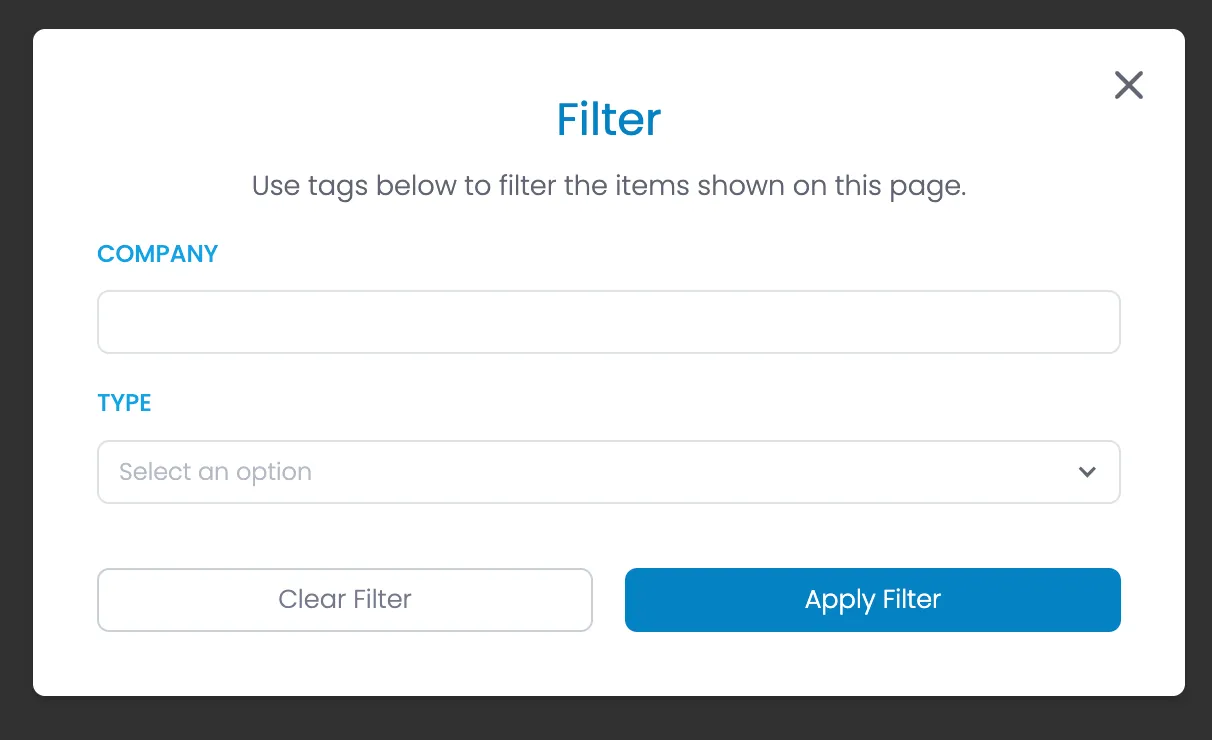
Description
This modal can be used for both the Filter PulseCheck dashboard function, and any other locations we want to filter by tag (contacts, feedback etc.)
HTML
<div class="modal-background">
    <div class="modal-container">
        <div class="modal-heading-container">
            <h1 class="modal-h1">Filter</h1>
            <div>Use tags below to filter the items shown on this page.</div>
        </div>
        <form id="tag-filter" name="tag-filter" method="get">
            <div class="form-list gap-1rem">

                <!-- START Tags - repeat for each tag -->

                <div class="form-field-container">


                    <!-- START IF Tag type = text -->

                    <div class="field-label-container">
                        <label for="{tag-name}" class="field-label">Company</label>
                    </div>
                    <input class="form-field w-input" maxlength="256" name="{tag-name}" type="text" id="{tag-name}">

                    <!-- END IF Tag type = text -->


                    <!-- START IF Tag type = dropdown -->

                    <div class="field-label-container">
                        <label for="name" class="field-label">Type</label>
                    </div>
                    <div data-delay="0" data-hover="false" class="dropdown w-dropdown">
                        <div class="dropdown-closed w-dropdown-toggle">
                            <div class="dropdown-arrow w-icon-dropdown-toggle"></div>
                            <div class="dropdown-text dropdown-placeholder">Select an option</div>
                        </div>
                        <div class="dropdown-open w-dropdown-list">
                            <div class="dropdown-options">

                                <!-- START Tag dropdown option - repeat for each option -->

                                <a href="#" class="dropdown-option w-inline-block">
                                    <div class="dropdown-option-selected-icon-container">
                                        <div class="dropdown-option-selected-icon {add 'selected' class if selected} w-embed">
                                            <svg xmlns="http://www.w3.org/2000/svg" width="24" height="24" viewbox="0 0 24 24" fill="none" stroke="currentColor" stroke-width="4" stroke-linecap="round" stroke-linejoin="round"><polyline points="20 6 9 17 4 12"></polyline>
                                            </svg>
                                        </div>
                                    </div>
                                    <div class="dropdown-option-text">{Dropdown Option}</div>
                                </a>

                                <!-- END Tag dropdown option -->

                            </div>
                        </div>
                    </div>

                    <!-- END IF Tag type = dropdown -->

                </div>
            </div>
        </form>
        <div class="form-button-container">
            <button type="button" href="#" class="button tertiary full w-button">Clear Filter</button>
            <button type="button" href="#" class="button full w-button">Apply Filter</button>
        </div>
        <div class="modal-close-button w-embed"><svg xmlns="http://www.w3.org/2000/svg" width="256" height="256" viewbox="0 0 24 24" fill="none" stroke="currentColor" stroke-width="2" stroke-linecap="round" stroke-linejoin="round">
            <line x1="18" y1="6" x2="6" y2="18"></line>
            <line x1="6" y1="6" x2="18" y2="18"></line>
            </svg></div>
    </div>
</div>