Add / Edit Question - Done
3 min
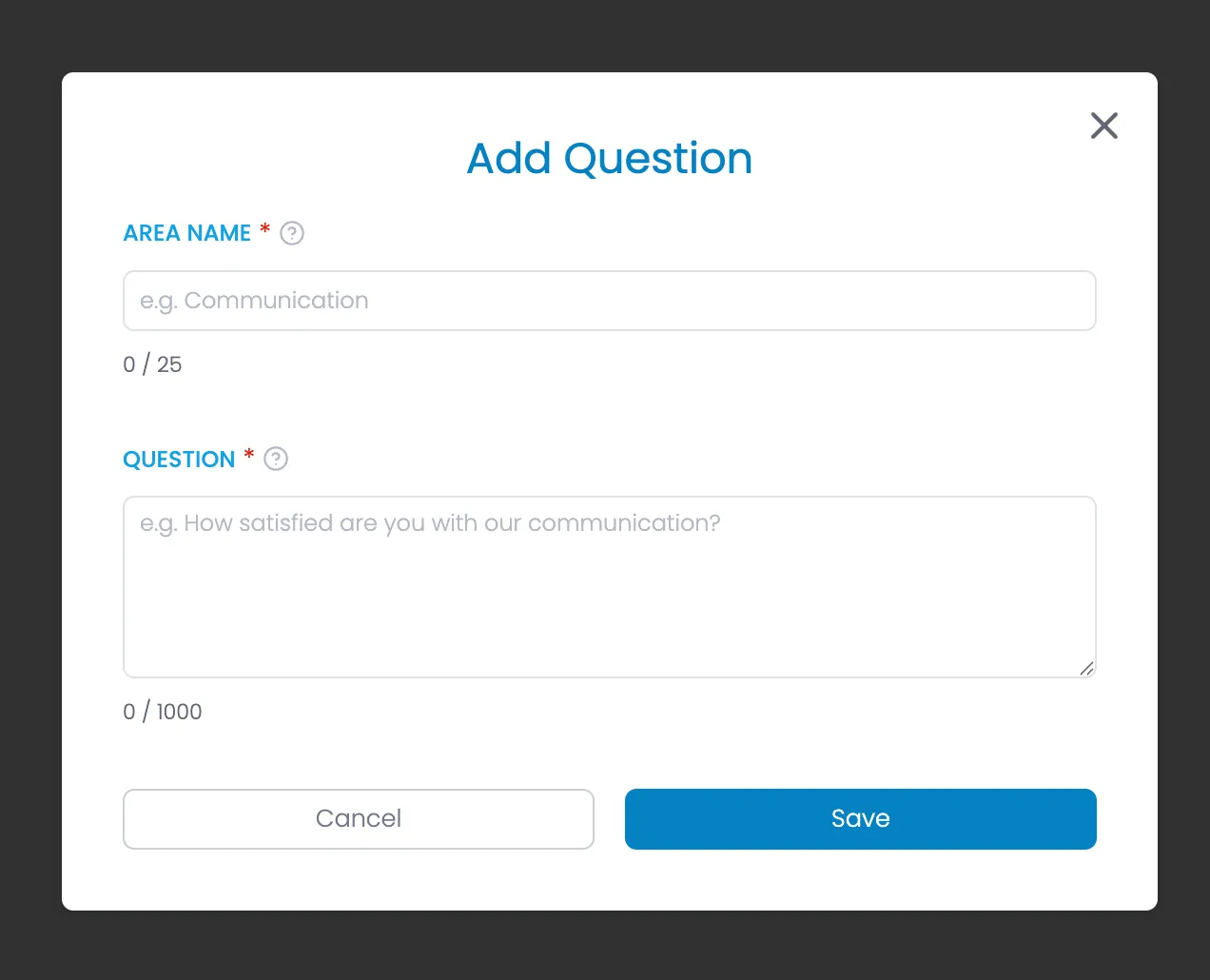
HTML
<div class="modal-background">
<div class="modal-container">
<div class="modal-heading-container">
<h1 class="modal-h1">{Add or Edit - change based on function} Question</h1>
</div>
<form id="add-question" name="add-question" method="get">
<div class="form-list gap-1rem">
<!-- START Edit Warning - Show on "Edit" mode only -->
<div class="alert-box warning">
<div class="icon _16 mt-2px">
<svg width="16" height="16" fill="currentColor" xmlns="http://www.w3.org/2000/svg" viewBox="0 0 512 512"><path d="M256 32c14.2 0 27.3 7.5 34.5 19.8l216 368c7.3 12.4 7.3 27.7 .2 40.1S486.3 480 472 480L40 480c-14.3 0-27.6-7.7-34.7-20.1s-7-27.8 .2-40.1l216-368C228.7 39.5 241.8 32 256 32zm0 128c-13.3 0-24 10.7-24 24l0 112c0 13.3 10.7 24 24 24s24-10.7 24-24l0-112c0-13.3-10.7-24-24-24zm32 224a32 32 0 1 0 -64 0 32 32 0 1 0 64 0z"></path></svg>
</div>
<div>Only edit this question if you're improving the wording but measuring the same thing. To track a different area, create a new question instead to preserve your historical data.</div>
</div>
<!-- END Edit Warning -->
<div class="form-field-container">
<div class="field-label-container">
<label for="area" class="field-label">Area Name</label>
<div class="required-star">*</div>
<div data-tippy-content="<p><strong>Area Name</strong></p> <p>The specific aspect of your business or service you want feedback on. This helps organize feedback into categories.</p> <p>Area names are also used in reporting to track satisfaction scores and trends for each specific business area.</p> <p>Use a short, descriptive name for the area being evaluated (e.g., Customer Support, Product Quality, Responsiveness).</p>" class="help-tooltip w-embed"><svg xmlns="http://www.w3.org/2000/svg" width="24" height="24" viewbox="0 0 24 24" fill="none" stroke="currentColor" stroke-width="2" stroke-linecap="round" stroke-linejoin="round">
<circle cx="12" cy="12" r="10"></circle>
<path d="M9.09 9a3 3 0 0 1 5.83 1c0 2-3 3-3 3"></path>
<line x1="12" y1="17" x2="12.01" y2="17"></line>
</svg></div>
</div>
<input class="form-field w-input" maxlength="25" name="area" placeholder="e.g. Communication" type="text" id="area" required="">
<div class="text-area-under">
<div class="">
<span id="usedChars">0</span>
/
<span id="maxChars">25</span>
</div>
</div>
</div>
<div class="form-field-container">
<div class="field-label-container">
<label for="question" class="field-label">Question</label>
<div class="required-star">*</div>
<div data-tippy-content="<p><strong>Question Text</strong></p> <p>The exact question that will be presented to survey respondents. The responses will be collected using a satisfaction scale (Happy, Neutral, Unhappy, N/A).</p> <p>Keep questions clear and focused. Avoid asking about multiple things in one question as this can lead to unclear feedback.</p>" class="help-tooltip w-embed">
<svg xmlns="http://www.w3.org/2000/svg" width="24" height="24" viewbox="0 0 24 24" fill="none" stroke="currentColor" stroke-width="2" stroke-linecap="round" stroke-linejoin="round"><circle cx="12" cy="12" r="10"></circle><path d="M9.09 9a3 3 0 0 1 5.83 1c0 2-3 3-3 3"></path><line x1="12" y1="17" x2="12.01" y2="17"></line></svg>
</div>
</div>
<textarea id="question" name="question" maxlength="1000" placeholder="e.g. How satisfied are you with our communication?" required="" class="form-field text-area w-input">{if Edit, populate with previous question}</textarea>
<div class="text-area-under">
<div class="">
<span id="usedChars">0</span>
/
<span id="maxChars">1000</span>
</div>
</div>
</div>
</div>
</form>
<div class="form-button-container">
<button type="button" class="button tertiary full w-button">Cancel</button>
<button type="button" class="button full disabled w-button" disabled>Save</button> <!-- Save button disabled if required fields are empty -->
</div>
<div class="modal-close-button w-embed">
<svg xmlns="http://www.w3.org/2000/svg" width="256" height="256" viewbox="0 0 24 24" fill="none" stroke="currentColor" stroke-width="2" stroke-linecap="round" stroke-linejoin="round"><line x1="18" y1="6" x2="6" y2="18"></line><line x1="6" y1="6" x2="18" y2="18"></line></svg>
</div>
</div>
</div>Prompts
Translate Question
On save, if Multi-language is enabled on the PulseCheck, create translations for this question.
Translate the survey question provided between <question> tags into multiple languages.

Input:
<question>{Question text goes here}</question>

Output: a JSON array with each language represented as an object containing:
- "code": ISO language code
- "english_name": English name of the language
- "translation": The translated question

Target languages: English (en), Chinese (zh), Spanish (es), French (fr), German (de), Japanese (ja), Korean (ko), Italian (it), Portuguese (pt), Dutch (nl), Russian (ru), Arabic (ar), Hindi (hi), Bengali (bn), Indonesian (id), Vietnamese (vi), Turkish (tr), Polish (pl), Ukrainian (uk), Swedish (sv), Norwegian (no), Danish (da), Finnish (fi), Greek (el), Hebrew (he), Filipino (fil), Cantonese (yue)

If translation is unavailable for any language, use the original English text.

Format example:
[
  {
    "code": "en",
    "english_name": "English",
    "translation": "Your survey question goes here"
  },
  {
    "code": "zh",
    "english_name": "Chinese",
    "translation": "你的问卷问题在这里"
  }
  // Include all target languages
]

Ensure the final JSON is syntactically correct.