Add Contact - Done
2 min
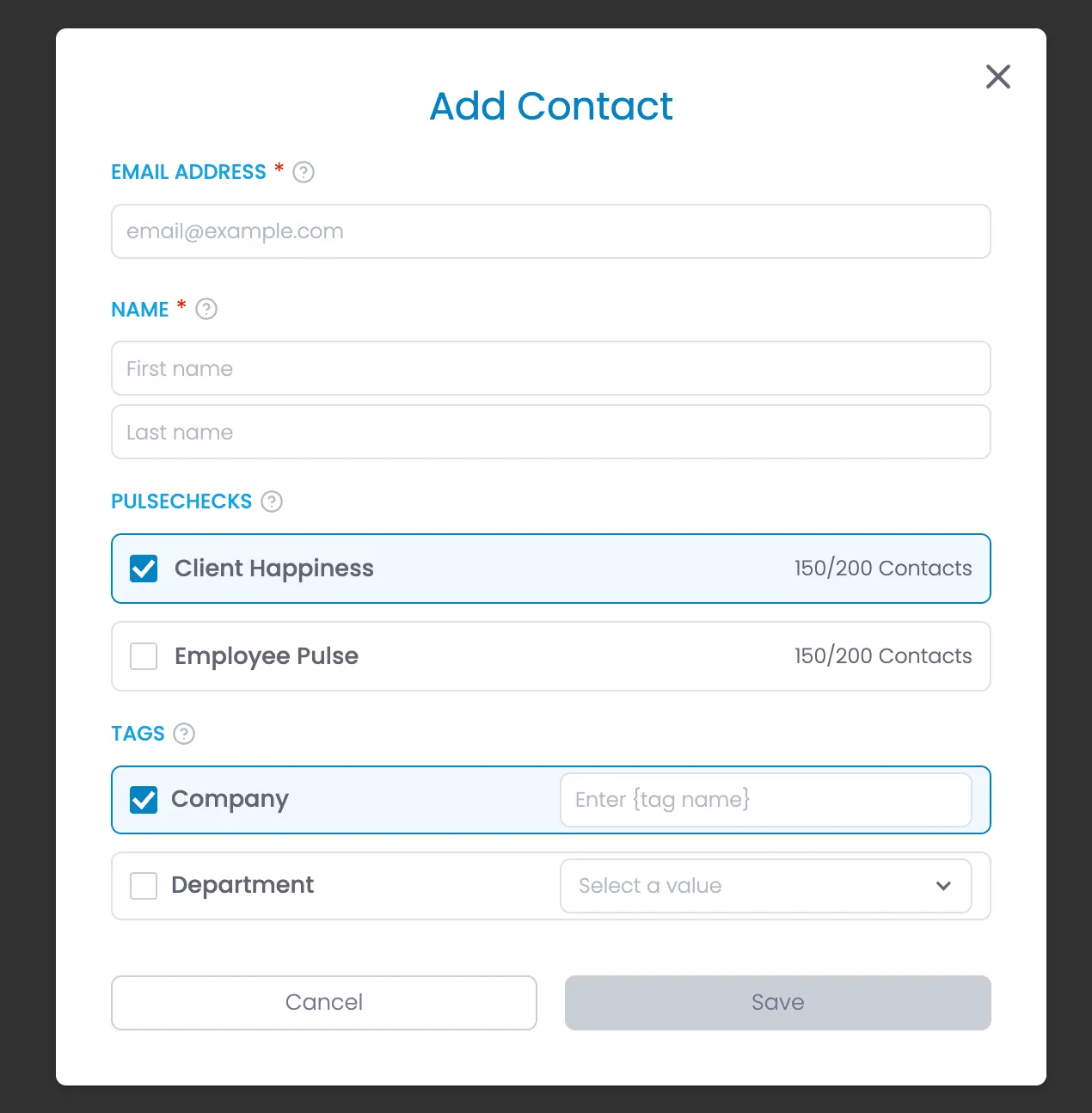
Description
Allows user to add a new contact to the system.
HTML
<div class="modal-background">
<div class="modal-container">
<div class="modal-heading-container">
<h1 class="modal-h1">Add Contact</h1>
</div>
<form id="add-contact" name="add-contact" method="get">
<div class="form-list gap-1rem">
<div class="form-field-container">
<div class="field-label-container"><label for="name" class="field-label">Email Address</label>
<div class="required-star">*</div>
<div data-tippy-content="Enter the contact's email address. This will be used as their unique identifier and for sending survey invitations." class="help-tooltip w-embed">
<svg xmlns="http://www.w3.org/2000/svg" width="24" height="24" viewbox="0 0 24 24" fill="none" stroke="currentColor" stroke-width="2" stroke-linecap="round" stroke-linejoin="round"><circle cx="12" cy="12" r="10"></circle><path d="M9.09 9a3 3 0 0 1 5.83 1c0 2-3 3-3 3"></path><line x1="12" y1="17" x2="12.01" y2="17"></line></svg>
</div>
</div>
<input class="form-field w-input" maxlength="256" name="Email" placeholder="[email protected]" type="email" id="Email" required="">
</div>
<div class="form-field-container">
<div class="field-label-container">
<label for="name" class="field-label">Name</label>
<div class="required-star">*</div>
<div data-tippy-content="Enter the contact's first and last name. This information will be used in personalized communications." class="help-tooltip w-embed">
<svg xmlns="http://www.w3.org/2000/svg" width="24" height="24" viewbox="0 0 24 24" fill="none" stroke="currentColor" stroke-width="2" stroke-linecap="round" stroke-linejoin="round"><circle cx="12" cy="12" r="10"></circle><path d="M9.09 9a3 3 0 0 1 5.83 1c0 2-3 3-3 3"></path><line x1="12" y1="17" x2="12.01" y2="17"></line></svg>
</div>
</div>
<input class="form-field w-input" maxlength="256" name="First-Name" placeholder="First name" type="text" id="First-Name" required="">
<input class="form-field w-input" maxlength="256" name="Last-Name" placeholder="Last name" type="text" id="Last-Name" required="">
</div>
<div class="form-field-container">
<div class="field-label-container"><label for="name" class="field-label">PulseChecks</label>
<div data-tippy-content="Select which PulseChecks this contact should receive. The contact will be included in the next scheduled PulseCheck instance." class="help-tooltip w-embed"><svg xmlns="http://www.w3.org/2000/svg" width="24" height="24" viewbox="0 0 24 24" fill="none" stroke="currentColor" stroke-width="2" stroke-linecap="round" stroke-linejoin="round">
<circle cx="12" cy="12" r="10"></circle>
<path d="M9.09 9a3 3 0 0 1 5.83 1c0 2-3 3-3 3"></path>
<line x1="12" y1="17" x2="12.01" y2="17"></line>
</svg></div>
</div>
<div class="fancy-option-group">
<!-- START PulseChecks, repeat for each PulseCheck -->
<div class="fancy-option selected">
<label class="w-checkbox checkbox-field">
<div class="w-checkbox-input w-checkbox-input--inputType-custom checkbox w--redirected-checked"></div>
<input type="checkbox" name="checkbox-2" id="checkbox-2" data-name="Checkbox 2" style="opacity:0;position:absolute;z-index:-1"> <!-- add attribute "checked" if its checked, and attribute "disabled" when there's no room to add to a PulseCheck. -->
</label>
<div class="fancy-option-text-container">
<div class="fancy-option-heading">Client Happiness</div>
</div>
<div class="text-small">{contacts currently assigned to pulsecheck}/{PulseCheck plan contact limit} Contacts</div>
</div>
</div>
<!-- END PulseChecks -->
</div>
</div>
<div class="form-field-container">
<div class="field-label-container"><label for="name" class="field-label">Tags</label>
<div data-tippy-content="Assign tags to categorize and organize your contacts. Tags help you filter and segment your audience for reporting and targeted PulseChecks." class="help-tooltip w-embed"><svg xmlns="http://www.w3.org/2000/svg" width="24" height="24" viewbox="0 0 24 24" fill="none" stroke="currentColor" stroke-width="2" stroke-linecap="round" stroke-linejoin="round">
<circle cx="12" cy="12" r="10"></circle>
<path d="M9.09 9a3 3 0 0 1 5.83 1c0 2-3 3-3 3"></path>
<line x1="12" y1="17" x2="12.01" y2="17"></line>
</svg></div>
</div>
<div class="fancy-option-group">
<!-- START Tags - Repeat for each tag -->
<div class="tag-editor selected"> <!-- add "selected" class if selected -->
<div class="flex full"><label class="w-checkbox checkbox-field">
<div class="w-checkbox-input w-checkbox-input--inputType-custom checkbox w--redirected-checked"></div><input type="checkbox" name="checkbox-2" id="checkbox-2" data-name="Checkbox 2" style="opacity:0;position:absolute;z-index:-1" checked="">
</label>
<div class="fancy-option-text-container">
<div class="fancy-option-heading">Company</div>
</div>
<div class="flex">
<div>
<!-- START IF Tag value type is "text" -->
<input class="form-field w15rem w-input" maxlength="256" name="Last-Name-2" data-name="Last Name 2" placeholder="Enter {tag name}" type="text" id="Last-Name-2" required="">
<!-- END IF Tag value type is "text" -->
<!-- START IF Tag value type is "dropdown" -->
<div data-delay="0" data-hover="false" class="dropdown w15rem w-dropdown">
<div class="dropdown-closed w-dropdown-toggle">
<div class="dropdown-arrow w-icon-dropdown-toggle"></div>
<div class="dropdown-text dropdown-placeholder">Select a value</div>
</div>
<div class="dropdown-open w-dropdown-list">
<div class="dropdown-options">
<!-- START Tag Dropdown Option - repeat for each dropdown option for this tag -->
<a href="#" class="dropdown-option w-inline-block">
<div class="dropdown-option-selected-icon-container">
<div class="dropdown-option-selected-icon selected w-embed"><svg xmlns="http://www.w3.org/2000/svg" width="24" height="24" viewbox="0 0 24 24" fill="none" stroke="currentColor" stroke-width="4" stroke-linecap="round" stroke-linejoin="round" class="feather feather-check">
<polyline points="20 6 9 17 4 12"></polyline>
</svg></div>
</div>
<div class="dropdown-option-text">Dropdown</div>
</a>
<!-- END Tag Dropdowm Option -->
</div>
</div>
</div>
<!-- END IF Tag value type is "dropdown" -->
</div>
</div>
</div>
</div>
<!-- END Tags -->
</div>
</div>
</form>
<div class="form-button-container">
<button type="button" href="#" class="button tertiary full w-button">Cancel</button>
<button type="button" href="#" class="button full disabled w-button" disabled>Save</button> <!-- disabled until required fields are satisfied. Only Email address and name are required fields -->
</div>
<div class="modal-close-button w-embed"><svg xmlns="http://www.w3.org/2000/svg" width="256" height="256" viewbox="0 0 24 24" fill="none" stroke="currentColor" stroke-width="2" stroke-linecap="round" stroke-linejoin="round">
<line x1="18" y1="6" x2="6" y2="18"></line>
<line x1="6" y1="6" x2="18" y2="18"></line>
</svg></div>
</div>
</div>